Turn on suggestions
Auto-suggest helps you quickly narrow down your search results by suggesting possible matches as you type.
Showing results for
- Home
- /
- Programming
- /
- Programming
- /
- How to split character and numeric data from a single column
Options
- RSS Feed
- Mark Topic as New
- Mark Topic as Read
- Float this Topic for Current User
- Bookmark
- Subscribe
- Mute
- Printer Friendly Page
🔒 This topic is solved and locked.
Need further help from the community? Please
sign in and ask a new question.


Fluorite | Level 6
- Mark as New
- Bookmark
- Subscribe
- Mute
- RSS Feed
- Permalink
- Report Inappropriate Content
Posted 02-07-2018 12:40 PM
(5605 views)
Hello SAS Community!
I need to split the address column into two new columns, City and ZipCode.
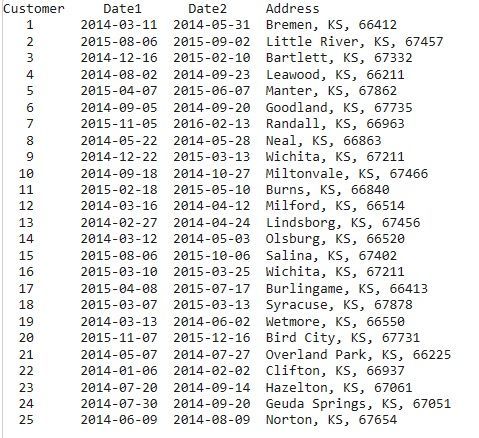
data AgentD;
infile '/home/Homework 3/AgentD.txt' firstobs=2;
length Customer 8 Date1 8 Date2 8 Address $13;
input Customer Date1 : YYMMDD10. Date2 : YYMMDD10. Address $ &;
run;
proc print data=agentd;
title 'AgentD';
run;
Any ideas on how to do this?
1 ACCEPTED SOLUTION
Accepted Solutions


Tourmaline | Level 20
- Mark as New
- Bookmark
- Subscribe
- Mute
- RSS Feed
- Permalink
- Report Inappropriate Content
use scan function
data AgentD;
infile '/home/Homework 3/AgentD.txt' firstobs=2;
length Customer 8 Date1 8 Date2 8 Address $13;
input Customer Date1 : YYMMDD10. Date2 : YYMMDD10. Address $ &;
City=scan(address,1,',');
zipcode=scan(address,-1,',');
run;
proc print data=agentd;
title 'AgentD';
run;
3 REPLIES 3
Tourmaline | Level 20
- Mark as New
- Bookmark
- Subscribe
- Mute
- RSS Feed
- Permalink
- Report Inappropriate Content
use scan function
data AgentD;
infile '/home/Homework 3/AgentD.txt' firstobs=2;
length Customer 8 Date1 8 Date2 8 Address $13;
input Customer Date1 : YYMMDD10. Date2 : YYMMDD10. Address $ &;
City=scan(address,1,',');
zipcode=scan(address,-1,',');
run;
proc print data=agentd;
title 'AgentD';
run;
Fluorite | Level 6
- Mark as New
- Bookmark
- Subscribe
- Mute
- RSS Feed
- Permalink
- Report Inappropriate Content
That worked with some formatting. Now how can I make the ZipCode column a numerical value?
data AgentD;
infile '/home/Homework 3/AgentD.txt' firstobs=2;
length Customer 8 Date1 8 Date2 8 Address $24;
input Customer Date1 : YYMMDD10. Date2 : YYMMDD10. Address $ &;
format Date1 Date2 YYMMDD10.;
City=scan(address,1,',');
ZipCode=scan(address,-1,',');
keep Customer Date1 Date2 City ZipCode;
run;
proc print data=agentd;
title 'AgentD';
run;
Tourmaline | Level 20
- Mark as New
- Bookmark
- Subscribe
- Mute
- RSS Feed
- Permalink
- Report Inappropriate Content
use input around the scan like:
ZipCode=input(strip(scan(address,-1,',')),5.);

Call for content now open!
It's your turn to help shape SAS Innovate 2027. Share your expertise and inspire the SAS community.
How to Concatenate Values
Learn how use the CAT functions in SAS to join values from multiple variables into a single value.

Find more tutorials on the SAS Users YouTube channel.
SAS Training: Just a Click Away
Ready to level-up your skills? Choose your own adventure.
Discussion stats
-
3 replies
-
02-07-2018 12:40 PM
-
5606 views
-
2 likes
-
2 in conversation
-


