- Home
- /
- Programming
- /
- Programming
- /
- How to: create an xml file
- RSS Feed
- Mark Topic as New
- Mark Topic as Read
- Float this Topic for Current User
- Bookmark
- Subscribe
- Mute
- Printer Friendly Page


- Mark as New
- Bookmark
- Subscribe
- Mute
- RSS Feed
- Permalink
- Report Inappropriate Content
Hello,
I want to create an xml file from a SAS table with a hierarchy.
The table has the following 8 fields:
atmld, bankcode, bankbranchcode, schum, dt, monthreport, cuerrentdate, factorcode.
Example table:
| atmld | bankcode | bankbranchcode | schum | dt | monthreport | cuerrentdate | factorcode |
| S$982 | 12 | 600 | 1234 | 2020-09-12 | 2020-02 | 2019-05-30 | 12 |
| S$982 | 12 | 600 | 12342 | 2020-09-13 | 2020-02 | 2019-05-30 | 12 |
Example of how I would like the xml file to be displayed.
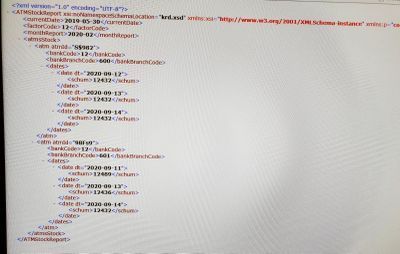
This is the code I wrote:
data _null_;
	set work.report end=eof;
	file "&outfile./Report.xml" noprint encoding="utf-8";

	if _n_ =1 then
		do;
			put '<?xml version="1.0" encoding="utf-8"?>';
			put '<ATMstockReport>';
			put '<currentDate>' currentDate '</currentDate>';
			put '<factorCode>' factorCode '</factorCode>';
			put '<monthReport>' monthReport '</monthReport>';
			put '<atmsStock>';
		end;

	put '<atm atmId="'atmId'">';
	put '<bankCode>' bankCode '</bankCode>';
	put '<bankBranchCode>' bankBranchCode '</bankBranchCode>';
	put '<dates>';
	put '<date dt="'cdt'">';
	put '<schum>' schum '</schum>';
	put '</date>';
	put '</dates>';
	put '</atm>';

	if eofl then
		do;
			put '</atmsStock>';
			put '</ATMstockReport>';
		end;
run;
How do I fix the code so that the 2 dates or more are open under the same atmId as in the picture?
I do not want each record to be opened separately.
Thanks.
Accepted Solutions


- Mark as New
- Bookmark
- Subscribe
- Mute
- RSS Feed
- Permalink
- Report Inappropriate Content
Your screenshot is hard to read but something like this should work.
Please adapt.
data _null_;
	set work.report end=eof;
	file "&outfile./Report.xml" noprint encoding="utf-8";
by ATMID BANKCODE BANKBRANCHCODE ;
	if _n_ =1 then
		do;
			put '<?xml version="1.0" encoding="utf-8"?>';
			put '<ATMstockReport>';
			put '<currentDate>' currentDate '</currentDate>';
			put '<factorCode>' factorCode '</factorCode>';
			put '<monthReport>' monthReport '</monthReport>';
			put '<atmsStock>';
		end;
if first.BANKBRANCHCODE then do;
	put '<atm atmId="'atmId'">';
	put '<bankCode>' bankCode '</bankCode>';
	put '<bankBranchCode>' bankBranchCode '</bankBranchCode>';
        put '<dates>';
end;
	put '<date dt="'cdt'">';
	put '<schum>' schum '</schum>';
	put '</date>';
if last.BANKBRANCHCODE then do;
	put '</dates>';
	put '</atm>';
end;
	if eofl then
		do;
			put '</atmsStock>';
			put '</ATMstockReport>';
		end;
run;
Note that the data must be sorted or indexed.
- Mark as New
- Bookmark
- Subscribe
- Mute
- RSS Feed
- Permalink
- Report Inappropriate Content
Your screenshot is hard to read but something like this should work.
Please adapt.
data _null_;
	set work.report end=eof;
	file "&outfile./Report.xml" noprint encoding="utf-8";
by ATMID BANKCODE BANKBRANCHCODE ;
	if _n_ =1 then
		do;
			put '<?xml version="1.0" encoding="utf-8"?>';
			put '<ATMstockReport>';
			put '<currentDate>' currentDate '</currentDate>';
			put '<factorCode>' factorCode '</factorCode>';
			put '<monthReport>' monthReport '</monthReport>';
			put '<atmsStock>';
		end;
if first.BANKBRANCHCODE then do;
	put '<atm atmId="'atmId'">';
	put '<bankCode>' bankCode '</bankCode>';
	put '<bankBranchCode>' bankBranchCode '</bankBranchCode>';
        put '<dates>';
end;
	put '<date dt="'cdt'">';
	put '<schum>' schum '</schum>';
	put '</date>';
if last.BANKBRANCHCODE then do;
	put '</dates>';
	put '</atm>';
end;
	if eofl then
		do;
			put '</atmsStock>';
			put '</ATMstockReport>';
		end;
run;
Note that the data must be sorted or indexed.

Call for content now open!
It's your turn to help shape SAS Innovate 2027. Share your expertise and inspire the SAS community.
Learn how use the CAT functions in SAS to join values from multiple variables into a single value.

Find more tutorials on the SAS Users YouTube channel.
SAS Training: Just a Click Away
Ready to level-up your skills? Choose your own adventure.
-
1 reply
-
10-25-2021 03:50 PM
-
1418 views
-
2 likes
-
2 in conversation
-

