- Home
- /
- Programming
- /
- Programming
- /
- Re: Run R code inside SAS easily
- RSS Feed
- Mark Topic as New
- Mark Topic as Read
- Float this Topic for Current User
- Bookmark
- Subscribe
- Mute
- Printer Friendly Page


- Mark as New
- Bookmark
- Subscribe
- Mute
- RSS Feed
- Permalink
- Report Inappropriate Content
*RUNNING R LANGUAGE INSIDE SAS ENVIRONMENT;
*by: (Alysson Jalles);
*First of all you have to set your SAS software to run R codes:
.You must have the SAS 9.22 or above.
. XCMD option must be enabled (sometimes not the case in a client-server setup like SAS Enterprise Guide or SAS Studio)
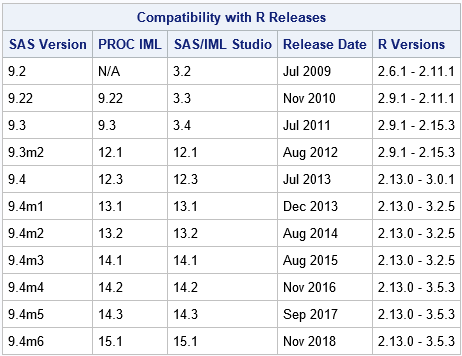
.Each version of SAS is able to run a specific R version, check out the link below to know what's the best option for you.
 _
_
(source: http://blogs.sas.com/content/iml/2013/09/16/what-versions-of-r-are-supported-by-sas.html);
R user who is learning SAS programming? Check out this free course and materials.
/*Setting SAS to RUN R comands - BEGIN******************************:
_____________________________________________________________________
1) Locate and open in Notepad or Notepad++ the file "sasv9.cfg".
In SAS 9.4 in windows OS the file is allocated in:
C:\Program Files\SASHome\SASFoundation\9.4\sasv9.cfg
.If possible make a backup of this file "sasv9.cfg".
2) Add this 3 lines of command in the end "sasv9.cfg" file, after that save,
.You have to change your "sasv9.cfg" location, according your SAS version(if necessary)
.You have to change your R location in "R_HOME", according your R version (if necessary):
-RLANG
-config "C:\Program Files\SASHome\SASFoundation\9.4\nls\en\sasv9.cfg"
-SET R_HOME "C:\Program Files\R\R-3.1.3"
3) Open your SAS foundation and Run in SAS editor:
proc options option=rlang;
run;
.In your SAS log must appear a message like this:
SAS (r) Proprietary Software Release 9.4 TS1M2
RLANG Enables SAS to execute R language statements.
NOTE: PROCEDURE OPTIONS used (Total process time):
real time 0.01 seconds
cpu time 0.01 seconds
.Congratulations, now you can run R inside SAS;
____________________________________________________________________________________
/*Setting SAS to RUN R comands - END*******************************************************************:*/
*=======================================================================;
*Simulating a RCBD experiment ===========================================BEGIN;
*=======================================================================;
*10 TREATMENTS;
*3 REPLICATION;
proc plan seed=123456;
factors GEN=10 ordered REP=3 ordered/noprint;
output out=RCBD_TEST
GEN cvals=('GEN1' 'GEN2' 'GEN3' 'GEN4' 'GEN5' 'GEN6' 'GEN7' 'GEN8' 'GEN9' 'GEN10')
REP nvals=(1 2 3);
run;
*Simulating VARIABLES - BEGIN;
data RCBD_TEST; set RCBD_TEST;
call streaminit(8789); /*SEED= 8789*/
VAR1=rand('normal',110, 15); /*MEAN 110: STD: 15*/
run;
data RCBD_TEST; set RCBD_TEST;
call streaminit(907854); /*SEED= 907854*/
VAR2=rand('normal',3000, 751);run; /*MEAN 3000: STD: 751*/
*Simulating VARIABLES - END;
*=======================================================================;
*Simulating and RCBD experiment =====================================END;
*=======================================================================;
*Printing dataset, first 6 observations of simulated dataset:;
proc print data=RCBD_TEST (obs=6); run;
/*Testing if R codes is working*/
/*Histogram and ANOVA of VAR1 in R language*/
proc iml;
title "Statistic in R (integration with SAS)";
run ExportDataSetToR("WORK.RCBD_TEST", "RCBD_IN_R");
submit / R;
#_______Begin of R code_________________
setwd("C:/")
#1)Histogram in R
#HISTOGRAM
HIST_R_GRAPH<-hist(RCBD_IN_R$VAR1
,col="azure3", #color
main="Histogram Of - VAR1", #title
ylab="frequency", #Y label
xlab="Class") #X label
#Exporting histogram graph to C:/ of Windows environment
#plot(HIST_R_GRAPH)
dev.copy(png, filename="Histogram_output.png", width=5.25,height=5.25,units="in", res=200)
#plot(HIST_R_GRAPH)dev.off()
#2) ANOVA in R [All sources of variation as fixed]
RESULT_ANOVA<-aov(VAR1~REP+GEN, data=RCBD_IN_R);
summary(RESULT_ANOVA);
#_______End of R code_________________
endsubmit;
*quit; /*Use Quit command to close GRAPHS*/
Accepted Solutions


- Mark as New
- Bookmark
- Subscribe
- Mute
- RSS Feed
- Permalink
- Report Inappropriate Content
Thanks for sharing these @invisibleman. For more about SAS and R integration, see:
- Series of blogs about R and SAS/IML from @Rick_SAS (Applies to SAS 9.22 and later)
- The enlighten-integration project from SAS Software on GitHub (Applies to SAS 9.x and later)
- For SAS Viya users, the R-swat project from SAS Software on GitHub
And another point from Rick:
- The SAS/IML documentation contains a chapter "Calling Functions in the R Language" which provides an overview of how to set up SAS, call R, and transfer data back and forth. The documentation provides several examples.
- Mark as New
- Bookmark
- Subscribe
- Mute
- RSS Feed
- Permalink
- Report Inappropriate Content
Thanks for sharing these @invisibleman. For more about SAS and R integration, see:
- Series of blogs about R and SAS/IML from @Rick_SAS (Applies to SAS 9.22 and later)
- The enlighten-integration project from SAS Software on GitHub (Applies to SAS 9.x and later)
- For SAS Viya users, the R-swat project from SAS Software on GitHub
And another point from Rick:
- The SAS/IML documentation contains a chapter "Calling Functions in the R Language" which provides an overview of how to set up SAS, call R, and transfer data back and forth. The documentation provides several examples.


- Mark as New
- Bookmark
- Subscribe
- Mute
- RSS Feed
- Permalink
- Report Inappropriate Content
I will add another bullet to Chris's list:
- The SAS/IML documentation contains a chapter "Calling Functions in the R Language" which provides an overview of how to set up SAS, call R, and transfer data back and forth. The documentation provides several examples.


- Mark as New
- Bookmark
- Subscribe
- Mute
- RSS Feed
- Permalink
- Report Inappropriate Content
So with SAS Enterprise Guide, how can I enable R languages?
- Mark as New
- Bookmark
- Subscribe
- Mute
- RSS Feed
- Permalink
- Report Inappropriate Content
@tampham92 - This requires the same setup described in the links we've already shared -- but all changes need on the SAS session, not your local Windows machine where EG is installed.
R must be installed on the machine with SAS (not your local machine with EG), and the RLANG SAS system options must be enabled. That might be a negotiation with your SAS admin.
Update: XCMD does not need to be enabled.
- Mark as New
- Bookmark
- Subscribe
- Mute
- RSS Feed
- Permalink
- Report Inappropriate Content
So if I am using EG at work, I just need to download R on my laptop and follows the steps described above; I would be able to use enable R language correct? Or I need to reach out to SAS Admin. If I reach out to them, what should I say to have this setup? Thanks.
- Mark as New
- Bookmark
- Subscribe
- Mute
- RSS Feed
- Permalink
- Report Inappropriate Content
R needs to be installed and accessible alongside your SAS installation -- which might be on a remote server and not on the same machine where you are running EG. See the topics in the solution for more details on setup.

Call for content now open!
It's your turn to help shape SAS Innovate 2027. Share your expertise and inspire the SAS community.
Learn how use the CAT functions in SAS to join values from multiple variables into a single value.

Find more tutorials on the SAS Users YouTube channel.
SAS Training: Just a Click Away
Ready to level-up your skills? Choose your own adventure.
-
6 replies
-
08-29-2015 11:19 AM
-
66500 views
-
7 likes
-
4 in conversation
-


