- Home
- /
- Programming
- /
- Programming
- /
- How do i do complex by group processing?
- RSS Feed
- Mark Topic as New
- Mark Topic as Read
- Float this Topic for Current User
- Bookmark
- Subscribe
- Mute
- Printer Friendly Page


- Mark as New
- Bookmark
- Subscribe
- Mute
- RSS Feed
- Permalink
- Report Inappropriate Content
Hi all,
I have a question regarding the table below (code used to generate it is at bottom of page). My objective is to do a deduplication by email based on the conditions below:
- if there are repeating values of email, priority is given to the origin with the highest rank (where 1=highest , 3=lowest);
- If an email with a rank of 1 is picked over one with a rank of 2, create another data set with a new variable - REASON - dropped since email exist in Europe:
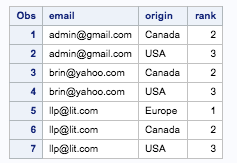
So the two output tables are desired. One contained the emails picked and another containing the emails dropped as follows:
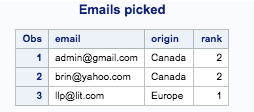
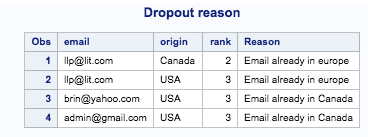
Here are the steps I have taken to get this done:
- sort by email and rank
- then output first record only for each by group
Codes used are below: But how do I create the desired drop out reason table above please?
proc sort data=t1;
by email rank;
run;
data t2;
set t1;
by email rank;
if first.email;
run;
I have been able to create the first desired table above but dont know how to go about creating the drop out reason table.
Please any ideas will help.
Thanks.
Code to generate the example data set is:
data t1;
length email $18 origin $8;
input email $ rank origin $;
datalines;
[email protected] 2 Canada
[email protected] 1 Europe
[email protected] 3 USA
[email protected] 3 USA
[email protected] 2 Canada
[email protected] 2 Canada
[email protected] 3 USA
;
Accepted Solutions


- Mark as New
- Bookmark
- Subscribe
- Mute
- RSS Feed
- Permalink
- Report Inappropriate Content
Like this?
data HAVE(index=(A=(EMAIL RANK )));
  length EMAIL $18 ;
  input EMAIL $ RANK ORIGIN $;
datalines;
[email protected] 2 Canada
[email protected] 1 Europe
[email protected] 3 USA
[email protected] 3 USA
[email protected] 2 Canada
[email protected] 2 Canada
[email protected] 3 USA
run;
data PICKED(drop=REASON) DROPPED;
  set HAVE;
  by EMAIL ;
  length REASON $20;
  retain REASON;
  if first.EMAIL then do;
    REASON='Already in '||ORIGIN;
    output PICKED;
  end;
  else output DROPPED;
run;
| RANK | ORIGIN | |
| [email protected] | 2 | Canada |
| [email protected] | 2 | Canada |
| [email protected] | 1 | Europe |
| RANK | ORIGIN | REASON | |
| [email protected] | 3 | USA | Already in Canada |
| [email protected] | 3 | USA | Already in Canada |
| [email protected] | 2 | Canada | Already in Europe |
| [email protected] | 3 | USA | Already in Europe |
- Mark as New
- Bookmark
- Subscribe
- Mute
- RSS Feed
- Permalink
- Report Inappropriate Content
Like this?
data HAVE(index=(A=(EMAIL RANK )));
  length EMAIL $18 ;
  input EMAIL $ RANK ORIGIN $;
datalines;
[email protected] 2 Canada
[email protected] 1 Europe
[email protected] 3 USA
[email protected] 3 USA
[email protected] 2 Canada
[email protected] 2 Canada
[email protected] 3 USA
run;
data PICKED(drop=REASON) DROPPED;
  set HAVE;
  by EMAIL ;
  length REASON $20;
  retain REASON;
  if first.EMAIL then do;
    REASON='Already in '||ORIGIN;
    output PICKED;
  end;
  else output DROPPED;
run;
| RANK | ORIGIN | |
| [email protected] | 2 | Canada |
| [email protected] | 2 | Canada |
| [email protected] | 1 | Europe |
| RANK | ORIGIN | REASON | |
| [email protected] | 3 | USA | Already in Canada |
| [email protected] | 3 | USA | Already in Canada |
| [email protected] | 2 | Canada | Already in Europe |
| [email protected] | 3 | USA | Already in Europe |

Call for content now open!
It's your turn to help shape SAS Innovate 2027. Share your expertise and inspire the SAS community.
Learn how use the CAT functions in SAS to join values from multiple variables into a single value.

Find more tutorials on the SAS Users YouTube channel.
SAS Training: Just a Click Away
Ready to level-up your skills? Choose your own adventure.
-
1 reply
-
04-05-2018 12:04 AM
-
1518 views
-
1 like
-
2 in conversation
-

