- Home
- /
- Programming
- /
- Programming
- /
- Explanation for code - reading a text file
- RSS Feed
- Mark Topic as New
- Mark Topic as Read
- Float this Topic for Current User
- Bookmark
- Subscribe
- Mute
- Printer Friendly Page


- Mark as New
- Bookmark
- Subscribe
- Mute
- RSS Feed
- Permalink
- Report Inappropriate Content
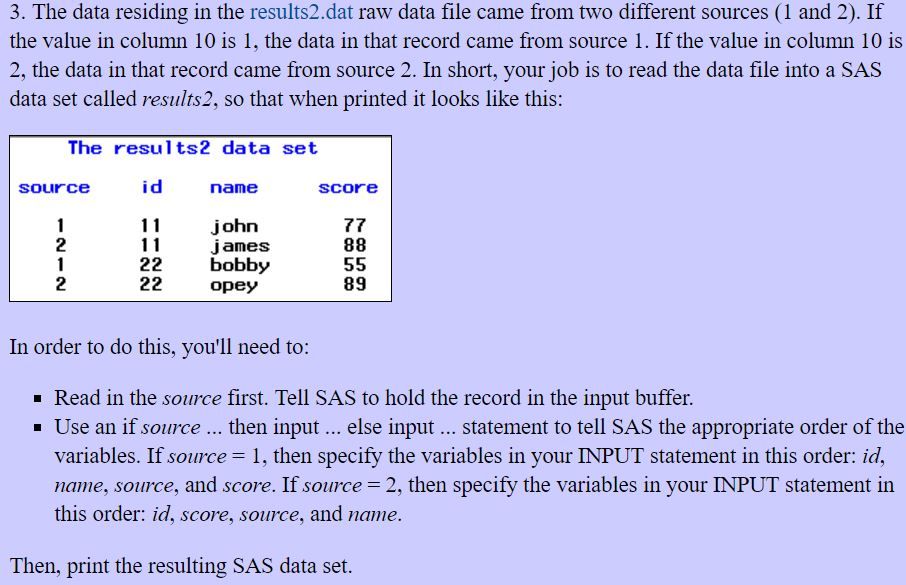
for given data:
11 john  1 77
11 88    2 james
22 bobby 1 55
22 89    2 opey
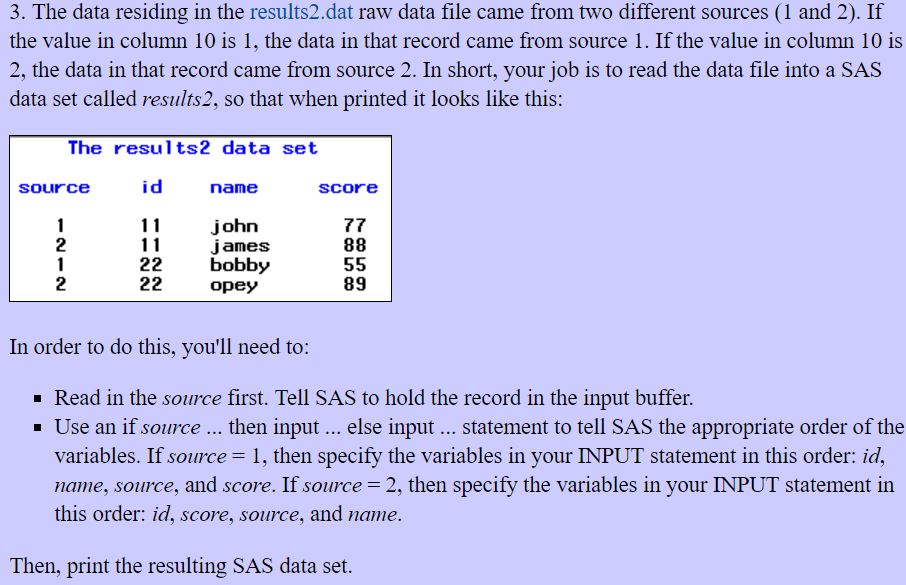
also , i coded as follows, though program works perfect, but I want to know why ((then input @1 id @4 score @12 name $5. @12 name $5. @10 source 1.;)) requires direct pointing , even id variable requires it?
dm"log;clear;output;clear";

DATA result2;
input @10 source 1.@; *recording in input buffer source ;

if source = 1 then input @1 id @4 name $5. @12 score @12 score @10 source 1. ;
if source = 2 then input @1 id @4 score @12 name $5. @12 name $5. @10 source 1.;

datalines;
11 john  1 77
11 88    2 james
22 bobby 1 55
22 89    2 opey
;

RUN;

PROC PRINT data = result2 noobs;
var source id name score;
RUN;
[Edit by Kurt Bremser] Moved program text to code window, corrected datalines so they match the input statement column pointers


- Mark as New
- Bookmark
- Subscribe
- Mute
- RSS Feed
- Permalink
- Report Inappropriate Content
After the first input statement, that stays in the same input line because of the trailing @, the column pointer stays where it was after reading source.
Therefore, the column pointer must be set to the beginning of the line before attempting to read id.
- Mark as New
- Bookmark
- Subscribe
- Mute
- RSS Feed
- Permalink
- Report Inappropriate Content
PS you could simplify your code like that:
data result2;
input @10 source 1. @1 @; *recording in input buffer source ;
if source = 1 then input id @4 name $5. @12 score @12 score @10 source 1. ;
if source = 2 then input id @4 score @12 name $5. @12 name $5. @10 source 1.;
datalines;
11 john  1 77
11 88    2 james
22 bobby 1 55
22 89    2 opey
;
run;
- Mark as New
- Bookmark
- Subscribe
- Mute
- RSS Feed
- Permalink
- Report Inappropriate Content
You input file a fixed width file so each variable starts at a specified column. Consider how it handles a name such as John Paul.
It has two layouts sending on source column. I think your input statements for source is incorrect as you read name/score twice.
Your sample data posted doesn't reflect this because of formatting in forum most likely.

Call for content now open!
It's your turn to help shape SAS Innovate 2027. Share your expertise and inspire the SAS community.
Learn how use the CAT functions in SAS to join values from multiple variables into a single value.

Find more tutorials on the SAS Users YouTube channel.
SAS Training: Just a Click Away
Ready to level-up your skills? Choose your own adventure.
-
3 replies
-
08-31-2016 07:14 AM
-
2862 views
-
0 likes
-
3 in conversation
-


