Hi SAS community,
I am trying to write a SAS program based off of the original code from this article http://www.sascommunity.org/wiki/Data_Cleaning:_Longitudinal_Study_Cross-Visit_Checks for patients taking a treatment regimen that may change from visit to visit. The database I'm working on is for an ongoing study, so there is a wide amount of variation in the amount of visits that patients may have completed. The variable for treatment regimen assigns a number to each different type of regimen. Because these numbers are representative of a category designation rather than a value, the code also needs modification in that respect. I tried to alter the code to accommodate these features, but haven't been achieve a good result.
This is the orignal array code from the article:
DATA vision_onevar (DROP = n k ncomb i);
SET vision_trans;
ARRAY visit {*} v:;
n = dim(visit);
k = 2;
ncomb = comb(n,k);
DO i=1 TO ncomb;
CALL allcomb(i, k, of visit[*]);
IF visit{1} < visit{2} AND visit[1]^=. THEN flag=1;
4
END;
Here is snapshot of some of what the data looks like transposed:
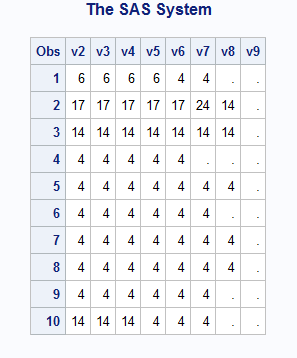
This is my attempted code:
DATA regimens_check (DROP = n k ncomb i);
SET regimens_trans;
ARRAY visit {*} v:;
n = dim(visit);
k = 2;
ncomb = comb(n,k);
DO i=1 TO ncomb;
CALL allcomb(i, k, of visit[*]);
IF visit{1} ne visit{2} AND visit[2] ne . THEN flag=1;
ELSE flag=0;
END;
IF flag=1 THEN OUTPUT;
RUN;
I'm not sure what is the best way to evaluate this variable since the number of visits per patient is not standard and the variable is not a value-based number, but rather a categorical number. Any suggestions welcome!




