- Home
- /
- Programming
- /
- Programming
- /
- Re: Date Conversion
- RSS Feed
- Mark Topic as New
- Mark Topic as Read
- Float this Topic for Current User
- Bookmark
- Subscribe
- Mute
- Printer Friendly Page


- Mark as New
- Bookmark
- Subscribe
- Mute
- RSS Feed
- Permalink
- Report Inappropriate Content
Hello All,
I'm new in SAS, Plz help me with the following issue.
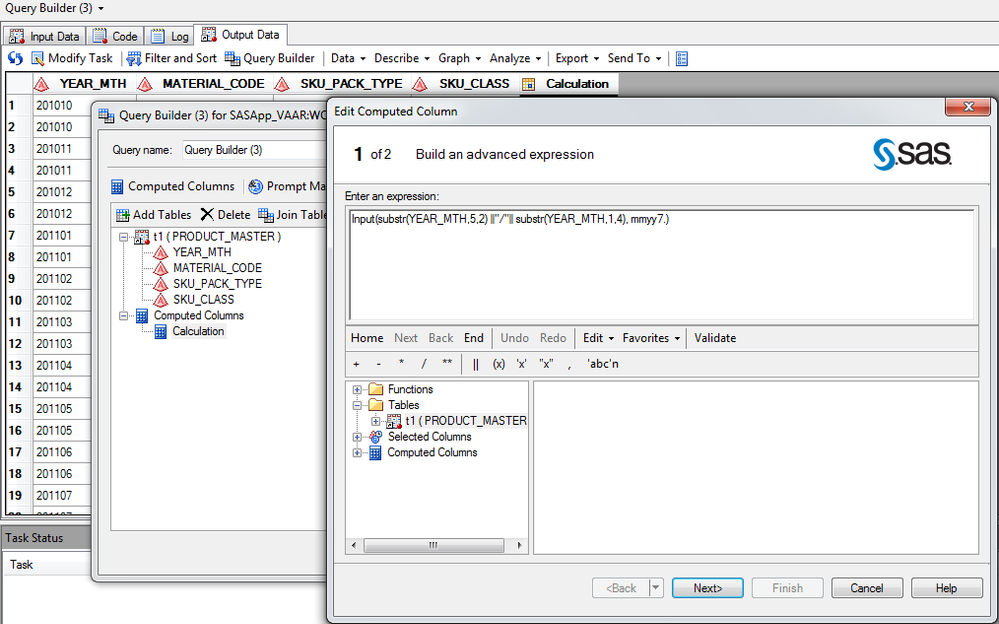
I'm trying to convert Date format in SAS EG
Scenario is
Month Date is given : 201305
Output i want : May/2013
I tried below expresssion
Input(substr(YEAR_MTH,5,2) ||"/"|| substr(YEAR_MTH,1,4), mmyy7.)
Still not able to get the output
Thanks in advance
Accepted Solutions


- Mark as New
- Bookmark
- Subscribe
- Mute
- RSS Feed
- Permalink
- Report Inappropriate Content
Hi ImVickie,
Yo don't mention whether this is a character or numeric 201305. The code shows how to do this with character but with the numeric option commented out.
data a;
* daten = 201305;
* sasd = input(put(daten,6.),yymmn6.);
datec = '201305';
sasd = input(datec,yymmn6.);
newdt = put(month(sasd),monname3.)!!'/'!!PUT(Year(sasd),4.);
run;
Hope it's what you want.
Regards


- Mark as New
- Bookmark
- Subscribe
- Mute
- RSS Feed
- Permalink
- Report Inappropriate Content
All SAS products require that a date variable contain a full date or nothing. You can still format the data to display month and year, but underneath the data will still be a full date:
data want;
  in_date="201305";
  processed_date=input(cats(in_date,"01"),yymmdd8.);
  format processed_date mmyy9.;
  character_date=cats(put(processed_date,monname.),'/',year(processed_date));
run;
Now you want a specific type of output not covered by the basic formats:
http://support.sas.com/documentation/cdl/en/lrdict/64316/HTML/default/viewer.htm#a001263753.htm
So you could either look into creating a picture format to create your own format, or my personal preference is create a text variable with the result.

- Mark as New
- Bookmark
- Subscribe
- Mute
- RSS Feed
- Permalink
- Report Inappropriate Content
Try this:-
%let mon=201305;
%let mon = %sysfunc( intnx( month , %sysfunc( inputn( &mon. , yymmn6. ) ) , 0 ) , date9. ) ;
%let want=%sysfunc(catx(/,%sysfunc(substr(&mon,3,3)),%sysfunc(substr(&mon,6,4))));
%put &want;
- Mark as New
- Bookmark
- Subscribe
- Mute
- RSS Feed
- Permalink
- Report Inappropriate Content
Hi ImVickie,
Yo don't mention whether this is a character or numeric 201305. The code shows how to do this with character but with the numeric option commented out.
data a;
* daten = 201305;
* sasd = input(put(daten,6.),yymmn6.);
datec = '201305';
sasd = input(datec,yymmn6.);
newdt = put(month(sasd),monname3.)!!'/'!!PUT(Year(sasd),4.);
run;
Hope it's what you want.
Regards

Call for content now open!
It's your turn to help shape SAS Innovate 2027. Share your expertise and inspire the SAS community.
Learn how use the CAT functions in SAS to join values from multiple variables into a single value.

Find more tutorials on the SAS Users YouTube channel.
SAS Training: Just a Click Away
Ready to level-up your skills? Choose your own adventure.
-
3 replies
-
05-12-2016 08:51 AM
-
2975 views
-
0 likes
-
4 in conversation
-


