- Home
- /
- Programming
- /
- Programming
- /
- Re: Creating a new variable based on multiple conditions
- RSS Feed
- Mark Topic as New
- Mark Topic as Read
- Float this Topic for Current User
- Bookmark
- Subscribe
- Mute
- Printer Friendly Page


- Mark as New
- Bookmark
- Subscribe
- Mute
- RSS Feed
- Permalink
- Report Inappropriate Content
Hi I require some help on the below. Want is the field I wish to create, I have also put a description of what I am trying to obtain:
| ID | FLAG | VAR1 | VAR2 | WANT | Description for explanation |
| 123 | 1 | 12.1 | 1 | 0 | =FIRST.ID=0 |
| 123 | 0 | 12.1 | 2 | 0 | =WANT RECORD BEFORE |
| 123 | 2 | 12.1 | 3 | 12.1 | =VAR1 |
| 123 | 2 | 12.9 | 4 | 12.9 | =VAR1 |
| 123 | 0 | 12.9 | 5 | 12.9 | =WANT RECORD BEFORE |
| 123 | 0 | 13.5 | 6 | 12.9 | =WANT RECORD BEFORE |
| 123 | 1 | 14.5 | 7 | 7.5 | =VAR1-VAR2 |
| 456 | 2 | 92 | 10 | 0 | =FIRST.ID=0 |
| 456 | 0 | 97 | 8 | 0 | =WANT RECORD BEFORE |
| 456 | 0 | 97 | 12 | 0 | =WANT RECORD BEFORE |
| 456 | 2 | 97 | 0 | 97 | =VAR1-VAR2 |
Current SAS code:
data data2;
	set data1;

	by id;

	retain want;
	if first.id then want=0.00;
	else if flag=2 then want=var1;
	else if flag=1 then want=var1-var2;
	else want+0; /* without just get . , with get 0 */
run;


- Mark as New
- Bookmark
- Subscribe
- Mute
- RSS Feed
- Permalink
- Report Inappropriate Content
How does your current result differ from the wanted result you posted?
- Mark as New
- Bookmark
- Subscribe
- Mute
- RSS Feed
- Permalink
- Report Inappropriate Content
Hi sorry I for got to mention. In the case where there is a flag=0 but the bucket before is non zero, Ishould have the same value as above. Instead I have a zero. (Issue highlighted in red).
What I have now:
| ID | FLAG | VAR1 | VAR2 | WANT | Description for explanation | Have now |
| 123 | 1 | 12.1 | 1 | 0 | =FIRST.ID=0 | 0 |
| 123 | 0 | 12.1 | 2 | 0 | =WANT RECORD BEFORE | 0 |
| 123 | 2 | 12.1 | 3 | 12.1 | =VAR1 | 12.1 |
| 123 | 2 | 12.9 | 4 | 12.9 | =VAR1 | 12.9 |
| 123 | 0 | 12.9 | 5 | 12.9 | =WANT RECORD BEFORE | 0 |
| 123 | 0 | 13.5 | 6 | 12.9 | =WANT RECORD BEFORE | 0 |
| 123 | 1 | 14.5 | 7 | 7.5 | =VAR1-VAR2 | 7.5 |
| 456 | 2 | 92 | 10 | 0 | =FIRST.ID=0 | 0 |
| 456 | 0 | 97 | 8 | 0 | =WANT RECORD BEFORE | 0 |
| 456 | 0 | 97 | 12 | 0 | =WANT RECORD BEFORE | 0 |
| 456 | 2 | 97 | 0 | 97 | =VAR1-VAR2 | 97 |


- Mark as New
- Bookmark
- Subscribe
- Mute
- RSS Feed
- Permalink
- Report Inappropriate Content
Hi @lm12abh
Correct me if I'm wrong but it seems that you want to display 2 decimals (e.g. not 0 but 0.00).
You can do that with a FORMAT Statement.
NB: There is no need to write want = 0.00 as it is exactly the same as want=0.
Idem for else want+0 as you have the value is already retained.
My best,
data data2;
	set data1;

	by id;
	format want 8.2;
	retain want;
	if first.id then want=0;
	else if flag=2 then want=var1;
	else if flag=1 then want=var1-var2;
run;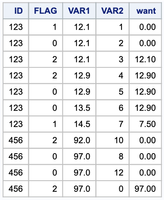
- Mark as New
- Bookmark
- Subscribe
- Mute
- RSS Feed
- Permalink
- Report Inappropriate Content
Thanks, Yes I already have a format statement (I didn't include that part of the code) good to know it wont affect it.

Call for content now open!
It's your turn to help shape SAS Innovate 2027. Share your expertise and inspire the SAS community.
Learn how use the CAT functions in SAS to join values from multiple variables into a single value.

Find more tutorials on the SAS Users YouTube channel.
SAS Training: Just a Click Away
Ready to level-up your skills? Choose your own adventure.
-
4 replies
-
02-07-2020 04:17 AM
-
2575 views
-
0 likes
-
3 in conversation
-


