- Home
- /
- Programming
- /
- Programming
- /
- Comp-3 fields - getting control characters in the output
- RSS Feed
- Mark Topic as New
- Mark Topic as Read
- Float this Topic for Current User
- Bookmark
- Subscribe
- Mute
- Printer Friendly Page


- Mark as New
- Bookmark
- Subscribe
- Mute
- RSS Feed
- Permalink
- Report Inappropriate Content
Hi,
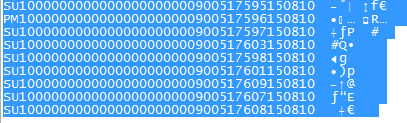
I was using a text file from mainframe in one of the program, there are some comp-3 fields. While using this fields with the format starting with PDw.d formats.
I am getting the control characters in the output. I am not able to read the format with these characters.
Can any one suggest how to read control character in the output. Below is the screnshot.
Thanks & Regards,
Sid


- Mark as New
- Bookmark
- Subscribe
- Mute
- RSS Feed
- Permalink
- Report Inappropriate Content
Can you not do:
data want;
set have;
my_new_var=input(substr(var,1,index(var," ")),pdX.Y.);
run;
- Mark as New
- Bookmark
- Subscribe
- Mute
- RSS Feed
- Permalink
- Report Inappropriate Content
There are almost around 20 fields with the PDw.d format defined in the program.
Below is the format we are using in the PUT statement:
@127 SUB_TOTAL_AMT PD5.2
@132 TAX_AMT PD5.2
@137 TOT_INVOICE_AMT PD5.2
@244 CASH_SALE_AMT_P PD4.2
@293 STBASE PD5.2
@298 STTAX PD5.2
Thanks & Regards,
Siddhartha
- Mark as New
- Bookmark
- Subscribe
- Mute
- RSS Feed
- Permalink
- Report Inappropriate Content
Well, you wouldn't read the control chars in in that type of import. I would suggest you need to clean the datafile first:
data _null_;
infile "your_original_file.txt" recfm=n;
file "cleaned_file.txt" recfm=n;
input a $char1.;
if lengthn(compress(upcase(a),"A","n"))=0 then put a; /* I.e. if character is alphanumeric then output */
run;
Then read that new file in.

Call for content now open!
It's your turn to help shape SAS Innovate 2027. Share your expertise and inspire the SAS community.
Learn how use the CAT functions in SAS to join values from multiple variables into a single value.

Find more tutorials on the SAS Users YouTube channel.
SAS Training: Just a Click Away
Ready to level-up your skills? Choose your own adventure.
-
3 replies
-
08-25-2015 10:17 AM
-
3424 views
-
0 likes
-
2 in conversation
-


