- Home
- /
- Programming
- /
- Programming
- /
- Re: Code to Download a File from SAS Studio (Viya)
- RSS Feed
- Mark Topic as New
- Mark Topic as Read
- Float this Topic for Current User
- Bookmark
- Subscribe
- Mute
- Printer Friendly Page


- Mark as New
- Bookmark
- Subscribe
- Mute
- RSS Feed
- Permalink
- Report Inappropriate Content
Hi All,
We are running SAS Viya on Unix and every time I create a file on SAS Studio, I need to manually download the file into windows. I am somehow trying to automate this.
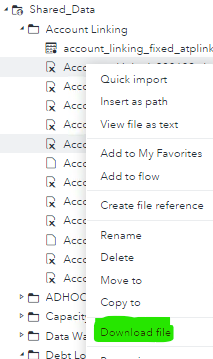
Any idea what code runs in the background when you right click on a folder in SAS Viya and chose Download File ?
Or if anyone knows an alternate solution to automate the download of files from SAS Studio to Windows directory ?
Kind Regards and Thanks in Advance 🙂


- Mark as New
- Bookmark
- Subscribe
- Mute
- RSS Feed
- Permalink
- Report Inappropriate Content
Have your admins set up a shared network resource which is mounted on the SAS server and accessible by the Windows clients. Once you know the UNIX path to the mountpoint, you use it in your SAS code.


- Mark as New
- Bookmark
- Subscribe
- Mute
- RSS Feed
- Permalink
- Report Inappropriate Content
Is there a way to download the file from SAS Viya 4 using some simple scripts like path and file name as input parameters.


- Mark as New
- Bookmark
- Subscribe
- Mute
- RSS Feed
- Permalink
- Report Inappropriate Content
As @Kurt_Bremser has already stated, just a script wont work unless your administrators set up a network folder share that is accessible from your SAS server. Once that is done SAS code can be run on Viya 4 that will write to the share. PROC EXPORT would be one option to write SAS data to an Excel spreadsheet or a CSV file.
- Mark as New
- Bookmark
- Subscribe
- Mute
- RSS Feed
- Permalink
- Report Inappropriate Content
Please define "simple script". Shell script, SAS program, something else? Which client and server platform?
- Mark as New
- Bookmark
- Subscribe
- Mute
- RSS Feed
- Permalink
- Report Inappropriate Content
Requesting for a SAS program. To be more precise on my requirement. We are in the phase of migration from SAS AML 7.1 on-prem solution to SAS AML on Viya 4 hosted as managed service on cloud. Our business need to move the old attachments (older than 5 years) and comments to be migrated in an archive folder in cloud and needed a facility to download it on demand based on CB or Internal auditors. So my request is to in request i will give the file name and path in content server so that sas program is required to download the file as per need.
- Mark as New
- Bookmark
- Subscribe
- Mute
- RSS Feed
- Permalink
- Report Inappropriate Content

- Mark as New
- Bookmark
- Subscribe
- Mute
- RSS Feed
- Permalink
- Report Inappropriate Content
You should be able to do this with a Viya JOB.
There should be examples you could module your JOB after that provide a download option for the user.
- Mark as New
- Bookmark
- Subscribe
- Mute
- RSS Feed
- Permalink
- Report Inappropriate Content
This works in SAS/Studio used by SAS On Demand for Academics.
Not sure if it works in SAS/Studio for VIYA.
%let fname=example.xlsx;
filename _dataout "~/&fname";
%let _dataout_name=&fname;
%let _dataout_mime_type=application/vnd.openxmlformats-officedocument.spreadsheetml.sheet ;
Call for content now open!
It's your turn to help shape SAS Innovate 2027. Share your expertise and inspire the SAS community.
Learn how use the CAT functions in SAS to join values from multiple variables into a single value.

Find more tutorials on the SAS Users YouTube channel.
SAS Training: Just a Click Away
Ready to level-up your skills? Choose your own adventure.
-
8 replies
-
09-04-2023 11:49 PM
-
3247 views
-
2 likes
-
5 in conversation
-


