- Home
- /
- Programming
- /
- Programming
- /
- Re: Change value in a dataset
- RSS Feed
- Mark Topic as New
- Mark Topic as Read
- Float this Topic for Current User
- Bookmark
- Subscribe
- Mute
- Printer Friendly Page


- Mark as New
- Bookmark
- Subscribe
- Mute
- RSS Feed
- Permalink
- Report Inappropriate Content
Hi,
How can I write this as a datastep to change the actual values stored in the variable 'LBTEST' in 9.4?
If I use the below Proc format and then Proc Print the updated values show, but how can I save the updated dataset?
proc format;
value $LBTEST
'Albumin (Alb)'='Albumin'
'Alanine aminotransferase (ALT)'='Alanine aminotransferase'
'Alkaline phosphatase (ALP)'='Alkaline phosphatase'
'Aspartate aminotransferase (AST)'='Aspartate aminotransferase'
'Basophils - % (Baso %)'='Basophils (%)'
'Basophils - Absolute (Baso Abs)'='Basophils (Abs)'
'Blood urea nitrogen (BUN)'='Blood urea nitrogen'
run;
proc print data=ABNLABKEEP;
format LBTEST $LBTEST.;
run;


- Mark as New
- Bookmark
- Subscribe
- Mute
- RSS Feed
- Permalink
- Report Inappropriate Content
Do you mean ?:
data ABNLABKEEP;
set ABNLABKEEP;
format LBTEST $LBTEST.;
run;


- Mark as New
- Bookmark
- Subscribe
- Mute
- RSS Feed
- Permalink
- Report Inappropriate Content
To actually change the values:
data WANT;
set ABNLABKEEP;
LBTEST = put(LBTEST, $LBTEST.);
run;
- Mark as New
- Bookmark
- Subscribe
- Mute
- RSS Feed
- Permalink
- Report Inappropriate Content
Thanks!
I get an error....
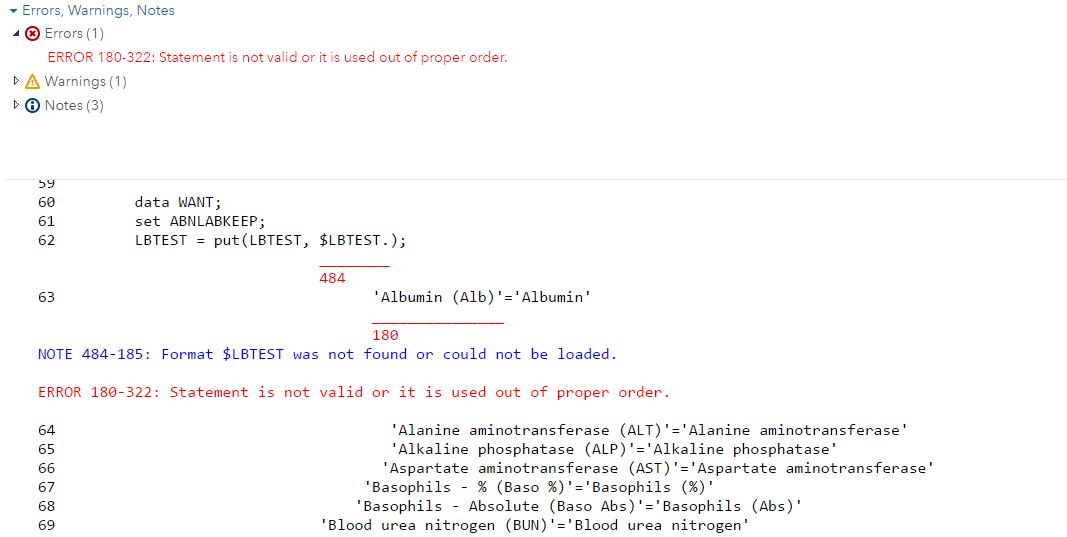


- Mark as New
- Bookmark
- Subscribe
- Mute
- RSS Feed
- Permalink
- Report Inappropriate Content
I have to guess that you made some kind of mistake in creating the format. The following works for me:
data ABNLABKEEP;
  informat lbtest $80.;
  input lbtest &;
  cards;
Albumin (Alb)
Alanine aminotransferase (ALT)
Alkaline phosphatase (ALP)
Aspartate aminotransferase (AST)
Basophils - % (Baso %)
Basophils - Absolute (Baso Abs)
Blood urea nitrogen (BUN)
;

proc format;
value $LBTEST
        'Albumin (Alb)'='Albumin'
       'Alanine aminotransferase (ALT)'='Alanine aminotransferase'
       'Alkaline phosphatase (ALP)'='Alkaline phosphatase'
      'Aspartate aminotransferase (AST)'='Aspartate aminotransferase'
   'Basophils - % (Baso %)'='Basophils (%)'
  'Basophils - Absolute (Baso Abs)'='Basophils (Abs)'
 'Blood urea nitrogen (BUN)'='Blood urea nitrogen'
run;

data WANT;
set ABNLABKEEP;
LBTEST = put(LBTEST, $LBTEST.);
run;
Art, CEO, AnalystFinder.com


- Mark as New
- Bookmark
- Subscribe
- Mute
- RSS Feed
- Permalink
- Report Inappropriate Content
Or perhaps make that format an INVALUE and use it as an INFORMAT to read the data. This may be a better option in the long run if you are reading multiple files with the same contents.

Call for content now open!
It's your turn to help shape SAS Innovate 2027. Share your expertise and inspire the SAS community.
Learn how use the CAT functions in SAS to join values from multiple variables into a single value.

Find more tutorials on the SAS Users YouTube channel.
SAS Training: Just a Click Away
Ready to level-up your skills? Choose your own adventure.
-
5 replies
-
05-16-2017 06:06 AM
-
3980 views
-
0 likes
-
5 in conversation
-


