- Home
- /
- Programming
- /
- SAS Procedures
- /
- Re: proc template --- give different background color to different co...
- RSS Feed
- Mark Topic as New
- Mark Topic as Read
- Float this Topic for Current User
- Bookmark
- Subscribe
- Mute
- Printer Friendly Page


- Mark as New
- Bookmark
- Subscribe
- Mute
- RSS Feed
- Permalink
- Report Inappropriate Content
Hi,
I need to give different background colors to different columns in a table by using proc template. Does anyone have experience on it?
I tried to use below codes. But the program only changed the backgrounds of the body of the table. The background color of the headers is still the same.
proc template;
/*--------------------------*/
/* Table definition
/*--------------------------*/
define table mytable;
column a b c ;
center=on;
/*-------------------------------------*/
/* Set up the headers of each variable
/*-------------------------------------*/
define a ;
header='AAA' style=[background=red]
just=center;
end;
define a ;
header='BBB' style=[background=blue]
just=center;
end;
define a ;
header='CCC' style=[background=yellow]
just=center;
end;
run;
Accepted Solutions


- Mark as New
- Bookmark
- Subscribe
- Mute
- RSS Feed
- Permalink
- Report Inappropriate Content
Hi, something bothered me about the OP code. There weren't enough END statements -- so the originally posted code should be getting an error:
ERROR: Parse environments were left open. You might be missing an END statement.
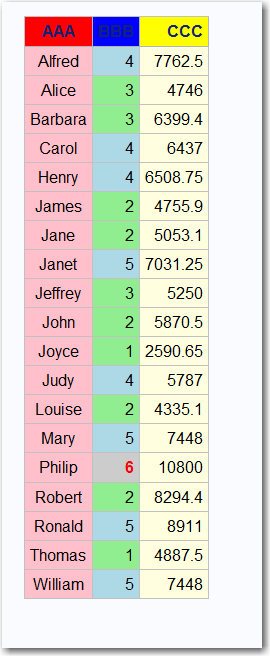
Had a chance to modify the example.
Cynthia
ods path work.tmp(update) sasuser.templat(update)
sashelp.tmplmst(read);
** you can define header text and style in the define block;
** for the column;
** then the simple style= in the define block refers to the datacells;
** and cellstyle ...as refers to the data cells;
proc template;
define table mytable;
column a b c ;
center=on;
define a ;
define header ahd;
text 'AAA';
style={background=red};
end;
header=ahd;
style={background=pink};
just=center;
end;
define b ;
define header bhd;
text 'BBB';
style={background=blue};
end;
header=bhd;
cellstyle _val_ le 3 as [background=lightgreen],
_val_ le 5 as {background=lightblue},
_val_ ge 6 as {background=graycc foreground=red font_weight=bold};
just=center;
end;
define c ;
define header chd;
text 'CCC';
style={background=yellow};
end;
header=chd;
style=[background=lightyellow]
just=center;
end;
end;
run;
ods listing close;
ods html file='c:\temp\maketable.html';
data _null_;
set sashelp.class;
keep a b c;
a = name;
b= age - 10;
c=height*weight;
file print ods=(template='mytable');
put _ods_;
run;
ods html close;


- Mark as New
- Bookmark
- Subscribe
- Mute
- RSS Feed
- Permalink
- Report Inappropriate Content
I see repeated "Define A" statements, not a Define header. Also you may need a Define Column.
- Mark as New
- Bookmark
- Subscribe
- Mute
- RSS Feed
- Permalink
- Report Inappropriate Content
You are correct, slightly different syntax is needed to style a whole column vs the style for a header. This paper shows some of the techniques, at least enough to get the OP started.
http://www2.sas.com/proceedings/sugi30/088-30.pdf
cynthia
- Mark as New
- Bookmark
- Subscribe
- Mute
- RSS Feed
- Permalink
- Report Inappropriate Content
Hi, something bothered me about the OP code. There weren't enough END statements -- so the originally posted code should be getting an error:
ERROR: Parse environments were left open. You might be missing an END statement.
Had a chance to modify the example.
Cynthia
ods path work.tmp(update) sasuser.templat(update)
sashelp.tmplmst(read);
** you can define header text and style in the define block;
** for the column;
** then the simple style= in the define block refers to the datacells;
** and cellstyle ...as refers to the data cells;
proc template;
define table mytable;
column a b c ;
center=on;
define a ;
define header ahd;
text 'AAA';
style={background=red};
end;
header=ahd;
style={background=pink};
just=center;
end;
define b ;
define header bhd;
text 'BBB';
style={background=blue};
end;
header=bhd;
cellstyle _val_ le 3 as [background=lightgreen],
_val_ le 5 as {background=lightblue},
_val_ ge 6 as {background=graycc foreground=red font_weight=bold};
just=center;
end;
define c ;
define header chd;
text 'CCC';
style={background=yellow};
end;
header=chd;
style=[background=lightyellow]
just=center;
end;
end;
run;
ods listing close;
ods html file='c:\temp\maketable.html';
data _null_;
set sashelp.class;
keep a b c;
a = name;
b= age - 10;
c=height*weight;
file print ods=(template='mytable');
put _ods_;
run;
ods html close;
- Mark as New
- Bookmark
- Subscribe
- Mute
- RSS Feed
- Permalink
- Report Inappropriate Content
Thank you Cynthia! It works 🙂

Catch up on SAS Innovate 2026
Nearly 200 sessions are now available on demand with the SAS Innovate Digital Pass.
Explore Now →Learn the difference between classical and Bayesian statistical approaches and see a few PROC examples to perform Bayesian analysis in this video.

Find more tutorials on the SAS Users YouTube channel.
SAS Training: Just a Click Away
Ready to level-up your skills? Choose your own adventure.
-
4 replies
-
03-06-2014 03:32 PM
-
4915 views
-
0 likes
-
3 in conversation
-


