- Home
- /
- Programming
- /
- SAS Procedures
- /
- Re: SAS PROC REPORT
- RSS Feed
- Mark Topic as New
- Mark Topic as Read
- Float this Topic for Current User
- Bookmark
- Subscribe
- Mute
- Printer Friendly Page


- Mark as New
- Bookmark
- Subscribe
- Mute
- RSS Feed
- Permalink
- Report Inappropriate Content
Hello,
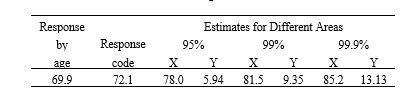
I am using style = theme for my proc report. If I have the following column titles, how do I place a border (not and underline) under the second row of titles (under the titles "Estimates for Different Areas" and also under 95%, 99% and 99.9%) ?
column
(' Response ' ('By ' ('Age ' Mean )))
(' ' ('Response ' (' Code ' MeanNC )))
('Estimates for Different Areas('95%' ('X' cpv95) ('Y' ncf95)) ('99%' ('X' cpv99) ('Y' ncf99)) ('99.9%' ('X' cpv99_9) ('Y' ncf99_9)) ) ;


- Mark as New
- Bookmark
- Subscribe
- Mute
- RSS Feed
- Permalink
- Report Inappropriate Content
What does
'-Estimates for Different Areas-'
do?
Edit:
Or maybe
'-95%-'
- Mark as New
- Bookmark
- Subscribe
- Mute
- RSS Feed
- Permalink
- Report Inappropriate Content
- Mark as New
- Bookmark
- Subscribe
- Mute
- RSS Feed
- Permalink
- Report Inappropriate Content
- Mark as New
- Bookmark
- Subscribe
- Mute
- RSS Feed
- Permalink
- Report Inappropriate Content
I saw where 'My Title' would just be that centered.
It looked like '-My Title-' would fill to become --------------My Title---------------- in a wide column or over multiple columns.
I don't know how to do the underline so I was suggesting seeing if that worked and was a look you might be able to live with. .
- Mark as New
- Bookmark
- Subscribe
- Mute
- RSS Feed
- Permalink
- Report Inappropriate Content
Thank you for your suggestion! I was hoping to get the border under that specific title.

Call for content now open!
It's your turn to help shape SAS Innovate 2027. Share your expertise and inspire the SAS community.
Learn the difference between classical and Bayesian statistical approaches and see a few PROC examples to perform Bayesian analysis in this video.

Find more tutorials on the SAS Users YouTube channel.
SAS Training: Just a Click Away
Ready to level-up your skills? Choose your own adventure.
-
5 replies
-
12-06-2017 04:41 PM
-
3954 views
-
1 like
-
2 in conversation
-

