- Home
- /
- Programming
- /
- SAS Procedures
- /
- Removing row headers in tabulate
- RSS Feed
- Mark Topic as New
- Mark Topic as Read
- Float this Topic for Current User
- Bookmark
- Subscribe
- Mute
- Printer Friendly Page


- Mark as New
- Bookmark
- Subscribe
- Mute
- RSS Feed
- Permalink
- Report Inappropriate Content
(Related to - but not the same as my other question on headers).
I have
data test;
input v1 v2 v3;
cards;
1 1 1
2 2 4
3 4 10
;
proc tabulate;
class v1 v2;
var v3;
label v1=''; /* two single quotes */
label v3='';
table min*v3*v1,v2;
run;
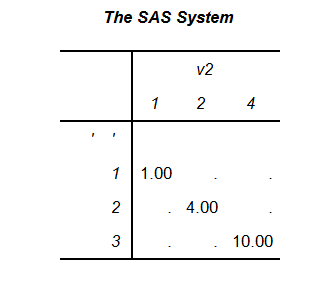
The output I get is in the attached screenshot. In short, I get single quotes appearing for the labels for v1 and v2. How do I remove them altogether? I'm using 9.4. (If use ' ' (a space between the quotes) the variable names appear instead. I get the same result if I use double quotes).
Accepted Solutions


- Mark as New
- Bookmark
- Subscribe
- Mute
- RSS Feed
- Permalink
- Report Inappropriate Content
data test;
input v1 v2 v3;
cards;
1 1 1
2 2 4
3 4 10
;
proc tabulate;
  class v1 v2;
  var v3;
  table min*v3=' '*v1=' ',v2;
  run;
Xia Keshan


- Mark as New
- Bookmark
- Subscribe
- Mute
- RSS Feed
- Permalink
- Report Inappropriate Content
Have a blank between the quotes.
- Mark as New
- Bookmark
- Subscribe
- Mute
- RSS Feed
- Permalink
- Report Inappropriate Content
Tried that. If I do that, I get the variable name appearing.


- Mark as New
- Bookmark
- Subscribe
- Mute
- RSS Feed
- Permalink
- Report Inappropriate Content
Well, funnily enough this seems to work:
data test;
input v1 v2 v3;
cards;
1 1 1
2 2 4
3 4 10
;
run;
ods escapechar "^";
proc tabulate;
class v1 v2;
var v3;
label v1="^{subscript }"; /* two single quotes */
label v3="^{superscript }";
table min*v3*v1,v2;
run;
Not ideal I know (I personally don't use tabulate). You could also just output to a dataset:
proc tabulate out=xyz;
...
Then use proc report to generate the output required.


- Mark as New
- Bookmark
- Subscribe
- Mute
- RSS Feed
- Permalink
- Report Inappropriate Content
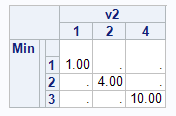
I would use the nob-breaking space byte(160) 'a0'x It may be output destination dependent but it seems that something with space in the name should print as "blank".
data test;
input v1 v2 v3;
cards;
1 1 1
2 2 4
3 4 10
;
proc tabulate;
class v1 v2;
var v3;
label v1='a0'x;
label v3='a0'x;
table min*v3*v1,v2;
run;
- Mark as New
- Bookmark
- Subscribe
- Mute
- RSS Feed
- Permalink
- Report Inappropriate Content
data test;
input v1 v2 v3;
cards;
1 1 1
2 2 4
3 4 10
;
proc tabulate;
  class v1 v2;
  var v3;
  table min*v3=' '*v1=' ',v2;
  run;
Xia Keshan
- Mark as New
- Bookmark
- Subscribe
- Mute
- RSS Feed
- Permalink
- Report Inappropriate Content
Ksharp wrote:
data test; input v1 v2 v3; cards; 1 1 1 2 2 4 3 4 10 ; proc tabulate; class v1 v2; var v3; table min*v3=' '*v1=' ',v2; run;Xia Keshan
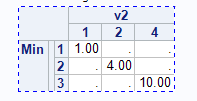
This should be the preferred method as it removes the "label" row produce by non-breaking space

- Mark as New
- Bookmark
- Subscribe
- Mute
- RSS Feed
- Permalink
- Report Inappropriate Content
Or instead of relying on label:
proc tabulate;
class v1 v2;
var v3;
table v3='' * v1='',v2*sum='';
run;
Single quotes with no space to override. Since V3 is a VAR it want a summary statistic row header which will still appear as blank.
- Mark as New
- Bookmark
- Subscribe
- Mute
- RSS Feed
- Permalink
- Report Inappropriate Content
Thanks all. The responses which suggest using the within table statement =' ' formatting work (with or without the space in between). I thought I had tried this, but obviously not.

Call for content now open!
It's your turn to help shape SAS Innovate 2027. Share your expertise and inspire the SAS community.
Learn the difference between classical and Bayesian statistical approaches and see a few PROC examples to perform Bayesian analysis in this video.

Find more tutorials on the SAS Users YouTube channel.
SAS Training: Just a Click Away
Ready to level-up your skills? Choose your own adventure.
-
8 replies
-
10-10-2014 02:07 AM
-
8318 views
-
6 likes
-
6 in conversation
-


