- Home
- /
- Programming
- /
- SAS Procedures
- /
- Re: Proc tabulate issue
- RSS Feed
- Mark Topic as New
- Mark Topic as Read
- Float this Topic for Current User
- Bookmark
- Subscribe
- Mute
- Printer Friendly Page


- Mark as New
- Bookmark
- Subscribe
- Mute
- RSS Feed
- Permalink
- Report Inappropriate Content
Hi Cynthia/ All
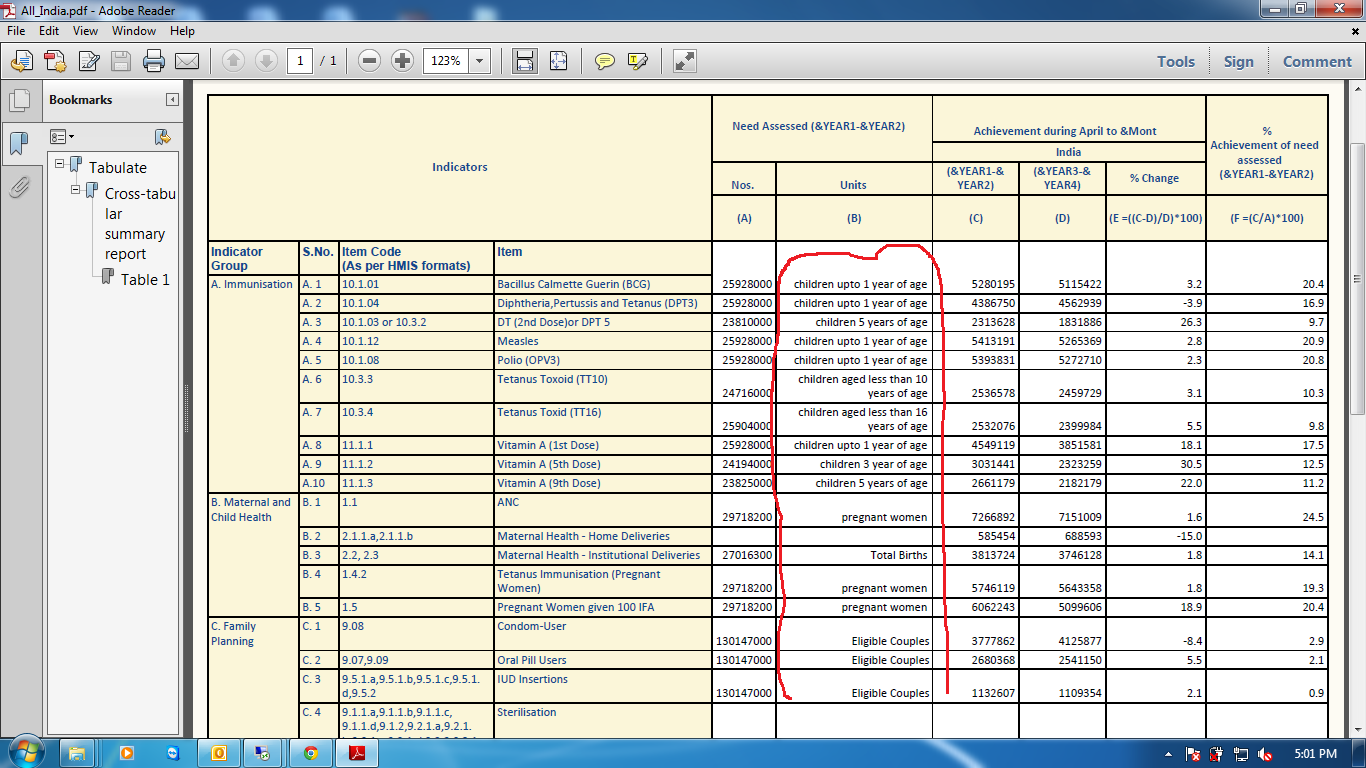
This is same report, Here is sub header B where there value is coming in a right alignment because in label it is numeric character and using proc format I have changed the value into a printable character value. Now this character value is still coming in right alignment now I have to put in left alignment which is not going. I have tried to solve it but unable to do it. Please help me out how can i do it. Herewith i am sharing a data set with sas code, print screen of output and desired output.


- Mark as New
- Bookmark
- Subscribe
- Mute
- RSS Feed
- Permalink
- Report Inappropriate Content
Why not add a STYLE to get it ?
proc format;
value fmt
 0-60='xx'
 70-200='yy';
run;

ods listing close;
ods pdf file='c:\temp\x.pdf';
proc tabulate data=sashelp.class;
class sex age;
var weight height;
table sex,age*weight=''*format=fmt10.*{style={just=left}} ;
run;
ods pdf close;
ods listing;
Xia Keshan
- Mark as New
- Bookmark
- Subscribe
- Mute
- RSS Feed
- Permalink
- Report Inappropriate Content
Hi,
my data set is there in gip file and already i have used a proc format and tried to move the B column value in left align but stll it is not moving in left. Even you can try with my dataset and sas code.
- Mark as New
- Bookmark
- Subscribe
- Mute
- RSS Feed
- Permalink
- Report Inappropriate Content
I have no time to download your data . Post it at ODS and Base Reporting Cynthia@sas might would do that .

Call for content now open!
It's your turn to help shape SAS Innovate 2027. Share your expertise and inspire the SAS community.
Learn the difference between classical and Bayesian statistical approaches and see a few PROC examples to perform Bayesian analysis in this video.

Find more tutorials on the SAS Users YouTube channel.
SAS Training: Just a Click Away
Ready to level-up your skills? Choose your own adventure.
-
3 replies
-
04-21-2015 05:37 AM
-
2244 views
-
0 likes
-
2 in conversation
-

