- Home
- /
- Programming
- /
- SAS Procedures
- /
- Re: Proc Boxplot- Center inset group
- RSS Feed
- Mark Topic as New
- Mark Topic as Read
- Float this Topic for Current User
- Bookmark
- Subscribe
- Mute
- Printer Friendly Page


- Mark as New
- Bookmark
- Subscribe
- Mute
- RSS Feed
- Permalink
- Report Inappropriate Content
Hello,
I am using proc boxplot in SAS v9.3 to produce side by side boxplots. I am including the inset group statement to include n, mean, std dev, etc in the plot. I have tried various formats and positions, but I cannot get the statistics in the inset to line up over the corresponding box.
Here is the code I used:
ods graphics off;
proc boxplot data=all;
plot diff*race/ boxwidth=5 skiphlabels=0 vref=3 -3 vreflabels='weight gain' 'weight loss' vreflabpos=3;
insetgroup n mean stddev q1 q2 q3 / format=bestd4.1 position=topoff cframe=black;
goptions htext=1.3;
run;
And here is the resulting plot:
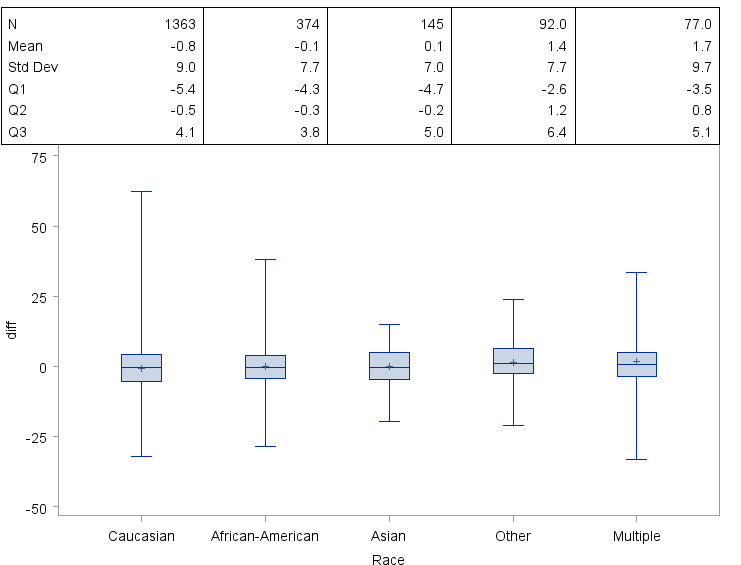
I just want the statistics to line up a little more precisely, to make this easier to interpret to those outside the study. Does anyone know if this is possible?
Thank you,
Kelsey


- Mark as New
- Bookmark
- Subscribe
- Mute
- RSS Feed
- Permalink
- Report Inappropriate Content
Use PROC SGPLOT .


data class;
 set sashelp.class;
run;
proc summary data=class nway;
 class sex;
 var weight;
 output out=temp n=n mean=mean std=std;
run;
data class;
 set class temp;
run;

proc sgplot data=class;
 vbox weight/category=sex;
 xaxistable n mean std/x=sex location=inside position=top;
run;
- Mark as New
- Bookmark
- Subscribe
- Mute
- RSS Feed
- Permalink
- Report Inappropriate Content
The xaxistable statement isn't working for me. I believe that is new to SAS 9.4. I'm using 9.3.
- Mark as New
- Bookmark
- Subscribe
- Mute
- RSS Feed
- Permalink
- Report Inappropriate Content
You could use other skill .

http://blogs.sas.com/content/graphicallyspeaking/2013/06/24/schematic-plot/

http://blogs.sas.com/content/graphicallyspeaking/2013/09/07/bar-charts-with-stacked-and-cluster-groups/

Call for content now open!
It's your turn to help shape SAS Innovate 2027. Share your expertise and inspire the SAS community.
Learn the difference between classical and Bayesian statistical approaches and see a few PROC examples to perform Bayesian analysis in this video.

Find more tutorials on the SAS Users YouTube channel.
SAS Training: Just a Click Away
Ready to level-up your skills? Choose your own adventure.
-
3 replies
-
09-26-2016 09:57 AM
-
4022 views
-
0 likes
-
2 in conversation
-

