- Home
- /
- Programming
- /
- SAS Procedures
- /
- Re: PROC REPORT only show top frequencies
- RSS Feed
- Mark Topic as New
- Mark Topic as Read
- Float this Topic for Current User
- Bookmark
- Subscribe
- Mute
- Printer Friendly Page


- Mark as New
- Bookmark
- Subscribe
- Mute
- RSS Feed
- Permalink
- Report Inappropriate Content
Hi all,
I'm trying to generate a report of cross-tabulated frequencies. However, one of the categorical variables (language) has a ton of different options. I would like a way for the report to only show the top 4 languages and group the rest into an "other" category. How would I do this? Here's my code so far:
PROC REPORT data= nodup_list nowd missing;
 	column motherdominantlanguage have_phone, (N pctn) Total;
	define motherdominantlanguage / group "Language" order=freq descending;
	define have_phone / across order = external "Phone Status";
	define n / format = 8. "N" ;
	define pctn / 'Percent' format=percent7.1 ;
	rbreak after / dol skip summarize ;
	compute total;
 		Total = sum(_c2_,_c4_);
 	endcomp;
	title2 "Mother's Language Frequency";
RUN;
And here's a sample of my current output:
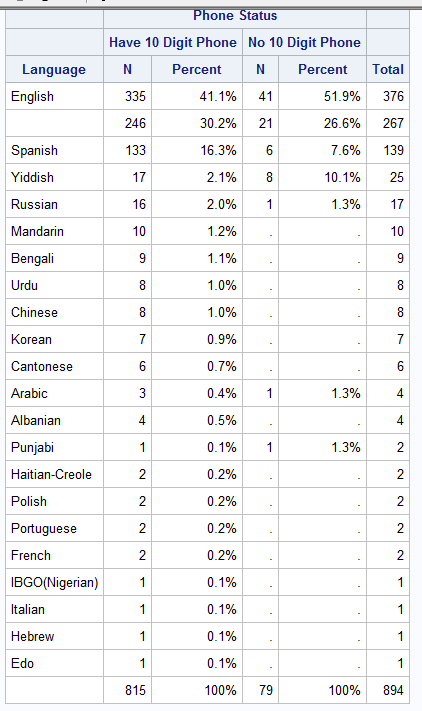
I'd really like to only have 5 language rows: top 4 languages and an other category!
Thanks!


- Mark as New
- Bookmark
- Subscribe
- Mute
- RSS Feed
- Permalink
- Report Inappropriate Content
Do the crosstab frequencies first (PROC FREQ), writing two intermediate data sets (NEED1 for crosstabs, and NEED2 for oneway freqs of motherdominantlanguage). Then left join the top 4 from need2 with need1 to make NEED. NEED will have the 8 cells of interest plus a frequency variable COUNT.
proc freq nodup_list order=freq noprint ;
  tables motherdominantlanguage*have_phone
    / out=need1 (drop=percent) sparse missing ;
  tables motherdominantlanguage
    / out=need2 ;
run;

proc sql;
  create table need as select n1.* from
    need2 (obs=4) as n2
      left join
    need1 as n1
      on n2.motherdominantlanguage=n1.motherdominantlanguage;
quit;
AT this point you can run your proc report against dataset NEED, but add a
FREQ COUNT;
statement.
The hash OUTPUT method will overwrite a SAS data set, but not append. That can be costly. Consider voting for Add a HASH object method which would append a hash object to an existing SAS data set
Would enabling PROC SORT to simultaneously output multiple datasets be useful? Then vote for
Allow PROC SORT to output multiple datasets
--------------------------
- Mark as New
- Bookmark
- Subscribe
- Mute
- RSS Feed
- Permalink
- Report Inappropriate Content
- Mark as New
- Bookmark
- Subscribe
- Mute
- RSS Feed
- Permalink
- Report Inappropriate Content
Just as the "obs=4" data set name option for need2 allows joining only on the 4 most frequent languages, you can also use the "firstobs=5" data set name option to perform a join on the remaining languages. Create a table NEED3 from this join, summing up the value of count for each have_phone value ("group by have_phone"), and creating a lable for that collection of languages ("other"=motherdominantlanguage).
Then you can do a union of NEED3 with the join produced using "obs=4":
proc sql noprint;
  create table need3 as
    select 'Other' as motherdominantlanguage,n1.have_phone,sum(n1.count) as count from
    need2 (firstobs=5) as n2    /* was "firstobs=2" - editted to "firstobs=5" */
      left join
    need1 as n1
      on n2.motherdominantlanguage=n1.motherdominantlanguage
    group by have_phone;

  create table need as select n1.* from
    need2 (obs=4) as n2
      left join
    need1 as n1
      on n2.motherdominantlanguage=n1.motherdominantlanguage
    outer union
    select * from need3;


quit;
The hash OUTPUT method will overwrite a SAS data set, but not append. That can be costly. Consider voting for Add a HASH object method which would append a hash object to an existing SAS data set
Would enabling PROC SORT to simultaneously output multiple datasets be useful? Then vote for
Allow PROC SORT to output multiple datasets
--------------------------
- Mark as New
- Bookmark
- Subscribe
- Mute
- RSS Feed
- Permalink
- Report Inappropriate Content


- Mark as New
- Bookmark
- Subscribe
- Mute
- RSS Feed
- Permalink
- Report Inappropriate Content
Have you considered a custom format?

Catch up on SAS Innovate 2026
Nearly 200 sessions are now available on demand with the SAS Innovate Digital Pass.
Explore Now →Learn the difference between classical and Bayesian statistical approaches and see a few PROC examples to perform Bayesian analysis in this video.

Find more tutorials on the SAS Users YouTube channel.
SAS Training: Just a Click Away
Ready to level-up your skills? Choose your own adventure.
-
5 replies
-
05-30-2017 05:05 PM
-
3015 views
-
0 likes
-
3 in conversation
-


