- Home
- /
- Programming
- /
- SAS Procedures
- /
- Creating and exporting graphs to excel
- RSS Feed
- Mark Topic as New
- Mark Topic as Read
- Float this Topic for Current User
- Bookmark
- Subscribe
- Mute
- Printer Friendly Page


- Mark as New
- Bookmark
- Subscribe
- Mute
- RSS Feed
- Permalink
- Report Inappropriate Content
Hi I have a query in relation to creating graphs and exporting them to sheets in excel.
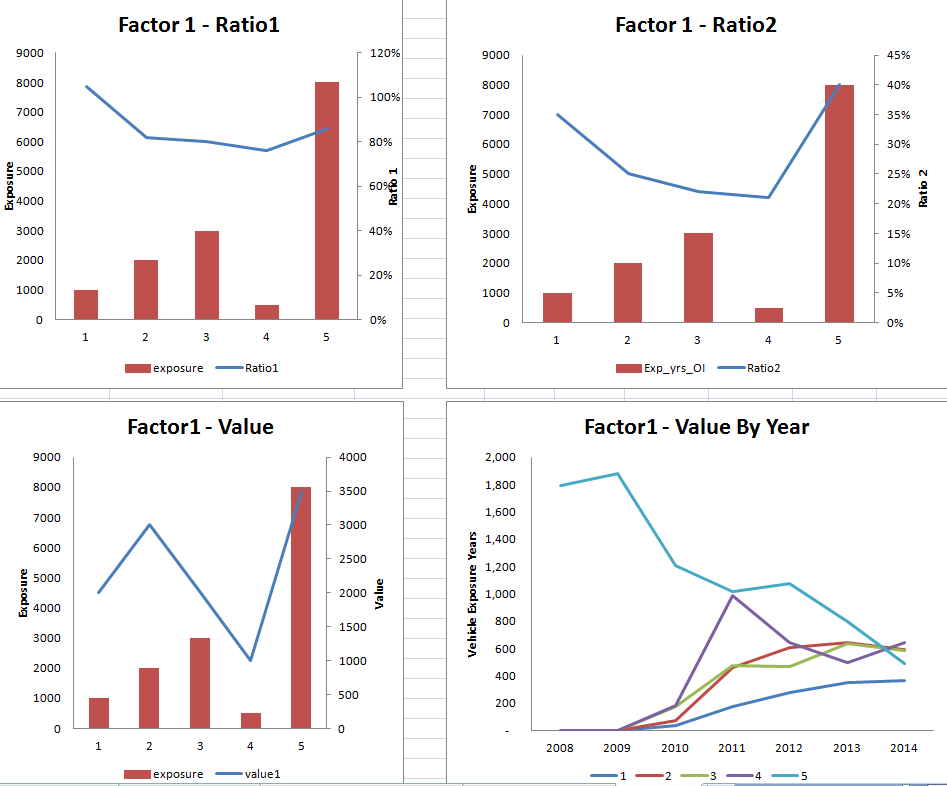
I'm trying to automate a process where I export four graphs for a particular factor for 20 factors. Creating macros in excel to do this is very slow and time-consuming. Below is a sample dataset showing details for one factor.
I've included a screenshot of what I want the graphs to look like. So the exposure will be a bar chart, the ratios will be a line chart etc. Is it possible to output in a tiled format? I'm new to sas/graph so any help would be greatly appreciated.
| factor | level | no_of_observations | exposure | Ratio1 | Ratio2 | value1 | 2008 | 2009 | 2010 | 2011 | 2012 | 2013 |
| factor1 | 1 | 500 | 1000 | 105% | 35% | 2000 | - | - | 39 | 172 | 280 | 348 |
| factor1 | 2 | 1000 | 2000 | 82% | 25% | 3000 | 0 | 1 | 74 | 463 | 605 | 644 |
| factor1 | 3 | 20000 | 3000 | 80% | 22% | 2000 | 0 | 0 | 177 | 477 | 469 | 633 |
| factor1 | 4 | 23000 | 500 | 76% | 21% | 1000 | 0 | 0 | 185 | 988 | 641 | 494 |
| factor1 | 5 | 22333 | 8000 | 86% | 40% | 3500 | 1,794 | 1,882 | 1,208 | 1,014 | 1,078 | 797 |


- Mark as New
- Bookmark
- Subscribe
- Mute
- RSS Feed
- Permalink
- Report Inappropriate Content
What version of SAS do you have?
Have you checked Rob AllI sons page?
Robslink.com
- Mark as New
- Bookmark
- Subscribe
- Mute
- RSS Feed
- Permalink
- Report Inappropriate Content
9.3 with sas/stat, sas/graph, sas/access, sas/export.
Thanks for the link.
In terms of exporting to a program out of sas, can you export to xlsx without it messing up the format? Is it better to output to pdf for graphs. I don't need to edit the graphs as this will all be done in SAS before the export.
Finally is it possible to export 4 graphs on one page/sheet?
Thanks

Call for content now open!
It's your turn to help shape SAS Innovate 2027. Share your expertise and inspire the SAS community.
Learn the difference between classical and Bayesian statistical approaches and see a few PROC examples to perform Bayesian analysis in this video.

Find more tutorials on the SAS Users YouTube channel.
SAS Training: Just a Click Away
Ready to level-up your skills? Choose your own adventure.
-
2 replies
-
02-27-2015 12:10 PM
-
1833 views
-
0 likes
-
2 in conversation
-


