- Home
- /
- Programming
- /
- SAS Procedures
- /
- Another Proc_Transpose Question
- RSS Feed
- Mark Topic as New
- Mark Topic as Read
- Float this Topic for Current User
- Bookmark
- Subscribe
- Mute
- Printer Friendly Page


- Mark as New
- Bookmark
- Subscribe
- Mute
- RSS Feed
- Permalink
- Report Inappropriate Content
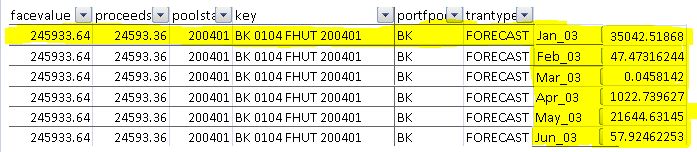
I am new to SAS and my skills are still abysmal at best. I am trying to work my way through Proc Transpose and I see frequent postings on it here in the forum. I was hoping someone could help walk me through my task so I better understand the Proc Transpose procedure. My data set that I am working with is as shown below.

Just observing the highlighted record, I am trying to transpose the Month_YY columns by each Key variable. The 0's represent the payment for each month of that key and I want the months in a single column with each paymnet in the next column, all while keeping the rest of the record constant. I have an example below of what I am trying to achieve.
Accepted Solutions


- Mark as New
- Bookmark
- Subscribe
- Mute
- RSS Feed
- Permalink
- Report Inappropriate Content
proc transpose ;
by facevalue proceeds poolstart key portfpool trantype ;
run;
The variable _NAME_ will have the former variable names.
The variable COL1 will have the values.

- Mark as New
- Bookmark
- Subscribe
- Mute
- RSS Feed
- Permalink
- Report Inappropriate Content
Assuming your data is sorted I'd probably go with a datastep. The link below is a good instruction. If you really want proc transpose that link is further below.
SAS Learning Module: Reshaping wide to long using a data step
You can use the vname function to capture the name of the array variable.
eg.
do i = 1 to dim(month_vars);
value=month_vars(i);
month=vname(month_vars(i));
output;
end;
SAS Learning Module: How to reshape data wide to long using proc transpose
The trick is to keep all the variables you want in your BY statement.
- Mark as New
- Bookmark
- Subscribe
- Mute
- RSS Feed
- Permalink
- Report Inappropriate Content
The data I have in my first example is already from a proc import of a csv file spit out form another sas job, so that is the format and structure I have to work with. I read that document and cannot get it to apply correctly to what I am working on. I was hoping someone could supply me some code to help me achieve my goal. I would be able to understand what it is doing much better I had an example of the code that provided my results.
- Mark as New
- Bookmark
- Subscribe
- Mute
- RSS Feed
- Permalink
- Report Inappropriate Content
proc transpose ;
by facevalue proceeds poolstart key portfpool trantype ;
run;
The variable _NAME_ will have the former variable names.
The variable COL1 will have the values.


- Mark as New
- Bookmark
- Subscribe
- Mute
- RSS Feed
- Permalink
- Report Inappropriate Content
Once you get the data transposed as per Tom's suggestion you will want to read the _NAME_ field using a date informat so you can convert the month and year to SASDate.
- Mark as New
- Bookmark
- Subscribe
- Mute
- RSS Feed
- Permalink
- Report Inappropriate Content
Thanks Tom, adding all my variables to be sorted and in the order I need them was the piece I was missing in all of this. I was only using a single variable to sort by which was throwing all my data off.


- Mark as New
- Bookmark
- Subscribe
- Mute
- RSS Feed
- Permalink
- Report Inappropriate Content
Just a side piece of advice. There are many more important areas to start learning SAS than PROC TRANSPOSE. Just to name a few, study these statements within a DATA step (what they do, when they can be used):
RETAIN
BY
value + amount;
LENGTH
The list could be longer, but each of these will likely prove more valuable to you than learning PROC TRANSPOSE.
Good luck.

Call for content now open!
It's your turn to help shape SAS Innovate 2027. Share your expertise and inspire the SAS community.
Learn the difference between classical and Bayesian statistical approaches and see a few PROC examples to perform Bayesian analysis in this video.

Find more tutorials on the SAS Users YouTube channel.
SAS Training: Just a Click Away
Ready to level-up your skills? Choose your own adventure.
-
6 replies
-
08-23-2013 03:48 PM
-
3753 views
-
4 likes
-
5 in conversation
-


