- Home
- /
- Programming
- /
- Graphics
- /
- Specify colours for a variable in proc g3D surface plots
- RSS Feed
- Mark Topic as New
- Mark Topic as Read
- Float this Topic for Current User
- Bookmark
- Subscribe
- Mute
- Printer Friendly Page


- Mark as New
- Bookmark
- Subscribe
- Mute
- RSS Feed
- Permalink
- Report Inappropriate Content
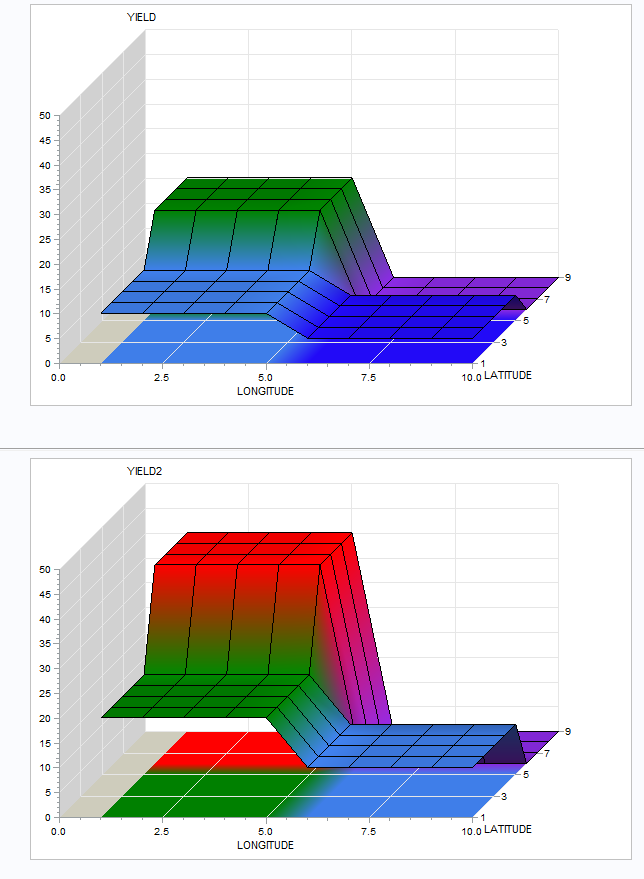
How can I specify colors for the 3D surface plot based on response values ? I want same colour to appear if the values are in the same range, for multiple graphs.
my code is :
ods _all_ close;
ods html file="/home/a.g/created for HTML output/new.htm";
/* Set the DEVICE on the GOPTIONS statement */
/* to ACTIVEX. */
goptions reset=all device=activex
border xpixels=600 ypixels=400
cback=white;
Data surface_data;
input longitude latitude yield;
datalines;
10 1 5
10 2 5
10 3 5
10 4 5
10 5 5
10 6 0
10 7 0
10 8 0
10 9 0
9 1 5
9 2 5
9 3 5
9 4 5
9 5 5
9 6 0
9 7 0
9 8 0
9 9 0
8 1 5
8 2 5
8 3 5
8 4 5
8 5 5
8 6 0
8 7 0
8 8 0
8 9 0
7 1 5
7 2 5
7 3 5
7 4 5
7 5 5
7 6 0
7 7 0
7 8 0
7 9 0
6 1 5
6 2 5
6 3 5
6 4 5
6 5 5
6 6 0
6 7 0
6 8 0
6 9 0
5 1 10
5 2 10
5 3 10
5 4 10
5 5 10
5 6 20
5 7 20
5 8 20
5 9 20
4 1 10
4 2 10
4 3 10
4 4 10
4 5 10
4 6 20
4 7 20
4 8 20
4 9 20
3 1 10
3 2 10
3 3 10
3 4 10
3 5 10
3 6 20
3 7 20
3 8 20
3 9 20
2 1 10
2 2 10
2 3 10
2 4 10
2 5 10
2 6 20
2 7 20
2 8 20
2 9 20
1 1 10
1 2 10
1 3 10
1 4 10
1 5 10
1 6 20
1 7 20
1 8 20
1 9 20
;
title1 "North America Elevation Contour Map";
title2 "Use 'Right-Mouse -> Graph Toolbar' to enable rotate mode";
goptions colors = ( blueviolet blue aquamarine green yellow orangered red );
proc g3d data=surface_data;
plot latitude*longitude=yield /
style=4 contour=1 grid
des='' name="&name";
run;
quit;
ODS HTML CLOSE;
ODS LISTING;


- Mark as New
- Bookmark
- Subscribe
- Mute
- RSS Feed
- Permalink
- Report Inappropriate Content
One way is to adapt the number of colours to the range of your data.
data SURFACE_DATA;
  set SURFACE_DATA;
  YIELD2=YIELD*2;
run;

axis order=(0 to 50 by 5);

goptions colors = ( blueviolet blue aquamarine green);
proc g3d data=SURFACE_DATA ;
  plot LATITUDE*LONGITUDE=YIELD / style=4 contour=1 grid zaxis=axis1;
run;

goptions colors = ( blueviolet blue aquamarine green yellow orangered red );
proc g3d data=SURFACE_DATA;
 plot LATITUDE*LONGITUDE=YIELD2 / style=4 contour=1 grid zaxis=axis1;
run;

Catch up on SAS Innovate 2026
Nearly 200 sessions are now available on demand with the SAS Innovate Digital Pass.
Explore Now →Learn how use the CAT functions in SAS to join values from multiple variables into a single value.

Find more tutorials on the SAS Users YouTube channel.
SAS Training: Just a Click Away
Ready to level-up your skills? Choose your own adventure.
-
1 reply
-
09-15-2016 01:21 PM
-
3011 views
-
0 likes
-
2 in conversation
-

