BookmarkSubscribeRSS Feed
analgore
Calcite | Level 5

Hi everyone,

I'm having a really annoying problem with EG 5.1 that I hope you can help me out with.

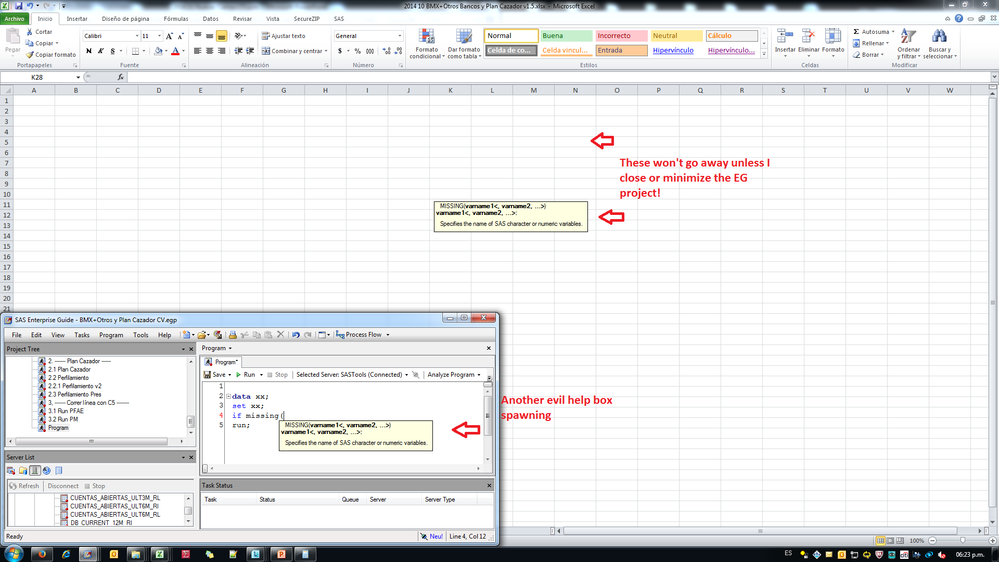
Sometimes when I start typing a command the help box appears and it won't go away.

For example, if I'm trying to write the following condition: "if missing(value" a yellow help box appears which describes the MISSING function and the parameters that the function uses.

The problem is that about 1/3rds of the times the help box won't go away no matter what I do. The only way to make it disappear is to exit EG, but sometimes that is impossible as some of my projects take up to 2 hours to run.

This is VERY annoying, as sometimes I have up to 3 help boxes floating around in my screen, making it difficult to see my code.

I've looked for ways to disable the help boxes or a way to reload the UI, but I haven't found out a solution yet.

I'm attaching a picture showing you what I just described in the post.

Thanks in advance for the help.

SAS.png
1 REPLY 1
Reeza
Super User

I've heard of this before, without a solution.

I believe it is solved in later versions of SAS EG.

Hope I'm wrong though Smiley Happy

EDIT: Here's a thread that discusses the issue a bit:

LISTSERV 16.0 - SAS-L Archives - August 2014, week 1

Subject is :

(Update) Annoying random persistent tooltips in Enterprise Guide 5.1

sas-innovate-2026-white.png


April 27 – 30 | Gaylord Texan | Grapevine, Texas

Registration is open

Walk in ready to learn. Walk out ready to deliver. This is the data and AI conference you can't afford to miss.
Register now and lock in 2025 pricing—just $495!

Register now

Creating Custom Steps in SAS Studio

Check out this tutorial series to learn how to build your own steps in SAS Studio.

Find more tutorials on the SAS Users YouTube channel.

SAS Training: Just a Click Away

 Ready to level-up your skills? Choose your own adventure.

Browse our catalog!

Discussion stats
  • 1 reply
  • 1708 views
  • 0 likes
  • 2 in conversation
