- Home
- /
- Programming
- /
- Enterprise Guide
- /
- SAS macro variable inspector: a custom task
- RSS Feed
- Mark Topic as New
- Mark Topic as Read
- Float this Topic for Current User
- Bookmark
- Subscribe
- Mute
- Printer Friendly Page


- Mark as New
- Bookmark
- Subscribe
- Mute
- RSS Feed
- Permalink
- Report Inappropriate Content
I thought this group might appreciate this tool I've built for use in SAS Enterprise Guide 4.3:
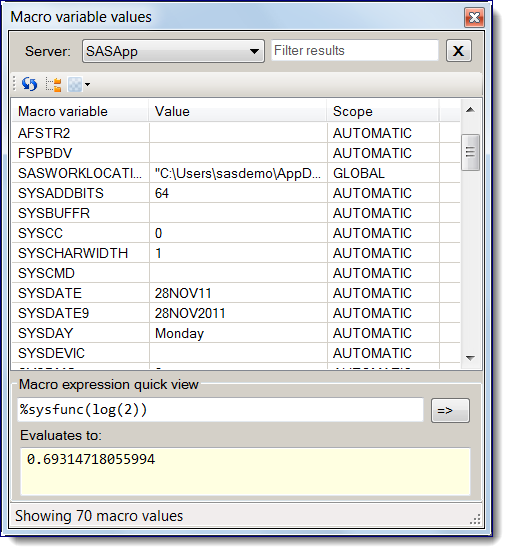
If you're a programmer who uses macro variables, you might find this custom task useful. If you have feedback, I'd love to hear from you on the blog.
Chris


- Mark as New
- Bookmark
- Subscribe
- Mute
- RSS Feed
- Permalink
- Report Inappropriate Content
Hi Chris,
This tools doesn't seem to work in 5.1.
Is this tool incompatible or am I doing something wrong?
Nick
- Mark as New
- Bookmark
- Subscribe
- Mute
- RSS Feed
- Permalink
- Report Inappropriate Content
Nick, I've tested it in 5.1 and had no problem. And I know that others here at SAS have used it as well.
Does the task show up in the menu when you put the DLL in %appdata%\SAS\EnterpriseGuide\5.1\Custom ?
If you continue to have problems, open a tech support track. This particular task won't be supported officially, but if you're having trouble we should get to the bottom of it. So if you open a track, mention this thread and my name to make sure that I get pulled into the loop, and we'll figure it out.
Chris

Call for content now open!
It's your turn to help shape SAS Innovate 2027. Share your expertise and inspire the SAS community.
Check out this tutorial series to learn how to build your own steps in SAS Studio.

Find more tutorials on the SAS Users YouTube channel.
SAS Training: Just a Click Away
Ready to level-up your skills? Choose your own adventure.
-
2 replies
-
11-28-2011 01:14 PM
-
2361 views
-
0 likes
-
2 in conversation
-


