- Home
- /
- Programming
- /
- Enterprise Guide
- /
- Re: SAS EG Error
- RSS Feed
- Mark Topic as New
- Mark Topic as Read
- Float this Topic for Current User
- Bookmark
- Subscribe
- Mute
- Printer Friendly Page


- Mark as New
- Bookmark
- Subscribe
- Mute
- RSS Feed
- Permalink
- Report Inappropriate Content
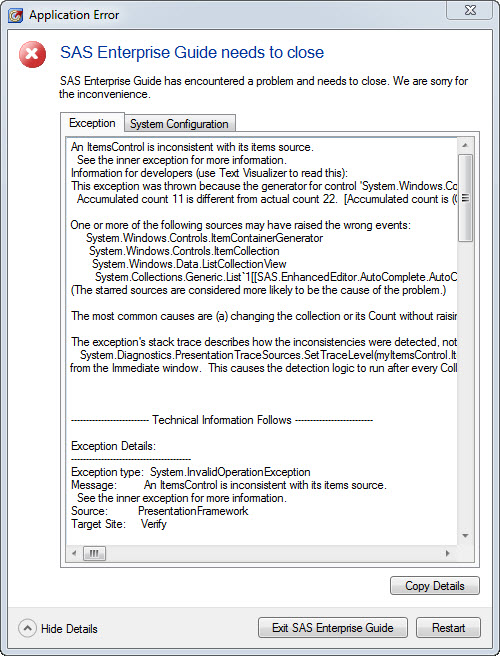
I have encountered a problem with my SAS EG when I tried to update some code.
here is the screenshot of the error msg.
Accepted Solutions


- Mark as New
- Bookmark
- Subscribe
- Mute
- RSS Feed
- Permalink
- Report Inappropriate Content
Hi @zzprc
The issue might be related to the autocomplete.
From the Tools => Options menu, go to SAS Programs and click on the Editor Options... button.
There, on the Autocomplete tab, untick the Enable Autocomplete option.
You might be using EG5.1 or 6.1.
If you are able to move to EG7.1, you should not have the issue.
Does that help you?
Cheers,
Damo
- Mark as New
- Bookmark
- Subscribe
- Mute
- RSS Feed
- Permalink
- Report Inappropriate Content
Hi @zzprc
The issue might be related to the autocomplete.
From the Tools => Options menu, go to SAS Programs and click on the Editor Options... button.
There, on the Autocomplete tab, untick the Enable Autocomplete option.
You might be using EG5.1 or 6.1.
If you are able to move to EG7.1, you should not have the issue.
Does that help you?
Cheers,
Damo
- Mark as New
- Bookmark
- Subscribe
- Mute
- RSS Feed
- Permalink
- Report Inappropriate Content
thanks for your reply. It works.

Catch up on SAS Innovate 2026
Nearly 200 sessions are now available on demand with the SAS Innovate Digital Pass.
Explore Now →Check out this tutorial series to learn how to build your own steps in SAS Studio.

Find more tutorials on the SAS Users YouTube channel.
SAS Training: Just a Click Away
Ready to level-up your skills? Choose your own adventure.
-
2 replies
-
05-30-2017 09:28 AM
-
2015 views
-
1 like
-
2 in conversation
-


