- Home
- /
- Programming
- /
- Enterprise Guide
- /
- Re: SAS EG - Calculate 40th and 60th Percentile
- RSS Feed
- Mark Topic as New
- Mark Topic as Read
- Float this Topic for Current User
- Bookmark
- Subscribe
- Mute
- Printer Friendly Page


- Mark as New
- Bookmark
- Subscribe
- Mute
- RSS Feed
- Permalink
- Report Inappropriate Content
How do I calculate the 40th and 60th percentile of a column in SAS EG?
Either 4.2 or 5.1.
Thanks!
Accepted Solutions


- Mark as New
- Bookmark
- Subscribe
- Mute
- RSS Feed
- Permalink
- Report Inappropriate Content
Hi, Reeza
40 and 60 have been added to PROC MEANS, but not the EG interface. However, easy to do:
1. Select your data.
2. Summary Statistics task.
3. Put your VAR variable in the Analysis variables, and set up the rest of the task.
4. Select Preview code.
5. Select Insert Code
6. At the end of all of the parameters for the PROC MEANS statement, before the semicolon, double-click on the "double-click to insert code" entry point.
7. In the Enter User Code box, type
P40 P60
OK your way out, and close the preview code window. When you run, you should get the 40th and 60th percentiles.
Tom
- Mark as New
- Bookmark
- Subscribe
- Mute
- RSS Feed
- Permalink
- Report Inappropriate Content
Hi, Reeza
40 and 60 have been added to PROC MEANS, but not the EG interface. However, easy to do:
1. Select your data.
2. Summary Statistics task.
3. Put your VAR variable in the Analysis variables, and set up the rest of the task.
4. Select Preview code.
5. Select Insert Code
6. At the end of all of the parameters for the PROC MEANS statement, before the semicolon, double-click on the "double-click to insert code" entry point.
7. In the Enter User Code box, type
P40 P60
OK your way out, and close the preview code window. When you run, you should get the 40th and 60th percentiles.
Tom


- Mark as New
- Bookmark
- Subscribe
- Mute
- RSS Feed
- Permalink
- Report Inappropriate Content
Any idea how to get all the 99 percentiles on SAS EG or through a program?
I actually have 6 values of which I need 99 percentiles (combined). I'm trying everything available online but not getting a clue.
Kindly help me if possible.


- Mark as New
- Bookmark
- Subscribe
- Mute
- RSS Feed
- Permalink
- Report Inappropriate Content
PROC UNIVARIATE can provide this. Check the documentation.


- Mark as New
- Bookmark
- Subscribe
- Mute
- RSS Feed
- Permalink
- Report Inappropriate Content
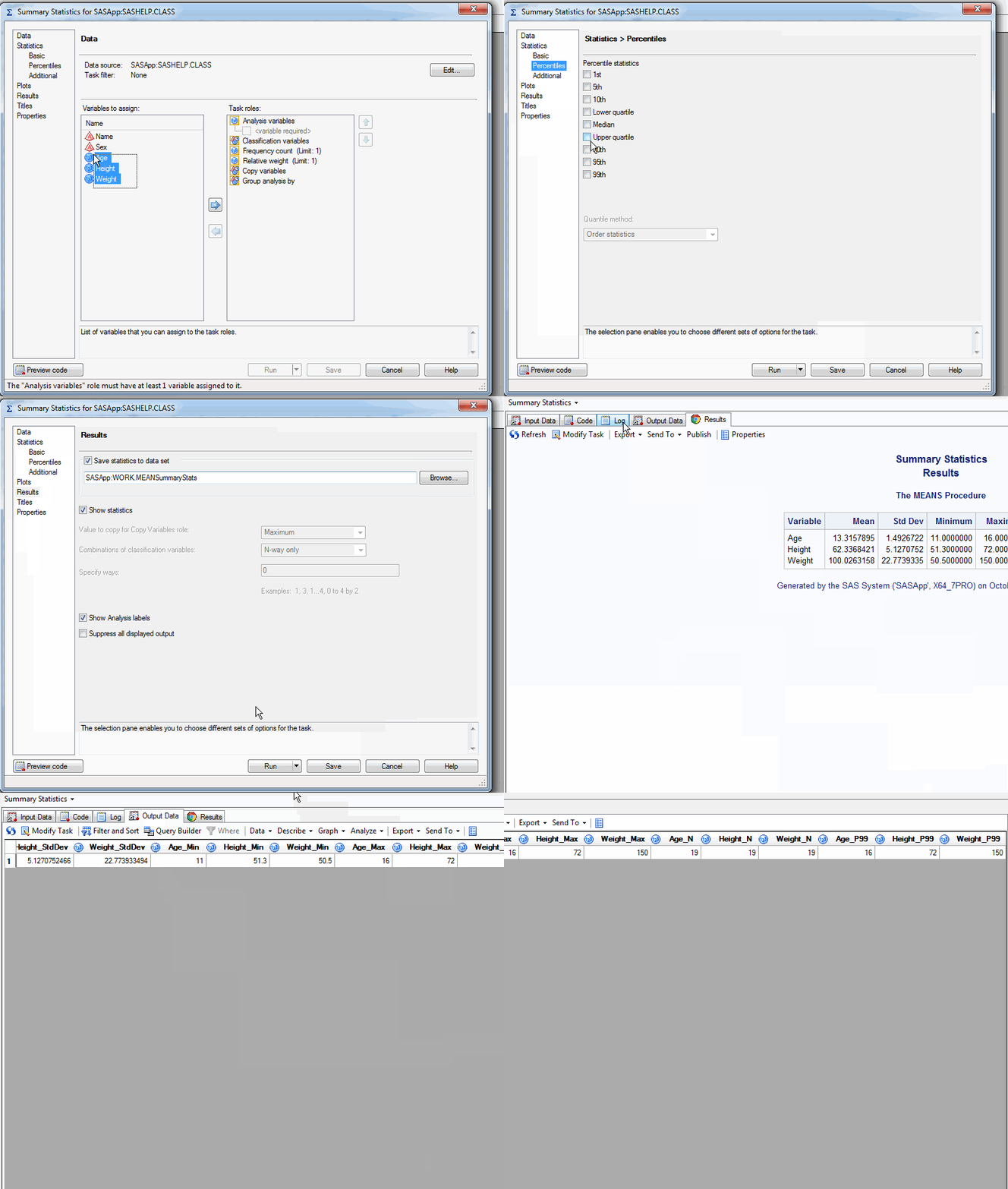
99th Percentile is an option in the Summary Statistics task (Describe menu).
Here's an example sequence.

Catch up on SAS Innovate 2026
Nearly 200 sessions are now available on demand with the SAS Innovate Digital Pass.
Explore Now →Check out this tutorial series to learn how to build your own steps in SAS Studio.

Find more tutorials on the SAS Users YouTube channel.
SAS Training: Just a Click Away
Ready to level-up your skills? Choose your own adventure.
-
4 replies
-
06-05-2013 06:01 PM
-
6979 views
-
4 likes
-
5 in conversation
-


