- Home
- /
- Programming
- /
- Enterprise Guide
- /
- Re: SAS EG 7.1 project file too big
- RSS Feed
- Mark Topic as New
- Mark Topic as Read
- Float this Topic for Current User
- Bookmark
- Subscribe
- Mute
- Printer Friendly Page


- Mark as New
- Bookmark
- Subscribe
- Mute
- RSS Feed
- Permalink
- Report Inappropriate Content
I am using SAS EG 7.1 and my project file has gottent too big. Now it will only open up in a notepad file. As a result I can't access the usual project log window in order to clear the project log. How do I clear a project log manually so I can go back to normal?
Accepted Solutions


- Mark as New
- Bookmark
- Subscribe
- Mute
- RSS Feed
- Permalink
- Report Inappropriate Content
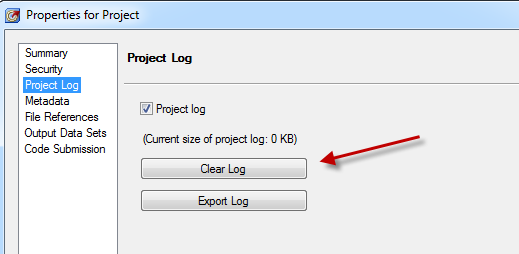
Select File->Project Properties, then the Project Log tab. There's a Clear Log button there:
Chris
- Mark as New
- Bookmark
- Subscribe
- Mute
- RSS Feed
- Permalink
- Report Inappropriate Content
Select File->Project Properties, then the Project Log tab. There's a Clear Log button there:
Chris
- Mark as New
- Bookmark
- Subscribe
- Mute
- RSS Feed
- Permalink
- Report Inappropriate Content
Thanks Chris! That worked like a charm. I never thought of looking there. I looked under project maintenance in tools but couldn't find anything.

- Mark as New
- Bookmark
- Subscribe
- Mute
- RSS Feed
- Permalink
- Report Inappropriate Content
When the Project Log is too large.
A SAS Eg. Dialog appears Recommending to Select SASEg/View/Project Log - and click on "clear Log" - but that is greyed out and does not work.
Your method seems to be more fail safe. and works.

Catch up on SAS Innovate 2026
Nearly 200 sessions are now available on demand with the SAS Innovate Digital Pass.
Explore Now →Check out this tutorial series to learn how to build your own steps in SAS Studio.

Find more tutorials on the SAS Users YouTube channel.
SAS Training: Just a Click Away
Ready to level-up your skills? Choose your own adventure.
-
3 replies
-
04-03-2015 09:53 AM
-
34744 views
-
27 likes
-
3 in conversation
-


