- Home
- /
- Programming
- /
- Enterprise Guide
- /
- Problem of connexion SEG 4.3
- RSS Feed
- Mark Topic as New
- Mark Topic as Read
- Float this Topic for Current User
- Bookmark
- Subscribe
- Mute
- Printer Friendly Page


- Mark as New
- Bookmark
- Subscribe
- Mute
- RSS Feed
- Permalink
- Report Inappropriate Content
Hello,
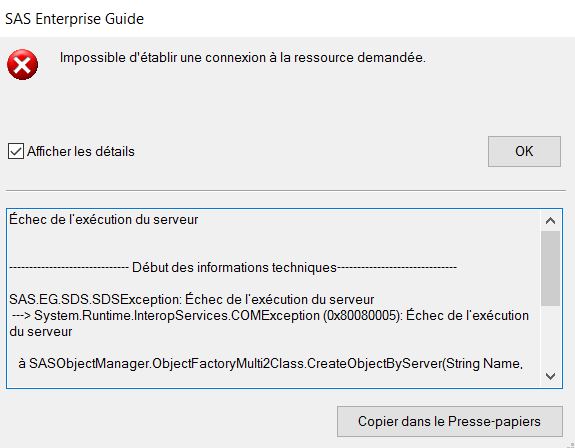
I don't understand why SEG displays the following message (see attachment) and nothing works now.
It always worked normally. I have a SAS based installation on my computer. I have never made a connection with any server.
Thank you for your help


- Mark as New
- Bookmark
- Subscribe
- Mute
- RSS Feed
- Permalink
- Report Inappropriate Content
If possible, can you please copy the entire error message (click on the button at the bottom-right corner of the popup box).
You said this is a stand-alone SAS workstation installation - yes? (On a client-server installation, I would have suggested checking the status of the Object Spawner).
What does your connection profile have?
- Mark as New
- Bookmark
- Subscribe
- Mute
- RSS Feed
- Permalink
- Report Inappropriate Content
There is the entire error message.
- Mark as New
- Bookmark
- Subscribe
- Mute
- RSS Feed
- Permalink
- Report Inappropriate Content
I use a french version


- Mark as New
- Bookmark
- Subscribe
- Mute
- RSS Feed
- Permalink
- Report Inappropriate Content
Disregard my response below, that was before seeing the full callstack you just posted. From the callstack you just sent, I see the error is occurring when attempting to make a connection to your local SAS server. The first thing I'd do is try to run SAS (Display Manager) directly from the Windows start menu (or C:\Program Files\SASHome\SASFoundation\9.4\sas.exe). If SAS comes up fine in that case (and able to submit something simple, ex. "%put hello;"), then I suggest trying to re-register SAS with this command:
C:\Program Files\SASHome\SASFoundation\9.4\sas.exe -regserver
If still no luck, you can use ITConfig2.exe discussed below to test Local connection (change to SAS Workspace Server and select COM as the Connection Protocol, then press Test button).
That looks like a failure trying to connect to a SAS metadata server. Check your active profile (in EG's Tools->Connections) to make sure your active profile is configured and set as expected. If you are intending for EG to connect to your local SAS, make sure "<do not use a profile>" is selected. If you are intending for EG to connect to a SAS metadata server (usually remote), use the SAS Integration Technologies Configuration Wizard (ex. C:\Program Files\SASHome\x86\Integration Technologies\ITConfig2.exe) to test a connection to the SAS server (ex. Test SAS Servers->Enter a SAS server definition manually->select SAS Metadata Server->specify appropriate machine name, port, and credentials->Press Test button).
Casey
Register today and join us virtually on June 16!
sasglobalforum.com | #SASGF
View now: on-demand content for SAS users

Catch up on SAS Innovate 2026
Nearly 200 sessions are now available on demand with the SAS Innovate Digital Pass.
Explore Now →Check out this tutorial series to learn how to build your own steps in SAS Studio.

Find more tutorials on the SAS Users YouTube channel.
SAS Training: Just a Click Away
Ready to level-up your skills? Choose your own adventure.
-
4 replies
-
06-08-2017 08:56 AM
-
2373 views
-
0 likes
-
3 in conversation
-


