- Home
- /
- Programming
- /
- Enterprise Guide
- /
- Re: Need to convert character mm/dd/yyyy to SAS date and time in Query...
- RSS Feed
- Mark Topic as New
- Mark Topic as Read
- Float this Topic for Current User
- Bookmark
- Subscribe
- Mute
- Printer Friendly Page


- Mark as New
- Bookmark
- Subscribe
- Mute
- RSS Feed
- Permalink
- Report Inappropriate Content
Can this be done in the advanced expression calculation?
Example data to convert from char to SAS date:
02/12/2016 to 12FEB2016:00:00:00
Accepted Solutions


- Mark as New
- Bookmark
- Subscribe
- Mute
- RSS Feed
- Permalink
- Report Inappropriate Content
Will that tool let you type an actualy function? If your variable with the characters in is named CHARVAR then this assignment statement will make the variable DATETIME have the equivalent datetime value.
datetime=dhms(input(charvar,'MMDDYY10.'),,,0);
- Mark as New
- Bookmark
- Subscribe
- Mute
- RSS Feed
- Permalink
- Report Inappropriate Content
Will that tool let you type an actualy function? If your variable with the characters in is named CHARVAR then this assignment statement will make the variable DATETIME have the equivalent datetime value.
datetime=dhms(input(charvar,'MMDDYY10.'),,,0);


- Mark as New
- Bookmark
- Subscribe
- Mute
- RSS Feed
- Permalink
- Report Inappropriate Content
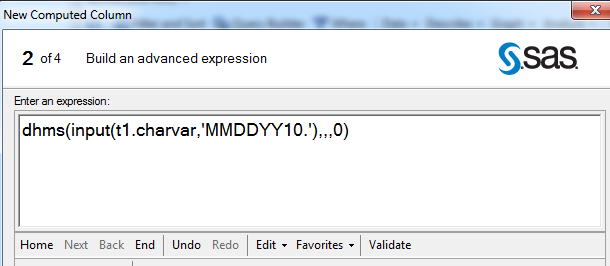
Yes, @Tom is correct. The Advanced Expression window allows this:
dhms(input(t1.charvar,'MMDDYY10.'),,,0)
Looks like this in your window:

- Mark as New
- Bookmark
- Subscribe
- Mute
- RSS Feed
- Permalink
- Report Inappropriate Content
@ChrisHemedinger Are the quotes required around the format? I think it might be like the following:
dhms(input(t1.charvar, MMDDYY10.),,,0)
- Mark as New
- Bookmark
- Subscribe
- Mute
- RSS Feed
- Permalink
- Report Inappropriate Content
With the INPUT() functions you do not want the quotes around the format since the second argument is a format.
But the INPUTN() function , or the INPUTC() function, take an expression for the second argument so you do need the quotes.
- Mark as New
- Bookmark
- Subscribe
- Mute
- RSS Feed
- Permalink
- Report Inappropriate Content
This worked. I had to add DATETIME20 to the format under "Modify additional options" in Enterprise Guide.
Thanks all!

Catch up on SAS Innovate 2026
Nearly 200 sessions are now available on demand in the Innovate Hub.
Watch Now →Check out this tutorial series to learn how to build your own steps in SAS Studio.

Find more tutorials on the SAS Users YouTube channel.
SAS Training: Just a Click Away
Ready to level-up your skills? Choose your own adventure.
-
5 replies
-
06-30-2016 02:19 PM
-
15136 views
-
0 likes
-
4 in conversation
-


