Hi All,
I need to calculate the percentage on multiple columns in a Proc Report. I'm using Compute Before however after the first compute I get the following error - ERROR: There are multiple COMPUTE statements for RBREAK BEFORE .
My test data is
data test;
	Input Centre $ A B C D E F Total_Calls;
	Datalines;
ADL 3 279 646 . 276 120  1324
BAL . 1298 1775 . 200 859 4152
Bay . 928 . 4 . 12 944
Ben 546 . . 195 1 60 802
Bri . 342 736 . 69 429 1576
Bun . 966 2257 . 214 1199 4636
Cai 163 . 2 . . 631 796
Can 16 . 137 . . 91 244
Cen 450 2 774 400 . 396 2022
Cof 2465 1 2206 876 . 311 5859
;
Run;
and the proc report code is
Proc Report Data=Test;
	Column CENTRE A B C D E F Total_Calls APct BPct;
	Define Centre / DISPLAY;
	Define A / DISPLAY 'A' Analysis SUM f=comma9. Style(Column)=[cellwidth=1in];
	Define B / DISPLAY 'B' Analysis SUM f=comma9. Style(Column)=[cellwidth=1in];
	Define C / DISPLAY 'C' Analysis SUM f=comma9. Style(Column)=[cellwidth=1in];
	Define D / DISPLAY 'D' Analysis SUM f=comma9. Style(Column)=[cellwidth=1in];
	Define E / DISPLAY 'E' Analysis SUM f=comma9. Style(Column)=[cellwidth=1in];
	Define F / DISPLAY 'F' Analysis SUM f=comma9. Style(Column)=[cellwidth=1in];
	Define Total_calls / Display 'Total' Analysis SUM f=comma9. Style(Column)=[cellwidth=1in];


	Compute Before;
				A_Total = A.SUM;
			Endcomp;

			Define APct / COMPUTED 'A Percent' f=Percent9.0 STYLE( column )={TAGATTR='format:0.00'};

			Compute APct;
				APct = A.SUM / A_Total;
			ENDCOMP;

Compute before;
				B_Total = B.SUM;
			Endcomp;

			Define BPct / COMPUTED 'B Percent' f=Percent9.0 STYLE( column )={TAGATTR='format:0.00'};

			Compute BPct;
				BPct = B.SUM / B_Total;
			ENDCOMP;


RBREAK AFTER / SUmmarize;

Run;
If I use the Compute after in the second and subsequent Compute statements it doesn't calculate the percentage.
The output I want would look like
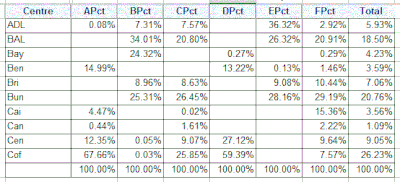
Is Proc Report the best proc to use? ANy help appreciated.
Cheers
Dean





