- Home
- /
- Programming
- /
- Enterprise Guide
- /
- Missing List Option for Tasks
- RSS Feed
- Mark Topic as New
- Mark Topic as Read
- Float this Topic for Current User
- Bookmark
- Subscribe
- Mute
- Printer Friendly Page


- Mark as New
- Bookmark
- Subscribe
- Mute
- RSS Feed
- Permalink
- Report Inappropriate Content
Am I missing something, or has the option to list tasks by category vanished from EG 7? Also the names of the procedures have been moved from the list by name to a pop-up that appears on mouse-over, which makes looking for a specific procedure rather tedious.
I don't know how others feel, but the behaviour of 6.1 and earlier suits me better.
Accepted Solutions


- Mark as New
- Bookmark
- Subscribe
- Mute
- RSS Feed
- Permalink
- Report Inappropriate Content
Hi @Kurt_Bremser - the Task Browser now covers this, though the UI is different. Tasks->Browse...
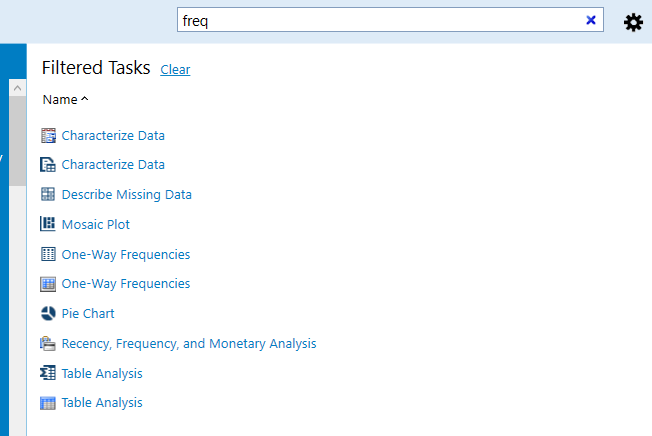
You can search for a task that covers a PROC that you want using the search field. Here's my search for tasks that use PROC FREQ (note that I have SAS Studio tasks installed as well, so I've got double coverage):
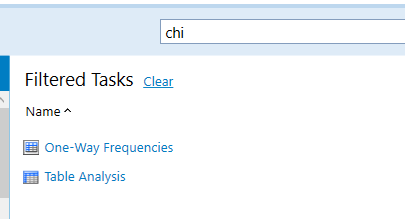
You can be more specific in your search. Looking for the Chi Square test? Just search for "chi":
- Mark as New
- Bookmark
- Subscribe
- Mute
- RSS Feed
- Permalink
- Report Inappropriate Content
Hi @Kurt_Bremser - the Task Browser now covers this, though the UI is different. Tasks->Browse...
You can search for a task that covers a PROC that you want using the search field. Here's my search for tasks that use PROC FREQ (note that I have SAS Studio tasks installed as well, so I've got double coverage):
You can be more specific in your search. Looking for the Chi Square test? Just search for "chi":
- Mark as New
- Bookmark
- Subscribe
- Mute
- RSS Feed
- Permalink
- Report Inappropriate Content
Ah! So the search is much more than just a search by task name. That is good to know.
- Mark as New
- Bookmark
- Subscribe
- Mute
- RSS Feed
- Permalink
- Report Inappropriate Content
The Task Browser also allows you to manage favorites and task templates. It was introduced in the SAS Add-In for Microsoft Office a couple of releases ago, and in v7.1 the two were sync'd to be the same UI/experience.

Catch up on SAS Innovate 2026
Nearly 200 sessions are now available on demand in the Innovate Hub.
Watch Now →Check out this tutorial series to learn how to build your own steps in SAS Studio.

Find more tutorials on the SAS Users YouTube channel.
SAS Training: Just a Click Away
Ready to level-up your skills? Choose your own adventure.
-
3 replies
-
05-11-2017 07:18 AM
-
2221 views
-
0 likes
-
2 in conversation
-


