- Home
- /
- Programming
- /
- Enterprise Guide
- /
- Re: Is there a quick way to get the site number of the active server?
- RSS Feed
- Mark Topic as New
- Mark Topic as Read
- Float this Topic for Current User
- Bookmark
- Subscribe
- Mute
- Printer Friendly Page


- Mark as New
- Bookmark
- Subscribe
- Mute
- RSS Feed
- Permalink
- Report Inappropriate Content
I'm considering linking a new custom task, written in VB.NET, to a specific SAS license, so I will need a quick way to get the site number of the active server, so I can check it whenever the custom task is opened.
If I use Consumer.ActiveServer, is there a quick way to get the site number of that active server?
...........Phil
Accepted Solutions


- Mark as New
- Bookmark
- Subscribe
- Mute
- RSS Feed
- Permalink
- Report Inappropriate Content
Phil,
You can get it this way:
Dim sasServer as New SAS.Tasks.Toolkit.SasServer(Consumer.AssignedServer)
sitenum = sasServer.GetSasMacroValue("SYSSITE")
Chris
- Mark as New
- Bookmark
- Subscribe
- Mute
- RSS Feed
- Permalink
- Report Inappropriate Content
FYI I know that the information I need is in &syssite. I just don't know how to get this information quickly (and easily).
............Phil
- Mark as New
- Bookmark
- Subscribe
- Mute
- RSS Feed
- Permalink
- Report Inappropriate Content
Phil,
You can get it this way:
Dim sasServer as New SAS.Tasks.Toolkit.SasServer(Consumer.AssignedServer)
sitenum = sasServer.GetSasMacroValue("SYSSITE")
Chris
- Mark as New
- Bookmark
- Subscribe
- Mute
- RSS Feed
- Permalink
- Report Inappropriate Content
That was a lot easier than I had expected.
Many thanks...........Phil


- Mark as New
- Bookmark
- Subscribe
- Mute
- RSS Feed
- Permalink
- Report Inappropriate Content
Hi Chris, could you do me a favor?
I just install Base SAS9.3 and SAS Enterprise Guide 5.1; While whenever I run SAS EG, it says no profile selected. While when I try to add an profile and set it active. It always pops up "an unexpected error...". How should I set up the server for EG and use it normally?
- Mark as New
- Bookmark
- Subscribe
- Mute
- RSS Feed
- Permalink
- Report Inappropriate Content
If you have SAS 9.3 installed on the same Windows machine as EG, you don't need to do anything additional. You should already have a server named "Local" that uses your local SAS instance automatically.
"No profile" means no metadata profile is configured. You need a metadata profile only if you are going to connect to a remote SAS session.
Chris
- Mark as New
- Bookmark
- Subscribe
- Mute
- RSS Feed
- Permalink
- Report Inappropriate Content
Hi Chris, thx for your reply. How's going today.
The reason why I am trying to find and connect to a remote free open server is because, although SAS9.3 is installed while I cannot run command on sas enterprise guide. ERROR MESG is like : a connection to server 'local' could not be established.
I checked a lot of troubleshooting method mentioned on SAS web, while problem is still there. Do you have any idea of that?
- Mark as New
- Bookmark
- Subscribe
- Mute
- RSS Feed
- Permalink
- Report Inappropriate Content
Check Help->About SAS Enterprise Guide, and click Configuration Details
You'll see a window like this:
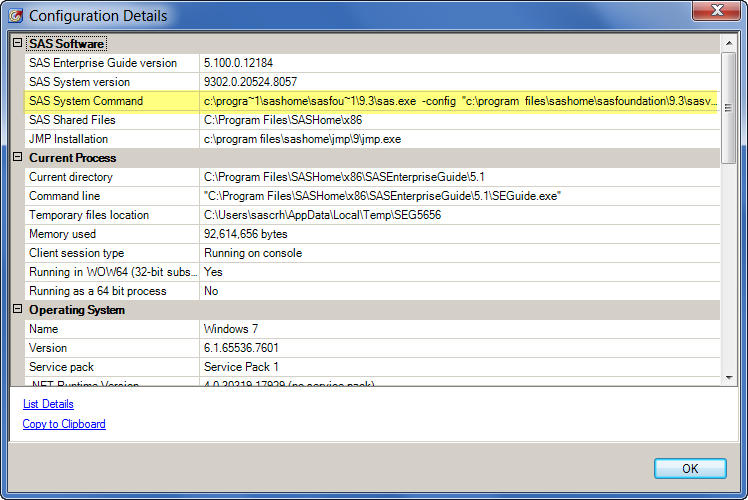
If it doesn't show a "SAS System version" or "SAS System command", then you don't have a properly installed version of SAS.
If you know for certain that you have SAS installed, try running this command from a command prompt:
"c:\program files\sashome\sasfoundation\9.3\sas.exe" -regserver
(Changing the path to where your SAS.EXE is installed.)
You won't see any message from the command, but after running it try restarting SAS Enterprise Guide and see if you can see a "Local" SAS server.
Chris

Catch up on SAS Innovate 2026
Nearly 200 sessions are now available on demand in the Innovate Hub.
Watch Now →Check out this tutorial series to learn how to build your own steps in SAS Studio.

Find more tutorials on the SAS Users YouTube channel.
SAS Training: Just a Click Away
Ready to level-up your skills? Choose your own adventure.
-
7 replies
-
10-08-2012 04:29 PM
-
4804 views
-
1 like
-
3 in conversation
-


