- Home
- /
- Programming
- /
- Enterprise Guide
- /
- ERROR Import Data from a Text File
- RSS Feed
- Mark Topic as New
- Mark Topic as Read
- Float this Topic for Current User
- Bookmark
- Subscribe
- Mute
- Printer Friendly Page


- Mark as New
- Bookmark
- Subscribe
- Mute
- RSS Feed
- Permalink
- Report Inappropriate Content
Hi Dear,
I'm beginning to learn SAS EG
I'm trying to import data from a Text File .txt
on Step" file -> Import Data"
But, I am receiving the error
"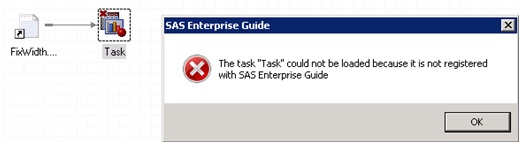 "
"
Does anyone know what this error might be?
Thanks so much!
Murilo Almeida
Accepted Solutions


- Mark as New
- Bookmark
- Subscribe
- Mute
- RSS Feed
- Permalink
- Report Inappropriate Content
Yes, you should definitely track with Tech Support. Something is amiss in your installation.
- Mark as New
- Bookmark
- Subscribe
- Mute
- RSS Feed
- Permalink
- Report Inappropriate Content
What version of EG is this? 4.1?
It looks like something is wrong with the EG installation. I suggest tracking this with SAS Technical Support.
Chris
- Mark as New
- Bookmark
- Subscribe
- Mute
- RSS Feed
- Permalink
- Report Inappropriate Content
Hi Chris.
Version of EG is 5.1.
Thanks so much!
- Mark as New
- Bookmark
- Subscribe
- Mute
- RSS Feed
- Permalink
- Report Inappropriate Content
Yes, you should definitely track with Tech Support. Something is amiss in your installation.


- Mark as New
- Bookmark
- Subscribe
- Mute
- RSS Feed
- Permalink
- Report Inappropriate Content
Hi, I had responded to a similar issue . It could be a compatibility issue meaning if SAS is 64 bit( can check in HELP) and the Office that you are running is 32 bit. I know in such a situation you normally receive "Class not registered" or Excel engine not found" messages.
Try checking the Excel version and if different from SAS version try Installing 64 bit Office 2010 to match your version of SAS .
Try the following links in the order given
http://www.office.com/office64setup
Or
The following links involve more steps using PC Server Files with Import Wizard
http://support.sas.com/kb/44197
Or
Iinstalling a SAS PC File server which provides a bridge between 32 bit Office and 64 bit SAS.
http://support.sas.com/kb/43802
Thanks,

Call for content now open!
It's your turn to help shape SAS Innovate 2027. Share your expertise and inspire the SAS community.
Check out this tutorial series to learn how to build your own steps in SAS Studio.

Find more tutorials on the SAS Users YouTube channel.
SAS Training: Just a Click Away
Ready to level-up your skills? Choose your own adventure.
-
4 replies
-
03-28-2013 07:02 AM
-
2797 views
-
1 like
-
3 in conversation
-


