
Hi there,
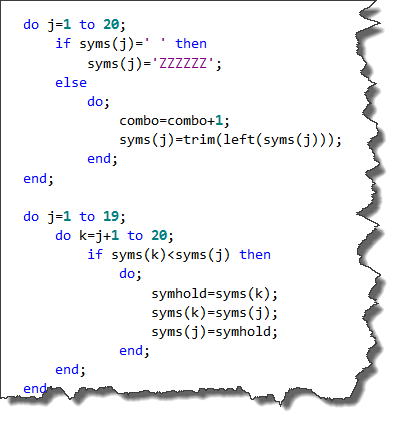
In the list of keyboard shortcuts, and also in this article http://blogs.sas.com/content/sasdummy/2013/10/29/five-keyboard-shortcuts/, it is advised that the keyboard shortcut ALT + [ or ALT + ] will take you to the end of the scope in the Do/End block.
I interpret this to mean that, like the CTRL + [ shortcut for parenthesis, it will allow me to jump between the opening and closing Do/End statements.
I'm having some trouble with this, in that when I am within the Do/End block, and use either one, I am taken to the opening Do statement.
Is there any way to take me to the 'End' statement instead?
I'm trying to navigate through some legacy code with multiple nested Do/End statements and this would be really helpful.
Thank you for your help.
Don't forget the ability to format your code! Use Ctrl+I or right-click, Format Code. It can turn code that looks like this:

Into this:

Chris
April 27 – 30 | Gaylord Texan | Grapevine, Texas
Walk in ready to learn. Walk out ready to deliver. This is the data and AI conference you can't afford to miss.
Register now and lock in 2025 pricing—just $495!
Check out this tutorial series to learn how to build your own steps in SAS Studio.

Find more tutorials on the SAS Users YouTube channel.
Ready to level-up your skills? Choose your own adventure.