- Home
- /
- Programming
- /
- Enterprise Guide
- /
- Re: DateTime Issue
- RSS Feed
- Mark Topic as New
- Mark Topic as Read
- Float this Topic for Current User
- Bookmark
- Subscribe
- Mute
- Printer Friendly Page


- Mark as New
- Bookmark
- Subscribe
- Mute
- RSS Feed
- Permalink
- Report Inappropriate Content
Hi,
I have issues with these datetime variables. They contain extra micro seconds. Because of that I cannot do sum or count based on month/year or use TimeStamp prompt.
Please see the image below for what I meant. See the last 3 numbers after the seconds. I want to get rid of those last 4 numbers.
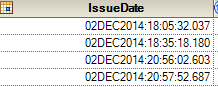
Thanks in advance.
Accepted Solutions


- Mark as New
- Bookmark
- Subscribe
- Mute
- RSS Feed
- Permalink
- Report Inappropriate Content
No manipulation of the value needed for many types of summaries. Assign an appropriated format, such as DTMONYY;
Proc means data=have;
class IssueDate;
var < a list of variables to summarize>;
format IssueDate ddmonyy7.;
run;
The formatted values will be used by most procedures to group values.


- Mark as New
- Bookmark
- Subscribe
- Mute
- RSS Feed
- Permalink
- Report Inappropriate Content
Please try to use the informat datetime22. to read and display the datetime as expected
data have;
input x : datetime22.;
format x datetime20.;
cards;
02dec2014:18:05:32.037
;
run;
else, simply try to use the format datetime20. to get the expected display.
Thanks,
Jag
Jag

- Mark as New
- Bookmark
- Subscribe
- Mute
- RSS Feed
- Permalink
- Report Inappropriate Content
Datetime values are the number of seconds since 1/1/1960. If you do not want the fractional parts of a second then use ROUND() or INT() function to convert the value to an integer.


- Mark as New
- Bookmark
- Subscribe
- Mute
- RSS Feed
- Permalink
- Report Inappropriate Content
I'm always trying to manipulate date and datetime data in ways that are independent of internal representation. I'm not certain it can always be done but in this case you could use a time constant representing a single second (whatever its value for SAS) in the ROUND function :
data have;
input x : datetime22.;
y = round(x, '00:00:01't);
format x y datetime22.3;
datalines;
02dec2014:18:05:32.037
;
proc print; run;
PG

- Mark as New
- Bookmark
- Subscribe
- Mute
- RSS Feed
- Permalink
- Report Inappropriate Content
Like that, as it will work even when SAS changes the datetime representation to nanoseconds since the Big Bang.
- Mark as New
- Bookmark
- Subscribe
- Mute
- RSS Feed
- Permalink
- Report Inappropriate Content
No manipulation of the value needed for many types of summaries. Assign an appropriated format, such as DTMONYY;
Proc means data=have;
class IssueDate;
var < a list of variables to summarize>;
format IssueDate ddmonyy7.;
run;
The formatted values will be used by most procedures to group values.
- Mark as New
- Bookmark
- Subscribe
- Mute
- RSS Feed
- Permalink
- Report Inappropriate Content
Thank you solved my problem.

Catch up on SAS Innovate 2026
Nearly 200 sessions are now available on demand in the Innovate Hub.
Watch Now →Check out this tutorial series to learn how to build your own steps in SAS Studio.

Find more tutorials on the SAS Users YouTube channel.
SAS Training: Just a Click Away
Ready to level-up your skills? Choose your own adventure.
-
6 replies
-
06-04-2015 08:10 PM
-
4428 views
-
8 likes
-
6 in conversation
-


