- Home
- /
- Programming
- /
- Enterprise Guide
- /
- Create a stacked bar graph
- RSS Feed
- Mark Topic as New
- Mark Topic as Read
- Float this Topic for Current User
- Bookmark
- Subscribe
- Mute
- Printer Friendly Page


- Mark as New
- Bookmark
- Subscribe
- Mute
- RSS Feed
- Permalink
- Report Inappropriate Content
Hi All,
I'm trying to create a stacked bar graph by day for 3 variables.
My code to create the data is:
Data work.aht_changesCalcs;
Set work.aht_changesAll;
Keep EVENT_DT AHT ATT AHold ACW;
ATT = TALK_TIME / TOTAL_CALLS;
AHold = HOLD_TIME / TOTAL_CALLS;
ACW = WORK_TIME / TOTAL_CALLS;
AHT = (TALK_TIME + WORK_TIME + HOLD_TIME + EXTENDED_WORK_TIME) / TOTAL_CALLS;
Format AHT ATT AHold ACW mmss.;
Run;
and the output looks like this this
EVENT_DT ATT AHold ACW AHT
2017-10-16 6:54 1:23 1:55 10:11
2017-10-17 7:00 1:25 1:56 10:21
2017-10-18 7:06 1:21 1:55 10:22
2017-10-19 7:03 1:24 1:59 10:27
2017-10-20 7:11 1:26 1:59 10:36
2017-10-23 7:07 1:22 1:59 10:28
2017-10-24 7:03 1:22 1:56 10:22
2017-10-25 7:09 1:25 1:59 10:32
2017-10-26 7:07 1:21 1:54 10:23
The code I have to create the graph is only adding one variable at this stage (not sure how to add the others)
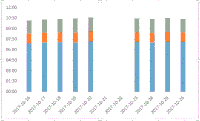
I need to have ATT, Ahold and ACW in the stacked graph.
Proc GCHART data=work.aht_changescalcs;
VBAR EVENT_DT / Freq=ATT;
Run;
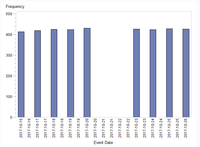
This code is adding additional multiple dates into the graph as seen in the output. How do I remove the additional dates and add the other variables into the bar?
I would like the final output to look like the below
All help appreciated.
Cheers
Dean
Accepted Solutions


- Mark as New
- Bookmark
- Subscribe
- Mute
- RSS Feed
- Permalink
- Report Inappropriate Content
First, I suggest you use SGPLOT. These procedures are much newer, and in my opinion much easier to use to produce high-quality statistical graphs.
The next thing, is you need to coalesce your four time variables into one categorized variable. The code below is a simple version; PROC TRANSPOSE would also do the job.
Tom
proc format;
value Catf
1 = "ATT"
2 = "AHold"
3 = "ACW"
4 = "AHT"
;
run;

data aht_changescalcs_trans;
keep EVENT_DT Category CatTime;
format Category Catf. CatTime time.;
set aht_changescalcs;
Category = 1;
CatTime = ATT;
output;
Category = 2;
CatTime = AHold;
output;
Category = 3;
CatTime = ACW;
output;
Category = 4;
CatTime = AHT;
output;
run;


proc sgplot data=work.aht_changescalcs_trans;
vbar EVENT_DT / response=CatTime Group=Category;
run;- Mark as New
- Bookmark
- Subscribe
- Mute
- RSS Feed
- Permalink
- Report Inappropriate Content
First, I suggest you use SGPLOT. These procedures are much newer, and in my opinion much easier to use to produce high-quality statistical graphs.
The next thing, is you need to coalesce your four time variables into one categorized variable. The code below is a simple version; PROC TRANSPOSE would also do the job.
Tom
proc format;
value Catf
1 = "ATT"
2 = "AHold"
3 = "ACW"
4 = "AHT"
;
run;

data aht_changescalcs_trans;
keep EVENT_DT Category CatTime;
format Category Catf. CatTime time.;
set aht_changescalcs;
Category = 1;
CatTime = ATT;
output;
Category = 2;
CatTime = AHold;
output;
Category = 3;
CatTime = ACW;
output;
Category = 4;
CatTime = AHT;
output;
run;


proc sgplot data=work.aht_changescalcs_trans;
vbar EVENT_DT / response=CatTime Group=Category;
run;- Mark as New
- Bookmark
- Subscribe
- Mute
- RSS Feed
- Permalink
- Report Inappropriate Content
Thanks Tom,
When you see the code it looks so simple. Thankyou very much.
Cheers
Dean


- Mark as New
- Bookmark
- Subscribe
- Mute
- RSS Feed
- Permalink
- Report Inappropriate Content
How about this one ?

data have;
input EVENT_DT  : yymmdd10.        ATT : time5. AHold : time5.  ACW : time5.   ;
format 	EVENT_DT   yymmdd10.        ATT  AHold   ACW : tod5.;
cards;
2017-10-16         6:54   1:23     1:55   10:11
2017-10-17         7:00   1:25     1:56   10:21
2017-10-18         7:06   1:21     1:55    10:22
2017-10-19        7:03    1:24      1:59   10:27
2017-10-20       7:11     1:26      1:59   10:36
2017-10-23       7:07     1:22      1:59   10:28
2017-10-24       7:03     1:22      1:56   10:22
2017-10-25      7:09      1:25      1:59   10:32
2017-10-26      7:07      1:21      1:54   10:23
;
run;
data have ;
 set have;
AHold=ATT+AHold;
ACW=AHold+ACW;
run;

proc sgplot data=have;
vbar EVENT_DT/response=ACW ;
vbar EVENT_DT/response=AHold;
vbar EVENT_DT/response=ATT;
run;

Call for content now open!
It's your turn to help shape SAS Innovate 2027. Share your expertise and inspire the SAS community.
Check out this tutorial series to learn how to build your own steps in SAS Studio.

Find more tutorials on the SAS Users YouTube channel.
SAS Training: Just a Click Away
Ready to level-up your skills? Choose your own adventure.
-
3 replies
-
10-27-2017 12:33 AM
-
3308 views
-
1 like
-
3 in conversation
-


