- Home
- /
- Programming
- /
- Enterprise Guide
- /
- Re: Compare statement
- RSS Feed
- Mark Topic as New
- Mark Topic as Read
- Float this Topic for Current User
- Bookmark
- Subscribe
- Mute
- Printer Friendly Page


- Mark as New
- Bookmark
- Subscribe
- Mute
- RSS Feed
- Permalink
- Report Inappropriate Content
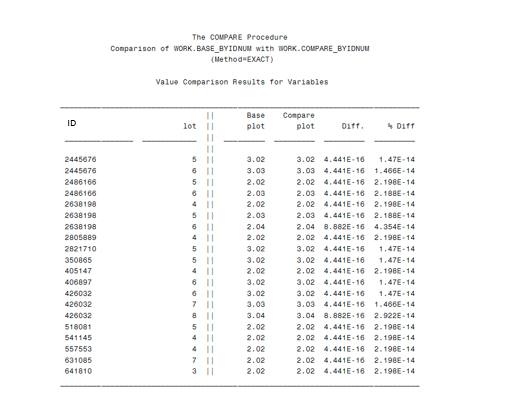
Can anyone tell me why EG compare datasets will show a very small difference for an exact match and if there is a setting that might be doing this that I should change? I have attached a snapshot of the results. The Base plot variable is a calculated field BUT it is only created by adding .01 NOT multiplication.


- Mark as New
- Bookmark
- Subscribe
- Mute
- RSS Feed
- Permalink
- Report Inappropriate Content
Hi CP2,
Seems a Machine-Precision probleme. It's related with how number are saved in base 2 in a compute, for example 0.1 could not be represented without error in a compute.
It's happen in all compute with all numbers, a way to solve it could be a round(var,0.0000000000001). Since you are working with not many decimals, this should not affect your calcs and solve the problems with EG.


- Mark as New
- Bookmark
- Subscribe
- Mute
- RSS Feed
- Permalink
- Report Inappropriate Content
The Proc Compare option FUZZ allows you to tune how close values may be to consider equal and not make into the report.
Try adding (or selecting the option) to set Fuzz=1e-10. That would consider values within 0.0000000001 to be equal. Since 1e-10 is larger than your shown e-14 range then likely most or your issue would be resolved.

Catch up on SAS Innovate 2026
Nearly 200 sessions are now available on demand in the Innovate Hub.
Watch Now →Check out this tutorial series to learn how to build your own steps in SAS Studio.

Find more tutorials on the SAS Users YouTube channel.
SAS Training: Just a Click Away
Ready to level-up your skills? Choose your own adventure.
-
2 replies
-
09-15-2016 11:03 AM
-
2535 views
-
1 like
-
3 in conversation
-


