- Home
- /
- Programming
- /
- Enterprise Guide
- /
- Categorising a continuous variable into quantiles
- RSS Feed
- Mark Topic as New
- Mark Topic as Read
- Float this Topic for Current User
- Bookmark
- Subscribe
- Mute
- Printer Friendly Page


- Mark as New
- Bookmark
- Subscribe
- Mute
- RSS Feed
- Permalink
- Report Inappropriate Content
I would need to categorize continuous variables in tertiles.
How can I do this in Enterprise Guide with the Query Builder,
computing columns interface?
Accepted Solutions


- Mark as New
- Bookmark
- Subscribe
- Mute
- RSS Feed
- Permalink
- Report Inappropriate Content
I think the easiest method is to use the Tasks->Data->Rank Data task. Select the column that you want to rank (the continuous variable of interest), and then on the Options page, select Group=N, and specify "3" for the Number of Groups value.
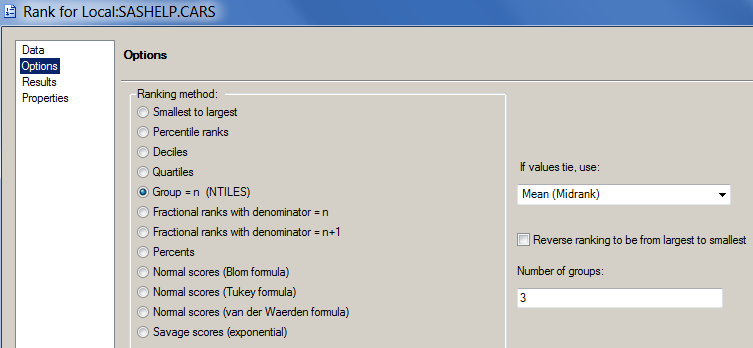
This will produce an output data set with your original variables, plus a new "rank" variable that indicates 1, 2, or 3.
Chris
- Mark as New
- Bookmark
- Subscribe
- Mute
- RSS Feed
- Permalink
- Report Inappropriate Content
I think the easiest method is to use the Tasks->Data->Rank Data task. Select the column that you want to rank (the continuous variable of interest), and then on the Options page, select Group=N, and specify "3" for the Number of Groups value.
This will produce an output data set with your original variables, plus a new "rank" variable that indicates 1, 2, or 3.
Chris
- Mark as New
- Bookmark
- Subscribe
- Mute
- RSS Feed
- Permalink
- Report Inappropriate Content
Great, thank you!

Catch up on SAS Innovate 2026
Nearly 200 sessions are now available on demand with the SAS Innovate Digital Pass.
Explore Now →Check out this tutorial series to learn how to build your own steps in SAS Studio.

Find more tutorials on the SAS Users YouTube channel.
SAS Training: Just a Click Away
Ready to level-up your skills? Choose your own adventure.
-
2 replies
-
02-04-2013 04:29 AM
-
3543 views
-
0 likes
-
2 in conversation
-


