- Home
- /
- Programming
- /
- Enterprise Guide
- /
- A SAS system OPTIONS window for SAS Enterprise Guide
- RSS Feed
- Mark Topic as New
- Mark Topic as Read
- Float this Topic for Current User
- Bookmark
- Subscribe
- Mute
- Printer Friendly Page


- Mark as New
- Bookmark
- Subscribe
- Mute
- RSS Feed
- Permalink
- Report Inappropriate Content
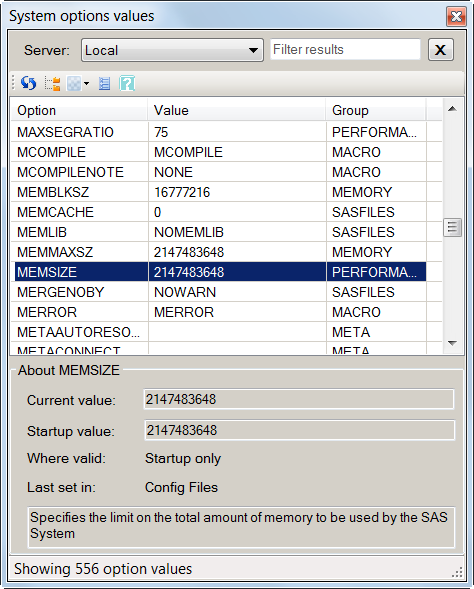
Are you a long time SAS user who is missing the OPTIONS window while using SAS Enterprise Guide?
Try this custom task (works with SAS Enterprise Guide 4.3). Easy to download and deploy, it provides quick access to SAS option values and other valuable options details.
http://blogs.sas.com/content/sasdummy/2011/12/16/a-sas-options-viewer-for-sas-enterprise-guide/
Chris


- Mark as New
- Bookmark
- Subscribe
- Mute
- RSS Feed
- Permalink
- Report Inappropriate Content
Chris,
First, very much appreciated! However, for those of us who like to take SAS even further beyond its current boundaries, is there any chance you can also share the source code and some info about what you used to compile it?
- Mark as New
- Bookmark
- Subscribe
- Mute
- RSS Feed
- Permalink
- Report Inappropriate Content
Art,
Yes, I do intend to share the source and some documentation about the techniques used in the task. In general, this task works by:
- polling option names descriptions, values, and groups from SASHELP.VALLOPT.
- pulling details about each option that you select using the GETOPTION function, using the HOWSET and STARTUPVALUE arguments.
Chris
- Mark as New
- Bookmark
- Subscribe
- Mute
- RSS Feed
- Permalink
- Report Inappropriate Content
Chris,
Thanks and VERY much appreciated! I look forward to seeing the rest when you post it.
Art

Catch up on SAS Innovate 2026
Nearly 200 sessions are now available on demand with the SAS Innovate Digital Pass.
Explore Now →Check out this tutorial series to learn how to build your own steps in SAS Studio.

Find more tutorials on the SAS Users YouTube channel.
SAS Training: Just a Click Away
Ready to level-up your skills? Choose your own adventure.
-
3 replies
-
12-18-2011 11:22 AM
-
2124 views
-
0 likes
-
2 in conversation
-

