- Home
- /
- Analytics
- /
- SAS Data Science
- /
- VDMML SAS code node, score a model within a data step
- RSS Feed
- Mark Topic as New
- Mark Topic as Read
- Float this Topic for Current User
- Bookmark
- Subscribe
- Mute
- Printer Friendly Page


- Mark as New
- Bookmark
- Subscribe
- Mute
- RSS Feed
- Permalink
- Report Inappropriate Content
Right after supervised learning nodes in Model Studio VDMML on SAS Viya 4, I place a sas code node to score a table with the learned scoring code. Meanwhile I can use the macro variable for referencing the astore after SVM and Gradient Boosting for example, I cannot figure out how to so for models that do not produce astore like logistic regression.
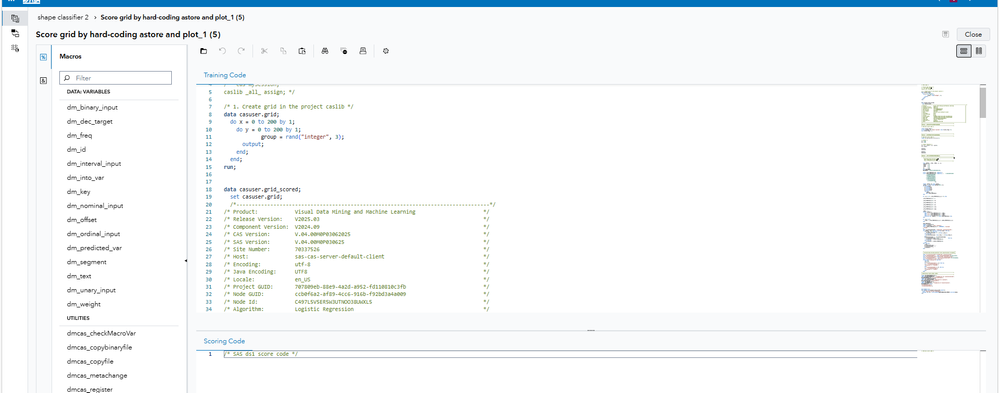
I can only achieve the scoring operation if I hard-cop the scoring code from the prior node and paste it into the data step.
One of my many attempts is this:
data grid_scored;
    set grid;
    %include "&dm_file_scorecode.";
run;


- Mark as New
- Bookmark
- Subscribe
- Mute
- RSS Feed
- Permalink
- Report Inappropriate Content
A logistic regression in Model Studio creates DATA step score code indeed (and not an Analytic store).
See here for a table Node Name + Type of Score Code.
https://go.documentation.sas.com/doc/en/vdmmlcdc/v_031/vdmmladvug/p0avxptqga2me0n0z81v01ky6t9o.htm
But the data step score code from a preceding logistic regression will not be the content of the &dm_file_scorecode macro variable in a subsequent code node.
Model Studio will use &dm_file_scorecode to get the score code for your code node.
This happens if you dynamically (and data-driven) create score code with the SAS code node in Model Studio. You should use &dm_file_scorecode as your destination file in that case. If you hard-code score code in the score code pane, it will also be put in that file (without you explicitly referencing it).
The score code can be anything like a data mining preprocessing step on your data (it does not have to be a model).
Data flowing through the code node will be scored.
Tip: How to include the SAS Code node in SAS® Visual Data Mining and Machine Learning's Model Studio
BR, Koen
- Mark as New
- Bookmark
- Subscribe
- Mute
- RSS Feed
- Permalink
- Report Inappropriate Content
Why don't you use
Add child node -> Miscellaneous -> "Score Data" - node
??
This will allow you to score a table of your choice with the model that was built in the preceding supervised modeling node !
BR, Koen
- Mark as New
- Bookmark
- Subscribe
- Mute
- RSS Feed
- Permalink
- Report Inappropriate Content
Because I want to score a grid of points and visualize it.
Here is the working example for a sas code node whose parent is a Gradient Boosting node.
My challenge is to "macrotize" the scoring code that is generated from logistic regression for example.
/* SAS code */

%put &_astore;

/* 1. Create grid in the project caslib */
data casuser.grid;
  do x = 0 to 200 by 1;
    do y = 0 to 200 by 1;
            group = rand("integer", 3);
      output;
    end;
  end;
run;


proc astore;
   score data=casuser.grid
            rstore=&dm_output_lib..&_astore
         copyvars=(x y)
         out=casuser.grid_scored;
run;

ods graphics on;
proc sgplot data=casuser.grid_scored aspect=1;
  title "Decision Surface (Heatmap)";
  heatmap x=x y=y / colorresponse=&DM_PREDICTED_VVNVAR colorstat=mean;
run;- Mark as New
- Bookmark
- Subscribe
- Mute
- RSS Feed
- Permalink
- Report Inappropriate Content
I think you have to select "Download score code" and then copy / paste.
I understand that's not very dynamic though. When the model changes, you have to copy/paste again ... not very practical ...not very handy.
Another option is you use PROC LOGSELECT with the CODE statement. The CODE statement writes the body of the score-code data step to an external file. And you can %INCLUDE that external *.sas file in a subsequent step to score new data.
In the PROC LOGSELECT you can avoid hard-coding table names and variable names. All you need is in automatic macro variables!
See also:
Using SAS Viya Data Step Score Code in SAS 9.4
https://communities.sas.com/t5/SAS-Communities-Library/Using-SAS-Viya-Data-Step-Score-Code-in-SAS-9-...
[EDIT] if you can download the score code, it is saved somewhere. I agree with you that you should be able to %INCLUDE that score code directly. I will try to find out about the location ! Could be next week ... .
Kind regards,
Koen
- Mark as New
- Bookmark
- Subscribe
- Mute
- RSS Feed
- Permalink
- Report Inappropriate Content
@sbxkoenk wrote:
[EDIT] if you can download the score code, it is saved somewhere. I agree with you that you should be able to %INCLUDE that score code directly. I will try to find out about the location ! Could be next week ... .
Next week ... 🙄😞 ... It took a little longer. Sorry.
First, you need to ask yourself whether you only need the score code of the logistic regression node, or the score code of the entire pipeline (up to and including your desired model).
Both (text) files with score code are present somewhere in the SAS Content folder. The folder structure and its contents are persisted inside a PostgreSQL relational database. (So, there is no physical file path on the UNIX/Linux server's file-system towards the wanted score code)
The FILESRVC access method in the SAS FILENAME statement lets you directly read and write files stored in SAS Content folders on the SAS Viya platform, but - unfortunately - I don't know where to look.
You can take direct access to the main CAS library that your Model Studio session and project use. Because the name of this CASLIB is always built according to the same principle. Namely: Analytics_Project_URI
(where URI is the Uniform Resource Identifier that each SAS Viya object in the SAS Content folder holds for unique identification).
In that Analytics_Project_URI CAS library are tables and files, but not the files you are looking for. I can only see *.sashdat files there.
But why not do it like this?
Build your CASUSER. GRID table in a SAS Code node (that code node does not add score code to the project). Then go to a SAS Score Data node and use CASUSER. GRID as your input table. Then set another code node to create the plot with the autocall macro %dmcas_report.
So you will have this in the pipeline:
Logistic regression node --> SAS Code node to build CASUSER. GRID --> SAS Score Data node --> SAS Code node to make plot.
That should be sufficiently flexible and you stay within Model Studio.
I just hope that the score data node doesn’t have to follow immediately after a modelling node (I haven’t tested this). Otherwise, you’ll have to remove the intermediate SAS code node in between and generate that casuser.grid table "elsewhere".
BR,
Koen

Call for content now open!
It's your turn to help shape SAS Innovate 2027. Share your expertise and inspire the SAS community.
Use this tutorial as a handy guide to weigh the pros and cons of these commonly used machine learning algorithms.

Find more tutorials on the SAS Users YouTube channel.
-
5 replies
-
05-06-2026 03:13 AM
-
1117 views
-
1 like
-
2 in conversation
-


