- Home
- /
- Analytics
- /
- SAS Data Science
- /
- SAS: how to change SAS text miner background color?
- RSS Feed
- Mark Topic as New
- Mark Topic as Read
- Float this Topic for Current User
- Bookmark
- Subscribe
- Mute
- Printer Friendly Page


- Mark as New
- Bookmark
- Subscribe
- Mute
- RSS Feed
- Permalink
- Report Inappropriate Content
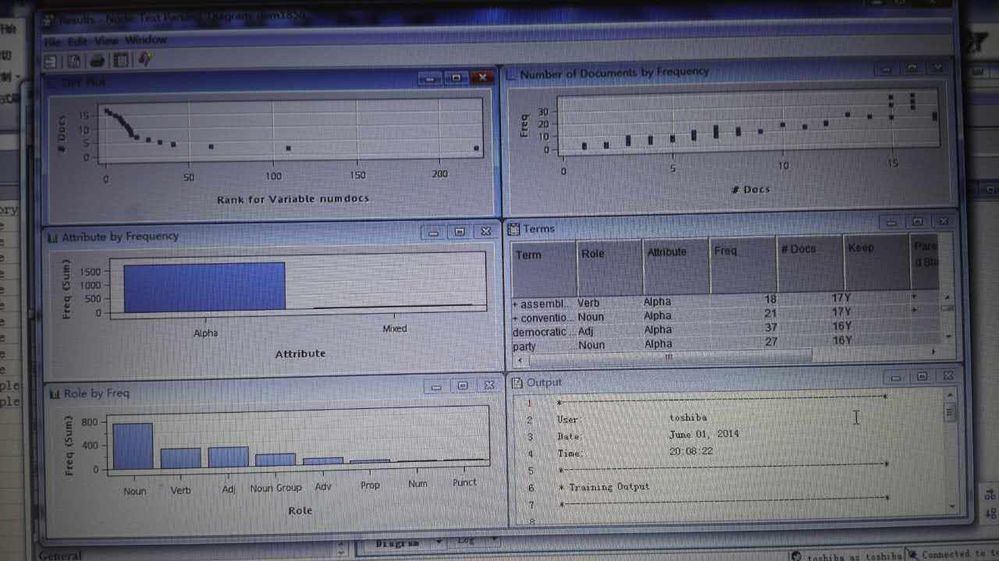
Can I change the background color of SAS text miner window. Below is snapshot of such window. How Can I change the gray to white or other color?
Thanks.
Accepted Solutions


- Mark as New
- Bookmark
- Subscribe
- Mute
- RSS Feed
- Permalink
- Report Inappropriate Content
If you right click in results window of one of the plots for the Text Parsing node, the pop-up window appears and you can click on Graph Properties. Click on the Graph section and choose the Style of Listing. Then click Apply and OK.
This will give you a white background for the graphs.
- Mark as New
- Bookmark
- Subscribe
- Mute
- RSS Feed
- Permalink
- Report Inappropriate Content
If you right click in results window of one of the plots for the Text Parsing node, the pop-up window appears and you can click on Graph Properties. Click on the Graph section and choose the Style of Listing. Then click Apply and OK.
This will give you a white background for the graphs.
- Mark as New
- Bookmark
- Subscribe
- Mute
- RSS Feed
- Permalink
- Report Inappropriate Content

Catch up on SAS Innovate 2026
Nearly 200 sessions are now available on demand with the SAS Innovate Digital Pass.
Explore Now →Use this tutorial as a handy guide to weigh the pros and cons of these commonly used machine learning algorithms.

Find more tutorials on the SAS Users YouTube channel.
-
2 replies
-
04-20-2018 09:40 PM
-
2782 views
-
0 likes
-
2 in conversation
-


