BookmarkSubscribeRSS Feed
acordes
Rhodochrosite | Level 12

I have a decision tree model from Visual Analytics. 

I know how to score it by exporting the model and running a data step with the %include statement referencing to the data step alike scoring code from VA. It works.


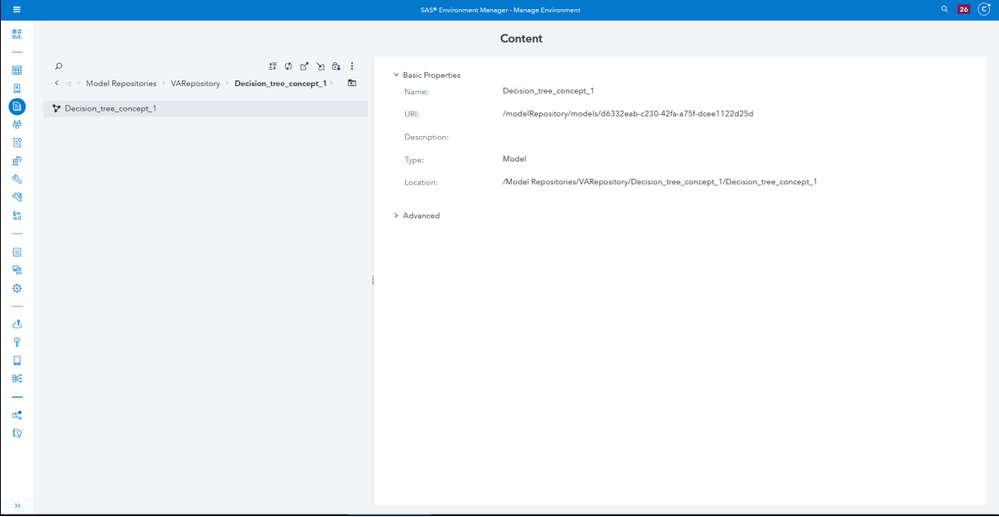
But there is the option to register the model as well. 

I can see my model, but I'm struggling to use it for scoring in SAS Studio. 

I do not have model manager licenced.


Here are my unsuccessful attempts:


/* Load the analytic store (ASTORE) file */
proc astore; libname='/modelRepository/models/' store='Decision_tree_concept_1';
run;

/* Score new data using the loaded ASTORE */
proc astore; 
score data=MKT.ESTADO_DECISION out=MKT.ESTADO_DECISION_sc;
   score rstore='/modelRepository/models/d6332eab-c230-42fa-a75f-dcee1122d25d';
run;


png1.png


1 REPLY 1
sbxkoenk
SAS Super FREQ

Hello,


The Model Repository service is always available, so you can still register models if SAS Model Manager is not licensed.

So far, so good.


You should have a ModelStore CAS library to the /opt/sas/viya/config/data/modelsvr/astore directory.

Don't you see it in the libraries pane after submitting


caslib _all_ assign;

?


Here's where access to registered models is discussed :

sas-innovate-2026-white.png


April 27 – 30 | Gaylord Texan | Grapevine, Texas

Registration is open

Walk in ready to learn. Walk out ready to deliver. This is the data and AI conference you can't afford to miss.
Register now and lock in 2025 pricing—just $495!

Register now

How to choose a machine learning algorithm

Use this tutorial as a handy guide to weigh the pros and cons of these commonly used machine learning algorithms.

Find more tutorials on the SAS Users YouTube channel.

Discussion stats
  • 1 reply
  • 1710 views
  • 0 likes
  • 2 in conversation