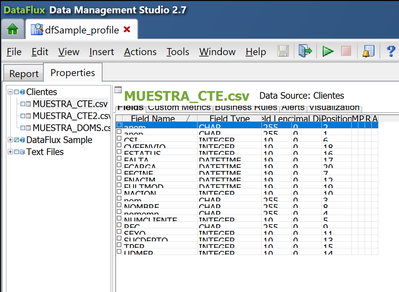
I cannot visualize correctly the tables in Data Profiles in de DataFlux Data Management Studio and have not found a way to modify it even manually.
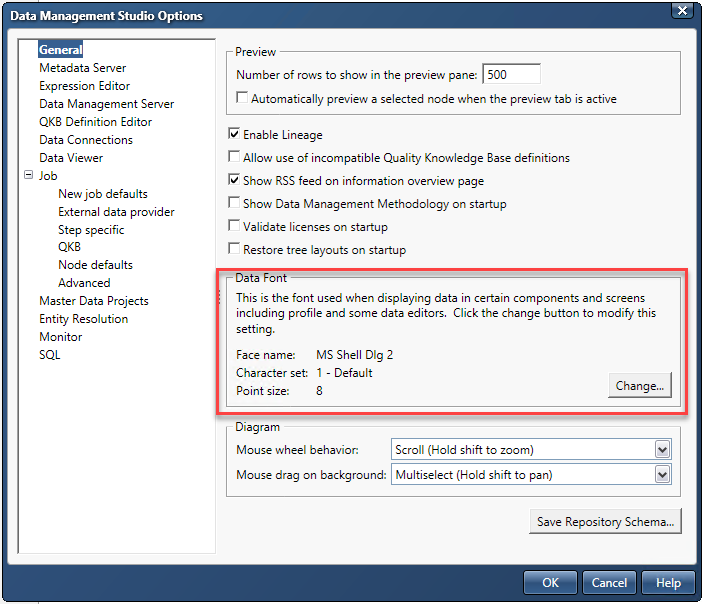
Have you tried modifying Data Font sizes in the Data Management Studio Options dialog?
Data Management Studio Options - Data Font
I can't think of any other setting that might solve the problem. If this doesn't help, you might need to take a look at your Windows desktop display options. If all fails, I would recommend that you open a technical support track.
Ron
Thank you Ron, I tried that and didn't work. The only thing that worked provisionally is executing the software in compatibility mode, where I give priority to the systems' visual optimization rather than the application. I say provisionally, because it worked for the profile, but set the other windows a little bit blurry. I am contacting technical support. Thanks again.
April 27 – 30 | Gaylord Texan | Grapevine, Texas
Walk in ready to learn. Walk out ready to deliver. This is the data and AI conference you can't afford to miss.
Register now and save with the early bird rate—just $795!
Need to connect to databases in SAS Viya? SAS’ David Ghan shows you two methods – via SAS/ACCESS LIBNAME and SAS Data Connector SASLIBS – in this video.

Find more tutorials on the SAS Users YouTube channel.