- Home
- /
- Solutions
- /
- Data Management
- /
- How to make a PDF- or HTML-file based on a SAS Data Set in DI Studio?
- RSS Feed
- Mark Topic as New
- Mark Topic as Read
- Float this Topic for Current User
- Bookmark
- Subscribe
- Mute
- Printer Friendly Page


- Mark as New
- Bookmark
- Subscribe
- Mute
- RSS Feed
- Permalink
- Report Inappropriate Content
I have a basic question that I can't seem to find an answer to. Any help would be greatly appreciated.
Working in DI Studio, I have a SAS Data Set that contains five String variables and a number of rows. How can I create a decent-looking CSV-file that lists all the data from the SAS Data Set?
Accepted Solutions


- Mark as New
- Bookmark
- Subscribe
- Mute
- RSS Feed
- Permalink
- Report Inappropriate Content
There is a List Data transformation you could use. It has ODS options you can set to specify the type of output.
But I wonder why there are reporting transformations in DIS at all. Reporting seems more suitable for EG...
- Mark as New
- Bookmark
- Subscribe
- Mute
- RSS Feed
- Permalink
- Report Inappropriate Content
There is a List Data transformation you could use. It has ODS options you can set to specify the type of output.
But I wonder why there are reporting transformations in DIS at all. Reporting seems more suitable for EG...


- Mark as New
- Bookmark
- Subscribe
- Mute
- RSS Feed
- Permalink
- Report Inappropriate Content
Hi,
You can get this by using list data transformation in SAS DI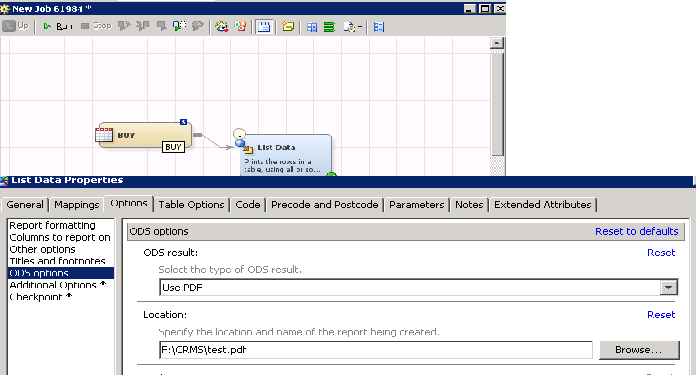
Hope this helps...If you want complete report of jobs and tables then you can use tools->reports.
Thanks,
Shiva

Catch up on SAS Innovate 2026
Nearly 200 sessions are now available on demand in the Innovate Hub.
Watch Now →Need to connect to databases in SAS Viya? SAS’ David Ghan shows you two methods – via SAS/ACCESS LIBNAME and SAS Data Connector SASLIBS – in this video.

Find more tutorials on the SAS Users YouTube channel.
-
2 replies
-
09-10-2012 06:36 AM
-
2198 views
-
3 likes
-
3 in conversation
-


