BookmarkSubscribeRSS Feed
🔒 This topic is solved and locked. Need further help from the community? Please sign in and ask a new question.
sdang
Quartz | Level 8

Hi all,

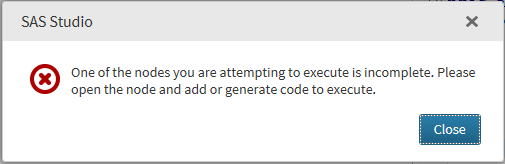
I can't execute a simple Random walk forecast in SAS Studio because of this error below.

SAS Studio Node Error.png

Before today, I was able to run the said forecast with same date field and dependent field.  I have not change anything.


Thank all for the advices on what to do.

1 ACCEPTED SOLUTION

Accepted Solutions
sdang
Quartz | Level 8

Nevermind solved the problem.  Make sure your import file is run and green light check in Process Flow.

View solution in original post

1 REPLY 1
sdang
Quartz | Level 8

Nevermind solved the problem.  Make sure your import file is run and green light check in Process Flow.

CFC_SAS_Communities_400x225.jpg

Call for content now open!

It's your turn to help shape SAS Innovate 2027. Share your expertise and inspire the SAS community.

Submit your proposal →

Develop Code with SAS Studio

Get started using SAS Studio to write, run and debug your SAS programs.

Find more tutorials on the SAS Users YouTube channel.

SAS Training: Just a Click Away

 Ready to level-up your skills? Choose your own adventure.

Browse our catalog!

Discussion stats
  • 1 reply
  • 1849 views
  • 0 likes
  • 1 in conversation