- Home
- /
- Programming
- /
- SAS Data & AI Studio
- /
- Error message after clicking Start SAS Studio
- RSS Feed
- Mark Topic as New
- Mark Topic as Read
- Float this Topic for Current User
- Bookmark
- Subscribe
- Mute
- Printer Friendly Page


- Mark as New
- Bookmark
- Subscribe
- Mute
- RSS Feed
- Permalink
- Report Inappropriate Content
Hi Everyone,
Doing some self study using SAS Program. I was able to install SAS University Edition and Oracle VM Virtual Box in my laptop.
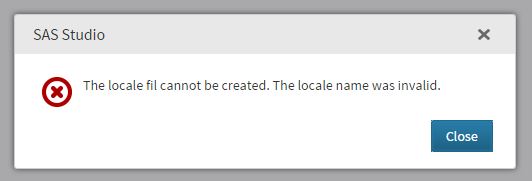
I followed the manual and got me up to the part "In a web browser, enter the URL that is shown on your Welcome screen, and press Enter to open the SAS Information Center." After i click the button "Start SAS Studio", an error message appeared -see below image. When i click Close button, it is directed to support/sas.com. Hope someone can help me. Thank you in advance.


- Mark as New
- Bookmark
- Subscribe
- Mute
- RSS Feed
- Permalink
- Report Inappropriate Content
Hm. What is the locale setting (country, region, language etc) of your Windows?
- Mark as New
- Bookmark
- Subscribe
- Mute
- RSS Feed
- Permalink
- Report Inappropriate Content
Hi Kurt,
Thank you for your message. Sorry i wasn't able to reply to your question immediately.
I have successfully imported SAS just last weekend. I removed the first imported SAS where i encountered that error.
Now its working fine. Apology for any inconvinience. 
- Mark as New
- Bookmark
- Subscribe
- Mute
- RSS Feed
- Permalink
- Report Inappropriate Content
Hi,
I install VM and SAS University Edition in a different laptop. I encountered the same problem.
"The locale fil cannot be created. The locale name was invalid."
I deleted the installation and started over again. Tried it several times.
But still encountered the same error.
I adjusted my System Locale (Region and Langauge) but still encountered the same problem.
Hope someone can help me.
Thanks you

Call for content now open!
It's your turn to help shape SAS Innovate 2027. Share your expertise and inspire the SAS community.
Get started using SAS Studio to write, run and debug your SAS programs.

Find more tutorials on the SAS Users YouTube channel.
SAS Training: Just a Click Away
Ready to level-up your skills? Choose your own adventure.
-
3 replies
-
02-01-2016 10:29 PM
-
2500 views
-
2 likes
-
2 in conversation
-


