BookmarkSubscribeRSS Feed
DemolitionLV
Calcite | Level 5

Hello everyone !


I am using SAS studio (student version)


1. Question

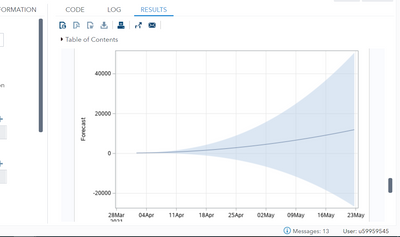
I would like to know how could I analyze deeper my forecasted results. When I run "Modeling and forecasting" it generates results but I can not zoom in (ctr+mouse wheel I dont need that) the graphs and analyze them deeper.

DemolitionLV_0-1638371191741.png


2. Question

If I can not zoom the graphs, then I know that the "Modeling and forecasting" generates forecasted values in a table. How can I change the time when the forecasting starts ?

For example I would like that the forecast starts on 2021 4th of january not on 2021 4th of april


CFC_SAS_Communities_400x225.jpg

Call for content now open!

It's your turn to help shape SAS Innovate 2027. Share your expertise and inspire the SAS community.

Submit your proposal →

Develop Code with SAS Studio

Get started using SAS Studio to write, run and debug your SAS programs.

Find more tutorials on the SAS Users YouTube channel.

SAS Training: Just a Click Away

 Ready to level-up your skills? Choose your own adventure.

Browse our catalog!

Discussion stats
  • 0 replies
  • 876 views
  • 0 likes
  • 1 in conversation