- Home
- /
- Programming
- /
- ODS Reports
- /
- grapghname with gchart ??
- RSS Feed
- Mark Topic as New
- Mark Topic as Read
- Float this Topic for Current User
- Bookmark
- Subscribe
- Mute
- Printer Friendly Page


- Mark as New
- Bookmark
- Subscribe
- Mute
- RSS Feed
- Permalink
- Report Inappropriate Content
dear all,
I am trying to define my own name for generated graphs (instead of gchartx) but it seems not to work with GSFNAME:
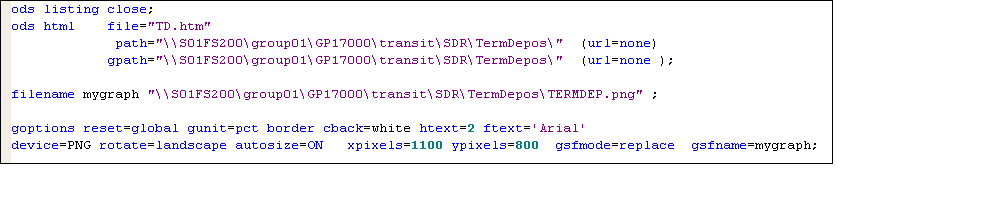
any idea ??
THX!!
PS.
how to copy/paste sas code into this page ??
Accepted Solutions


- Mark as New
- Bookmark
- Subscribe
- Mute
- RSS Feed
- Permalink
- Report Inappropriate Content
Hi.
First thing: you should never give a real path on your machine.
Second, when I ran your code (replicated below) it worked.
So please provide some log file, or something more.
ods listing close;
*define the path once, no need for quotations, just simply \\my_path_where_I_keep_things\...
%let path = your_path;
ods html file = "my_graph.htm"
path = "&path." (url = none)
gpath = "&path." (url = none);
filename my_graph "&path.\my_graph.png";
goptions reset = global gunit = pct border cback = white htext = 2 ftext = "Arial"
device = png gsfmode = replace gsfname = my_graph
rotate = landscape autosize = on xpixels = 1100 ypixels = 800 ;
proc gchart data = sashelp.class;
vbar age/group = sex name = "my_graph";
run;quit;
Good luck!
- Mark as New
- Bookmark
- Subscribe
- Mute
- RSS Feed
- Permalink
- Report Inappropriate Content
Hi.
First thing: you should never give a real path on your machine.
Second, when I ran your code (replicated below) it worked.
So please provide some log file, or something more.
ods listing close;
*define the path once, no need for quotations, just simply \\my_path_where_I_keep_things\...
%let path = your_path;
ods html file = "my_graph.htm"
path = "&path." (url = none)
gpath = "&path." (url = none);
filename my_graph "&path.\my_graph.png";
goptions reset = global gunit = pct border cback = white htext = 2 ftext = "Arial"
device = png gsfmode = replace gsfname = my_graph
rotate = landscape autosize = on xpixels = 1100 ypixels = 800 ;
proc gchart data = sashelp.class;
vbar age/group = sex name = "my_graph";
run;quit;
Good luck!

Catch up on SAS Innovate 2026
Nearly 200 sessions are now available on demand with the SAS Innovate Digital Pass.
Explore Now →Learn how use the CAT functions in SAS to join values from multiple variables into a single value.

Find more tutorials on the SAS Users YouTube channel.
SAS Training: Just a Click Away
Ready to level-up your skills? Choose your own adventure.
-
1 reply
-
12-04-2012 05:31 AM
-
1505 views
-
0 likes
-
2 in conversation
-
