- Home
- /
- Programming
- /
- ODS Reports
- /
- Re: Underline too long in title of PDF
- RSS Feed
- Mark Topic as New
- Mark Topic as Read
- Float this Topic for Current User
- Bookmark
- Subscribe
- Mute
- Printer Friendly Page


- Mark as New
- Bookmark
- Subscribe
- Mute
- RSS Feed
- Permalink
- Report Inappropriate Content
I am having trouble with the titles in my PDF output. When I underline them, the underline extends too far past the title. It doesn't seem to matter which style I use, this is always a problem. Any thoughts?
options orientation=portrait nodate	nonumber;
ods escapechar='^';

ods pdf file = "test.pdf";

title1 h=12pt "^{style [textdecoration=underline]This is my title}^n
^{style [textdecoration=underline]And the second line looks weird, too}";
footnote h=10pt j=c '^{thispage}';

proc tabulate data=sashelp.class missing;
class sex;
var height;
table sex='',height='Average Height'*mean='';
run;

ods pdf close;
Accepted Solutions


- Mark as New
- Bookmark
- Subscribe
- Mute
- RSS Feed
- Permalink
- Report Inappropriate Content
Update on this question: There is a Tech Support note related to this issue that suggests using a different font will correct the issue -- here's the note: http://support.sas.com/kb/56/784.html .
And when I use Times New Roman (a serif font) for my title statement, there is no added space after the last letter.
cynthia
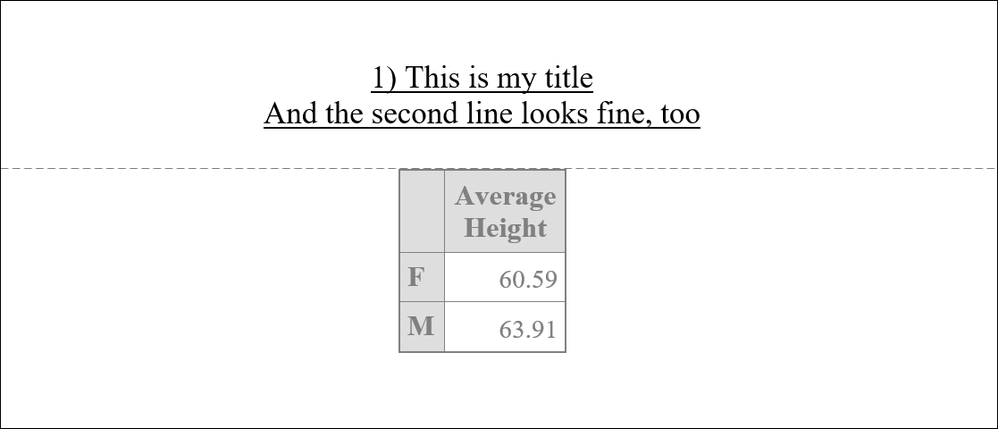
Here's the code:
options orientation=portrait nodate	nonumber;
ods escapechar='^';
ods html file="c:\temp\title_test2.html";
ods rtf file="c:\temp\title_test2.rtf";
ods pdf file = "c:\temp\title_test2.pdf";

title1 h=12pt font="Times New Roman"  "^{style [textdecoration=underline]1) This is my title}
^{newline 1} ^{style [textdecoration=underline]And the second line looks fine, too}";
footnote h=10pt font="Times New Roman"  j=c '^{thispage}';

proc tabulate data=sashelp.class missing;
class sex;
var height;
table sex='',height='Average Height'*mean='';
run;


title1 h=12pt font="Times New Roman" "^{style [textdecoration=underline]2) This is my title}";
title2 h=12pt font="Times New Roman" "^{style [textdecoration=underline]And the second line looks fine}";
footnote h=10pt font="Times New Roman"  j=c '^{thispage}';

proc tabulate data=sashelp.class missing;
class sex;
var height;
table sex='',height='Average Height'*mean='';
run;
ods pdf close;
ods html close;
ods rtf close;- Mark as New
- Bookmark
- Subscribe
- Mute
- RSS Feed
- Permalink
- Report Inappropriate Content
Hi:
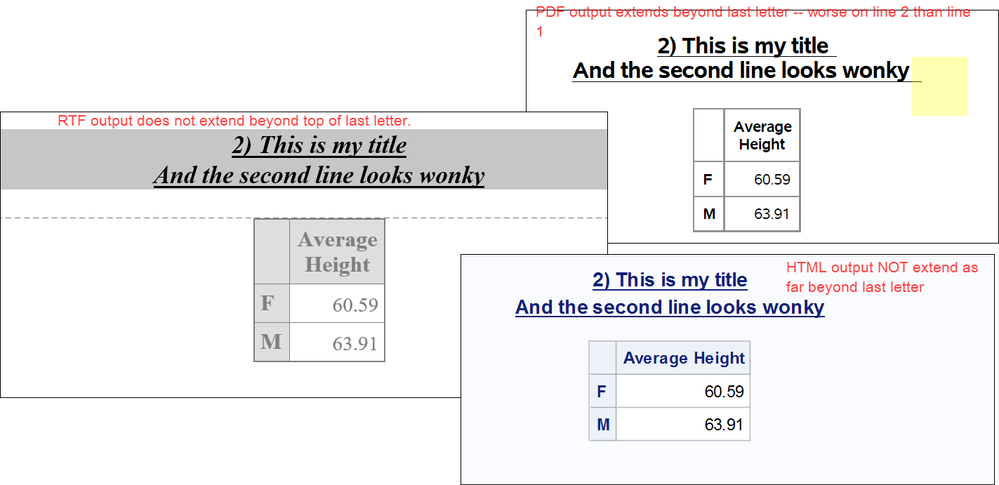
I observe the same behavior you do. In fact, it doesn't matter whether I use ^{NEWLINE 1} or just the old form ^n or use 2 title statements, like this:
title1 h=12pt "^{style [textdecoration=underline]2) This is my title}";
title2 h=12pt "^{style [textdecoration=underline]And the second line looks wonky}";
when I use textdecoration=underline in SAS 9.4, it appears that the underline does not stop under the last letter in PDF -- this is different behavior than with RTF or HTML.
I think you need to open a track with Tech Support on this behavior.
Cynthia
- Mark as New
- Bookmark
- Subscribe
- Mute
- RSS Feed
- Permalink
- Report Inappropriate Content
Update on this question: There is a Tech Support note related to this issue that suggests using a different font will correct the issue -- here's the note: http://support.sas.com/kb/56/784.html .
And when I use Times New Roman (a serif font) for my title statement, there is no added space after the last letter.
cynthia
Here's the code:
options orientation=portrait nodate	nonumber;
ods escapechar='^';
ods html file="c:\temp\title_test2.html";
ods rtf file="c:\temp\title_test2.rtf";
ods pdf file = "c:\temp\title_test2.pdf";

title1 h=12pt font="Times New Roman"  "^{style [textdecoration=underline]1) This is my title}
^{newline 1} ^{style [textdecoration=underline]And the second line looks fine, too}";
footnote h=10pt font="Times New Roman"  j=c '^{thispage}';

proc tabulate data=sashelp.class missing;
class sex;
var height;
table sex='',height='Average Height'*mean='';
run;


title1 h=12pt font="Times New Roman" "^{style [textdecoration=underline]2) This is my title}";
title2 h=12pt font="Times New Roman" "^{style [textdecoration=underline]And the second line looks fine}";
footnote h=10pt font="Times New Roman"  j=c '^{thispage}';

proc tabulate data=sashelp.class missing;
class sex;
var height;
table sex='',height='Average Height'*mean='';
run;
ods pdf close;
ods html close;
ods rtf close;- Mark as New
- Bookmark
- Subscribe
- Mute
- RSS Feed
- Permalink
- Report Inappropriate Content
Thank you, Cynthia! That's what Tech Support said, too. It is supposed to be fixed in a later SAS release...

Catch up on SAS Innovate 2026
Nearly 200 sessions are now available on demand in the Innovate Hub.
Watch Now →Learn how use the CAT functions in SAS to join values from multiple variables into a single value.

Find more tutorials on the SAS Users YouTube channel.
SAS Training: Just a Click Away
Ready to level-up your skills? Choose your own adventure.
-
3 replies
-
05-08-2018 11:40 AM
-
3754 views
-
0 likes
-
2 in conversation
-


