- Home
- /
- Programming
- /
- ODS Reports
- /
- Proc Template - Header Lines
- RSS Feed
- Mark Topic as New
- Mark Topic as Read
- Float this Topic for Current User
- Bookmark
- Subscribe
- Mute
- Printer Friendly Page


- Mark as New
- Bookmark
- Subscribe
- Mute
- RSS Feed
- Permalink
- Report Inappropriate Content
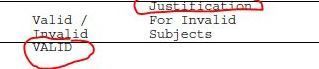
Please see above table columns with data.
Column names is almost overlapped with header lines. but when I zoom they actually not. I would like to get a space between header lines and columns and header and body data.
what should be changed proc template code.
I am using proc template.
proc template;
define style std/store=templates;
parent = Styles.rtf ;
class fonts /
'TitleFont' = ("Courier, Times Roman, Times", 8pt )
'TitleFont2' = ("Courier, Times Roman, Times", 8pt )
'footFont' = ("Courier, Times Roman, Times", 8pt )
'StrongFont' = ("Courier, Times Roman, Times", 8pt)
'EmphasisFont' = ("Courier, Times Roman, Times", 8pt)
'headingEmphasisFont' = ("Courier, Times Roman, Times", 8pt)
'headingFont' = ("Courier, Times Roman, Times", 8pt)
'docFont' = ("Courier, Times Roman, Times",8pt)
'FixedEmphasisFont' = ("Courier, Times Roman, Times", 8pt)
'FixedStrongFont' = ("Courier, Times Roman, Times", 8pt)
'FixedHeadingFont' = ("Courier, Times Roman, Times", 8pt)
'BatchFixedFont' = ("Courier, Times Roman, Times", 8pt)
'FixedFont' = ("Courier, Times Roman, Times", 8pt) ;
class color_list / 'link'= blue 'bgH' = white 'bgT' = white 'bgD' = white 'fg' = black 'bg' = white ;
style Table from Output / rules = groups frame= above cellpadding = 0 cellspacing = 0 ;
replace headersandFooters from cell/
font = fonts('HeadingFont') foreground = blank background = white;
class systemtitle / protectspecialchars=OFF asis=ON ;
class systemfooter / font=Fonts('footFont') protectspecialchars=OFF asis=ON ;
class text / 'continued' = " " ;
class continued / pretext=text('continued') width=_undef_ frame=void rules=none borderspacing = 0 padding = 0 ;
class header / protectspecialchars=off ;
class data / protectspecialchars=off ;
class rowheader / protectspecialchars=off ;
class usertext / protectspecialchars=off ;
class byline / protectspecialchars=off ;
end;
quit;


- Mark as New
- Bookmark
- Subscribe
- Mute
- RSS Feed
- Permalink
- Report Inappropriate Content
Change it in your proc report code:
proc report...;
...

  compute before;
    line ' ';
  endcomp;
  compute after;
    line ' ';
  endcomp;
run;

Catch up on SAS Innovate 2026
Nearly 200 sessions are now available on demand with the SAS Innovate Digital Pass.
Explore Now →Learn how use the CAT functions in SAS to join values from multiple variables into a single value.

Find more tutorials on the SAS Users YouTube channel.
SAS Training: Just a Click Away
Ready to level-up your skills? Choose your own adventure.
-
1 reply
-
09-12-2017 02:35 AM
-
2007 views
-
0 likes
-
2 in conversation
-


