- Home
- /
- Programming
- /
- ODS Reports
- /
- Re: ODS is removing special characters (please make it stop)
- RSS Feed
- Mark Topic as New
- Mark Topic as Read
- Float this Topic for Current User
- Bookmark
- Subscribe
- Mute
- Printer Friendly Page


- Mark as New
- Bookmark
- Subscribe
- Mute
- RSS Feed
- Permalink
- Report Inappropriate Content
Hi,
I'm trying to output a simple frequency using ODS. Either ODS or Excel is removing special characters in the field.
The SAS output window clearly displays the text "MCLab RO MAIN Campus^24D0404292^CLIA" with the hat character, but when I output it using ODS (either HTML or EXCEL), the hat characters are removed "MCLab RO MAIN CampusD0404292CLIA".
I would like for the ODS output to reflect exactly what is in the data. How do I make it so that it does not remove the hat character in the ODS output?
Thanks for your help


- Mark as New
- Bookmark
- Subscribe
- Mute
- RSS Feed
- Permalink
- Report Inappropriate Content
Could this possibly be related to the ODS ESCAPECHAR option? If that option specified the hat character, then ODS would treat that character as an escape character. Perhaps that character is the default escape character in your environment. Maybe try setting it to some other character that isn't in your data?


- Mark as New
- Bookmark
- Subscribe
- Mute
- RSS Feed
- Permalink
- Report Inappropriate Content
Hi:
I ran a little test and used that string for a label just with SASHELP.CLASS. I do not observe what you report. I see the caret/hat symbol being used in both ODS HTML and ODS EXCEL:
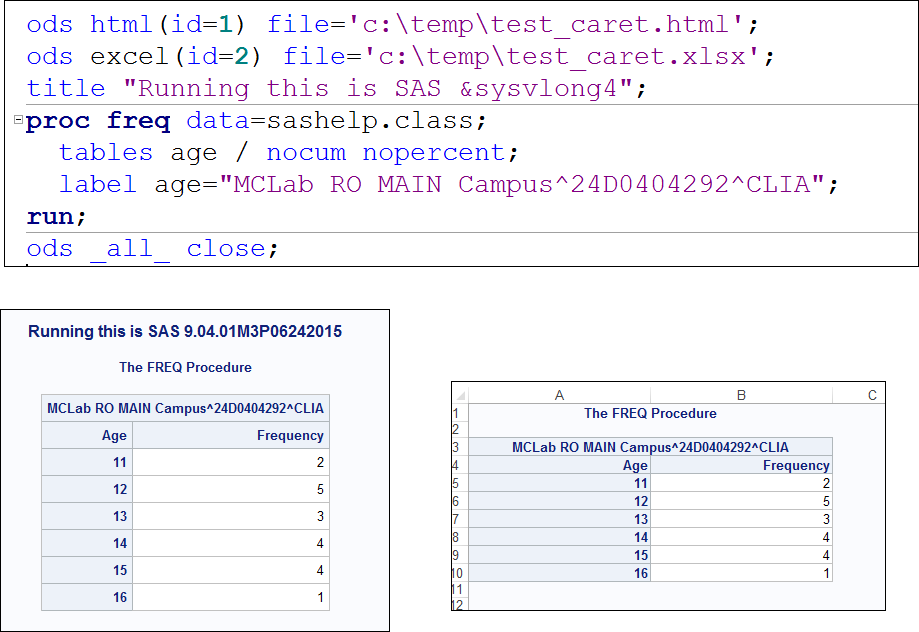
I am running 9.4 M3. Is there any chance that you were using ODS ESCAPECHAR='^'; elsewhere in your code? I find that if I have ESCAPECHAR set to ^, then the caret symbols are stripped out of the text string. As a test, right before you PROC FREQ, you could try
ODS ESCAPECHAR='~';
and then see if your ^ symbol appears in the text.
cynthia

- Mark as New
- Bookmark
- Subscribe
- Mute
- RSS Feed
- Permalink
- Report Inappropriate Content
I just find another character '/' which cannot be displayed in column header of ods excel. It appears as a new line feed. Any solution?
- Mark as New
- Bookmark
- Subscribe
- Mute
- RSS Feed
- Permalink
- Report Inappropriate Content
Hi:
I do not observe that behavior, as shown below when using PROC PRINT or PROC REPORT:
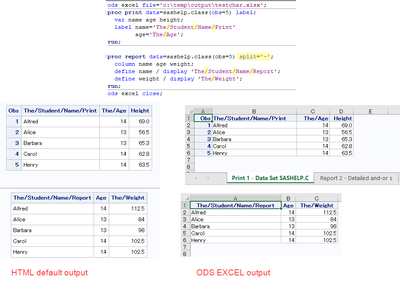
Since the / is the default split character in PROC REPORT, I did need to modify the split= option in my PROC REPORT code. But as you can see in the default HTML and in the ODS EXCEL output, I can see the / in the column headers.
Cynthia
- Mark as New
- Bookmark
- Subscribe
- Mute
- RSS Feed
- Permalink
- Report Inappropriate Content
thank you, Cynthia.

Catch up on SAS Innovate 2026
Nearly 200 sessions are now available on demand in the Innovate Hub.
Watch Now →Learn how use the CAT functions in SAS to join values from multiple variables into a single value.

Find more tutorials on the SAS Users YouTube channel.
SAS Training: Just a Click Away
Ready to level-up your skills? Choose your own adventure.
-
5 replies
-
01-24-2018 02:41 PM
-
5748 views
-
1 like
-
4 in conversation
-


