- Home
- /
- Programming
- /
- ODS Reports
- /
- ODS TEXT and VJUST options in SAS 9.4
- RSS Feed
- Mark Topic as New
- Mark Topic as Read
- Float this Topic for Current User
- Bookmark
- Subscribe
- Mute
- Printer Friendly Page


- Mark as New
- Bookmark
- Subscribe
- Mute
- RSS Feed
- Permalink
- Report Inappropriate Content
Hi Team,
I am using SAS 9.4 (TS1M1) in X64_7PRO WIN 6.1.7601 Service Pack 1 Workstation.
I am trying to create a pdf report using ODS PDF and requires me to use VJUST option to align the text, apparently VJUST has no effect in my report as all aligning to TOP only. Below is the snippet of code for your evaluation and suggestion.
Sample output from below code is attached for reference.
Appreciate any workaround or suggestion.
Thanks
options Papersize = (11.5in 9in ) orientation=landscape leftmargin=.01in rightmargin=.01in topmargin=.01in bottommargin=.01in nocenter nonumber nodate;
TITLE1; TITLE2;
ODS ESCAPECHAR= '^';
ods html close;
ODS PDF file="C:\Users\sjayara9\Desktop\svq report\ODSTEXT_VJUST.PDF"
startpage=never
pdftoc=1
bookmarklist=show
;
ODS layout start x=0.5 in y=0.5 in HEIGHT = 8 in WIDTH = 10 in ;
/* Test for TOP Alignment*/
ODS region x=0 in y=0.3 in height = 1 in width = 1 in style={background=CX0070C0 bordercolor=black borderwidth=0.5 };
ods text = "^S={just=R VJUST=T color=white background=CX0070C0 fontfamily=Arial font_size=8pt} WWID: ";
/* Test for MIDDLE Alignment*/
ODS region x=0 in y=1.3 in height = 1 in width = 1 in style={background=CX0070C0 bordercolor=black borderwidth=0.5 };
ods text = "^S={just=C VJUST=M color=white background=CX0070C0 fontfamily=Arial font_size=8pt} WWID: ";
/* Test for BOTTOM Alignment*/
ODS region x=0 in y=2.3 in height = 1 in width = 1 in style={background=CX0070C0 bordercolor=black borderwidth=0.5 };
ods text = "^S={just=L VJUST=B color=white background=CX0070C0 fontfamily=Arial font_size=8pt} WWID: ";
ODS layout end;
run;
quit;
ODS PDF close;
*ods results;
options leftmargin=0in rightmargin=0in topmargin=0in bottommargin=0in;
ods html ;
Accepted Solutions


- Mark as New
- Bookmark
- Subscribe
- Mute
- RSS Feed
- Permalink
- Report Inappropriate Content
Hi:
Your image/file did not open for me. However, there was already a posting about the issue of VJUST with ODS TEXT and ODS REGION in the Forums. Here it is: https://communities.sas.com/t5/ODS-and-Base-Reporting/vjust-usage-in-a-region/m-p/284878/highlight/t...
When I ran a test, using the solution posted there, I do see the VJUST works:
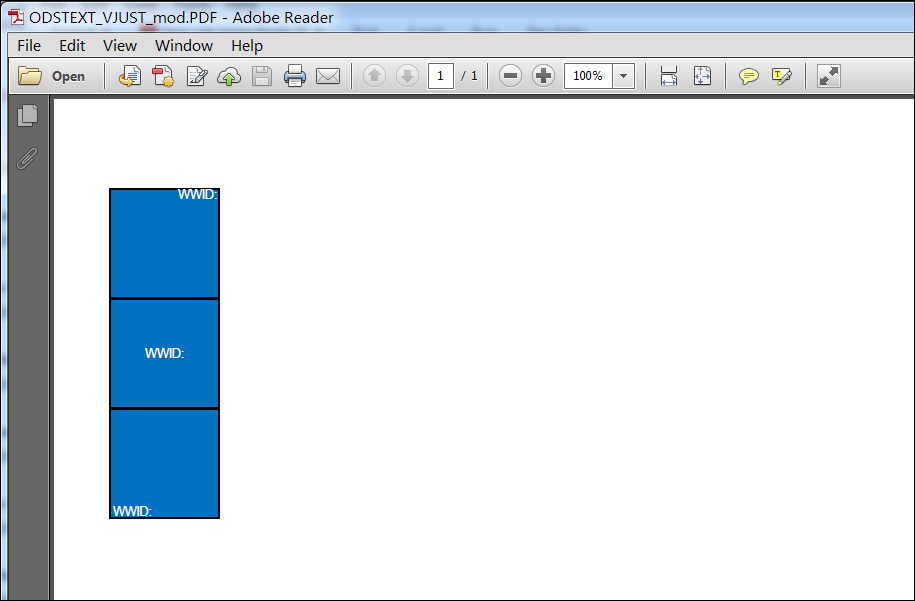
To get these results, I just added cellheight=1in inside the style specification for each ODS TEXT statement.
cynthia
- Mark as New
- Bookmark
- Subscribe
- Mute
- RSS Feed
- Permalink
- Report Inappropriate Content
Hi:
Your image/file did not open for me. However, there was already a posting about the issue of VJUST with ODS TEXT and ODS REGION in the Forums. Here it is: https://communities.sas.com/t5/ODS-and-Base-Reporting/vjust-usage-in-a-region/m-p/284878/highlight/t...
When I ran a test, using the solution posted there, I do see the VJUST works:
To get these results, I just added cellheight=1in inside the style specification for each ODS TEXT statement.
cynthia

Catch up on SAS Innovate 2026
Nearly 200 sessions are now available on demand in the Innovate Hub.
Watch Now →Learn how use the CAT functions in SAS to join values from multiple variables into a single value.

Find more tutorials on the SAS Users YouTube channel.
SAS Training: Just a Click Away
Ready to level-up your skills? Choose your own adventure.
-
1 reply
-
08-14-2016 09:38 AM
-
7916 views
-
0 likes
-
2 in conversation
-


